EasyManua.ls Logo

Burford 2000 - CPU DIP Switch Settings

Burford 2000
221 pages
Print Icon
To Next Page IconTo Next Page
To Previous Page IconTo Previous Page
Loading...
88
Chapter 5
CPU DIP Switch Settings
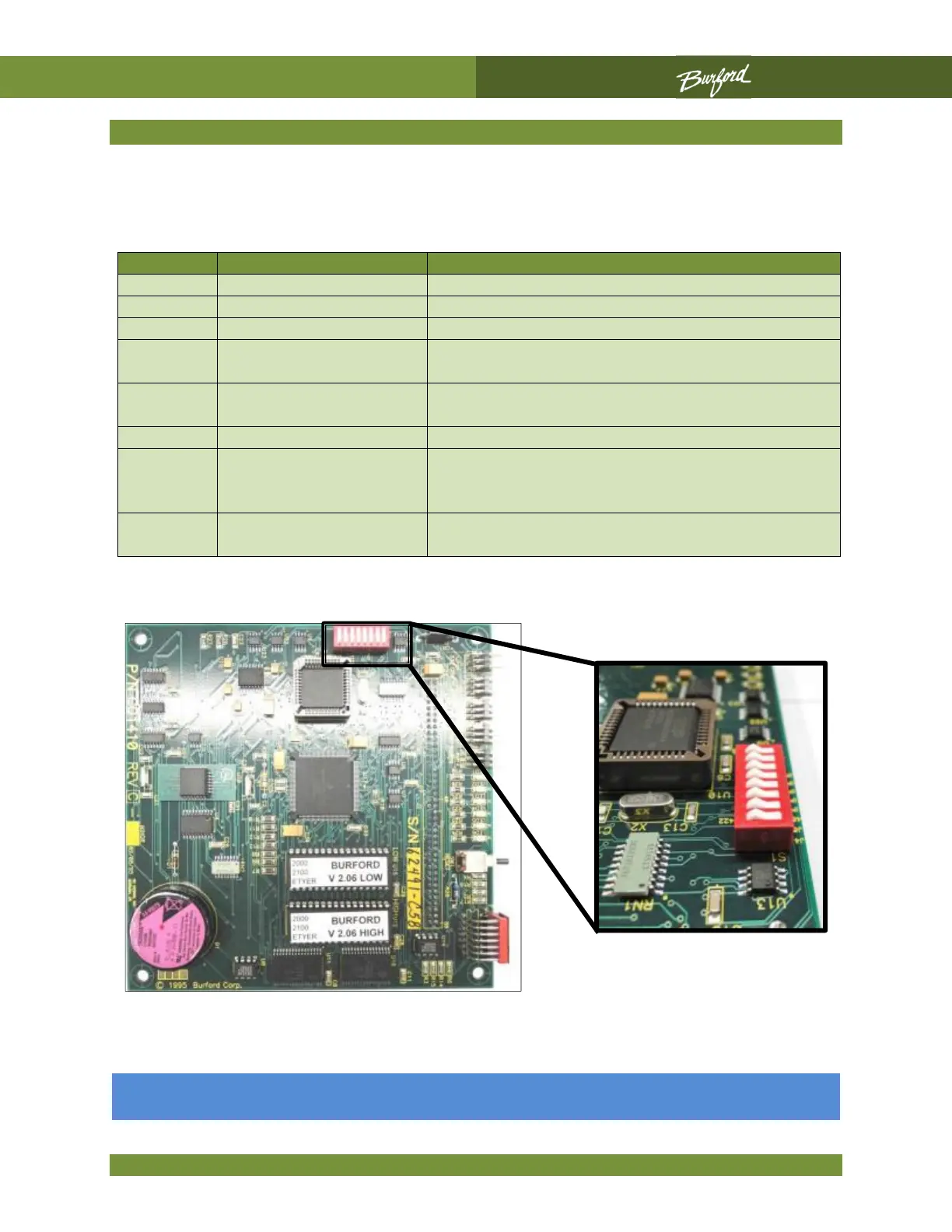
The CPU board, P/N C01410, has a group of eight DIP switches labeled S1. The following
table identifies the switch functions.
SWITCH #
“OFF” POSITION
“ON” POSITION
1
NOT USED
NOT USED.
2
NOT USED
NOT USED.
3
NORMAL SPEED
GO TO HIGH SPEED WHE
N BCD IS ABOVE 5
4
INTERNAL H / S
CONTROL
EXTERNAL H /S CONTROL*
5
INTERNAL TWISTER
HOOK CONTROL
EXTERNAL TWISTER HOOK CONTROL*
6
NORMAL MOTION
WIRELESS MOTION
7
PDS WILL NOT STOP
BAGGER (3 BEEP
ALARM)
NORMAL PDS (STOPS CONVEYOR)
8
COMMUNICATES
WITH LAPTOP
COMMUNICATES WITH OPTIONAL ERROR
DISPLAY
All eight (8) DIP switches shown in the “OFF” position.

.

Table of Contents

Related product manuals