221
DeviceNet
33.6. Configuration example 2
This example describes the principle procedure for setting up the process image of a DeviceNet master/scanner
using the software RSNetWorx for DeviceNet (Rev. 4.12.00).
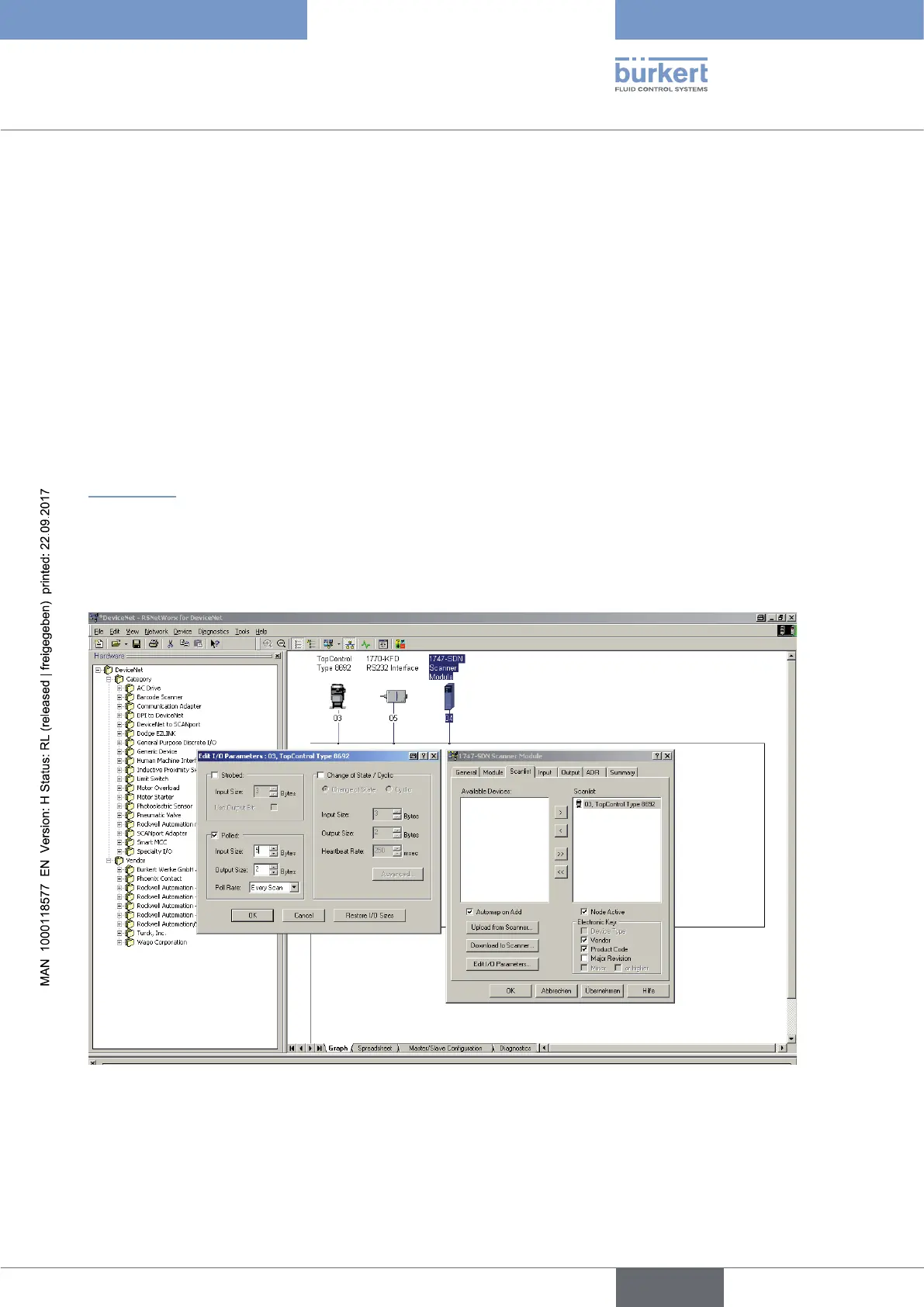
Setting up the scan list and setting the I/O parameters
→ First of all set up the scan list of the DeviceNet master/scanner.
To do this, include the devices listed in the left part of the associated window in the scan list in the right part of
the window.
→ Then the I/O parameters can be changed for each device included in the scan list.
This is required if assemblies which differ from the default settings were selected during configuration of the
device in question.
“Figure 131” shows the setting of the I/O parameters when
- Input assembly
POS+CMD+ERR (5 bytes long) is selected and when
- Output assembly
INP (2 bytes long; default assembly - no change required) is selected
Figure 131: Screenshot - DeviceNet - Setting of I/O parameters



 To Next Page