93
Start-Up
25.4. P.Q‘LIN – Linearization of the process characteristic
This function automatically linearizes the process characteristic.
In doing so, the nodes for the correction characteristic are automatically determined. To do this, the program moves
through the valve stroke in 20 steps and measures the associated process variable.
The correction characteristic and the associated value pairs are saved in the menu option CHARACT → FREE.
This is where they can be viewed and freely programmed. For a description see Chapter "26.2.1".
If the CARACT menu option has still not been activated and incorporated into the main menu (MAIN), this will happen
automatically when P.Q‘LIN is being run.
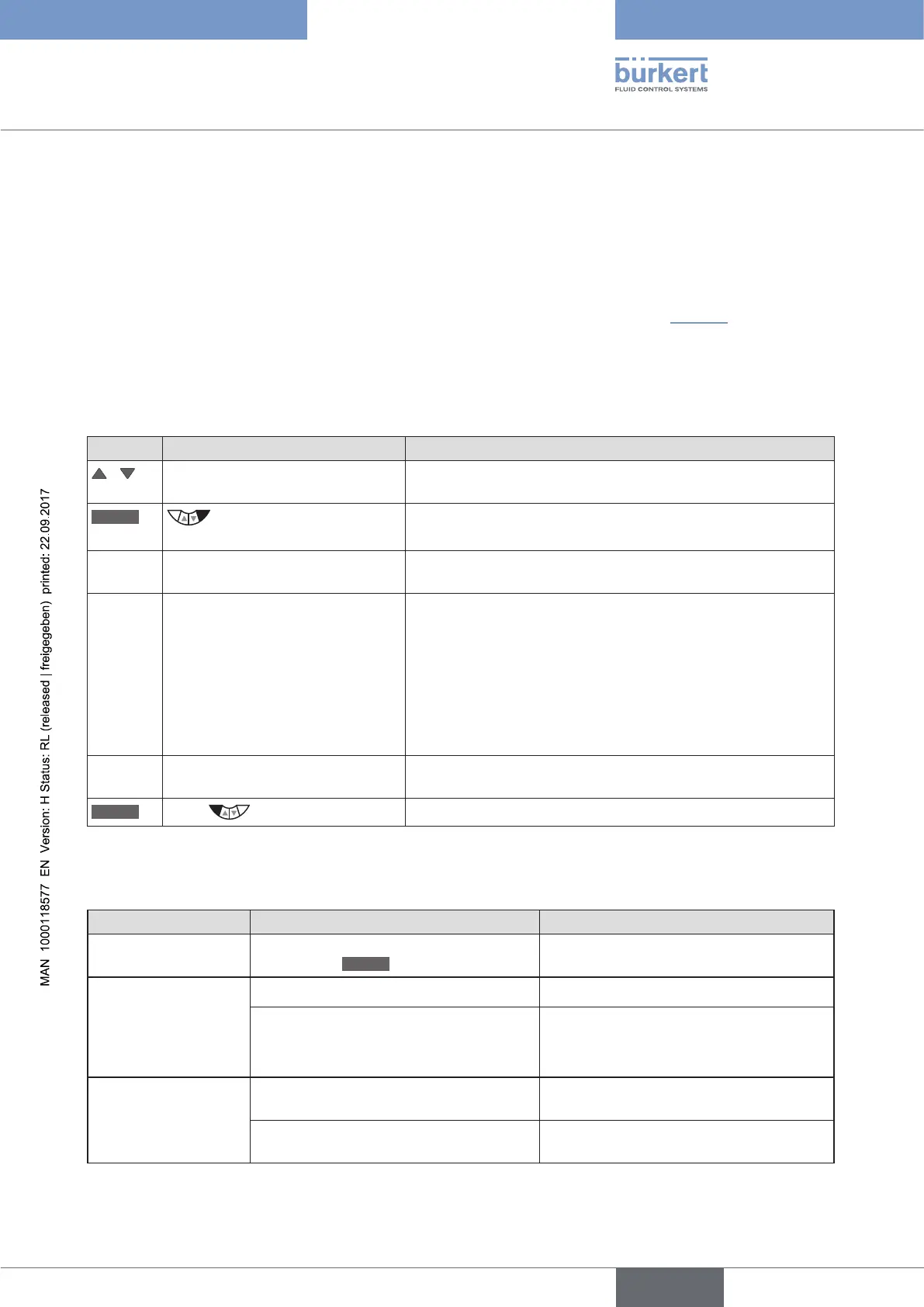
Run P.Q‘LIN:
Key Action Description
/ Select P.Q‘LIN The function is in the main menu (MAIN) after activation of
P.CONTROL.
RUN
Hold down as long as
countdown (5 ...) is running
P.Q‘LIN is started.
The following displays are indi-
cated on the display:
Q‘LIN #0
CMD=0%
Q.LIN #1
CMD=10%
... continuing to
Q.LIN #10
CMD=100%
Display of the node which is currently running (progress is indi-
cated by a progress bar along the upper edge of the display).
Q.LIN
ready
Automatic linearization was successfully completed.
EXIT
Press
Return to the main menu (MAIN).
Table 47: P.Q‘LIN; Automatic linearization of the process characteristic
Possible error messages when running P.Q‘LIN:
Display Cause of fault Remedial action
Q.LIN
err/break
Manual termination of linearization by
pressing the
EXIT
key.
P.Q‘LIN
ERROR 1
No supply pressure connected. Connect supply pressure.
No change to process variable. Check process and, if required, switch on
pump or open the shut-off valve.
Check process sensor.
P.Q‘LIN
ERROR 2
Failure of the supply pressure while
P.Q’LIN running.
Check supply pressure.
Automatic adjustment of the X.TUNE
positioner not run.
Run X.TUNE.
Table 48: P.Q‘LIN; possible error messages



 To Next Page