99
Auxiliary functions
26. CONFIGURING THE AUXILIARY FUNCTIONS
The device has auxiliary functions for demanding control tasks.
This chapter describes how the auxiliary functions are activated, set and configured.
26.1. Activating and deactivating auxiliary functions
The required auxiliary functions must be activated by the user initially by incorporation into the main menu (MAIN).
The parameters for the auxiliary functions can then be set.
To deactivate a function, remove it from the main menu. This will cause the previous settings, created under this
function, to be rendered invalid again.
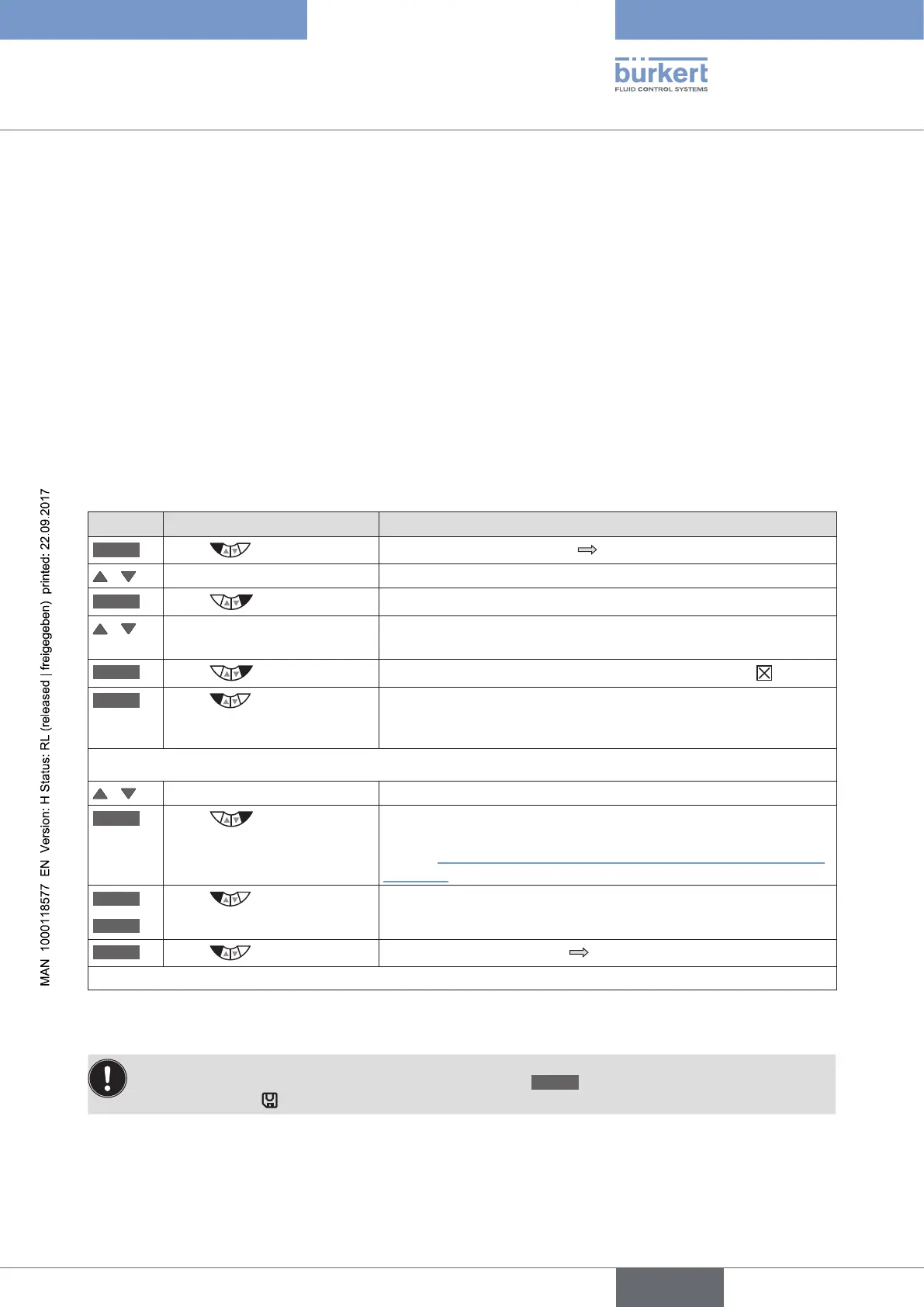
26.1.1. Including auxiliary functions in the main menu
Procedure:
Key Action Description
MENU
Press for approx. 3 s
Switching from process level setting level.
/ Select ADD.FUNCTION
ENTER
Press
The possible auxiliary functions are displayed.
/ Select required auxiliary
function
ENTER
Press
The selected auxiliary function is now marked by a cross .
EXIT
Press
Acknowledgment and simultaneous return to the main menu (MAIN).
The marked function is now activated and incorporated into the
main menu.
The parameters can then be set as follows.
/ Select the auxiliary function In the main menu (MAIN) select the auxiliary function.
ENTER
Press
Opening the submenu to input the parameters.
Further information about the setting can be found in the following
chapter “26.2. Overview and description of the auxiliary functions”,
page 101
EXIT
*
ESC
*
Press
Return to a higher level or to the main level (MAIN).
EXIT
Press
Switching from setting level process level.
* The designation of the key depends on the selected auxiliary function.
Table 53: Incorporating auxiliary functions
The changed data is saved in the memory (EEPROM) only when there is a switch to the process level,
by leaving the main menu (MAIN) using the left selection key
EXIT
. During the save process, the save
symbol is indicated
on the display.



 To Next Page