● When <Coded Dial TX Conrmation> is set to <On>, a screen is displayed that shows the destination and
the name for the number. (For Group Dial, the destination name and the number of destinations are
shown.) Check the contents and if everything is correct, and tap <On>. To specify a different destination,
tap <Cancel> and re-enter the three-digit coded dial number. Displaying Destinations in Address
Book(P. 561)
If you want to specify multiple destinations
● Repeat the following steps. Up to 281 destinations can be specied using coded dial numbers.
<Destination> <Specify from Coded Dial> Enter a number.
● To specify any additional destinations with the numeric keys, tap <Destination> <Specify Using Numeric
Keys>.
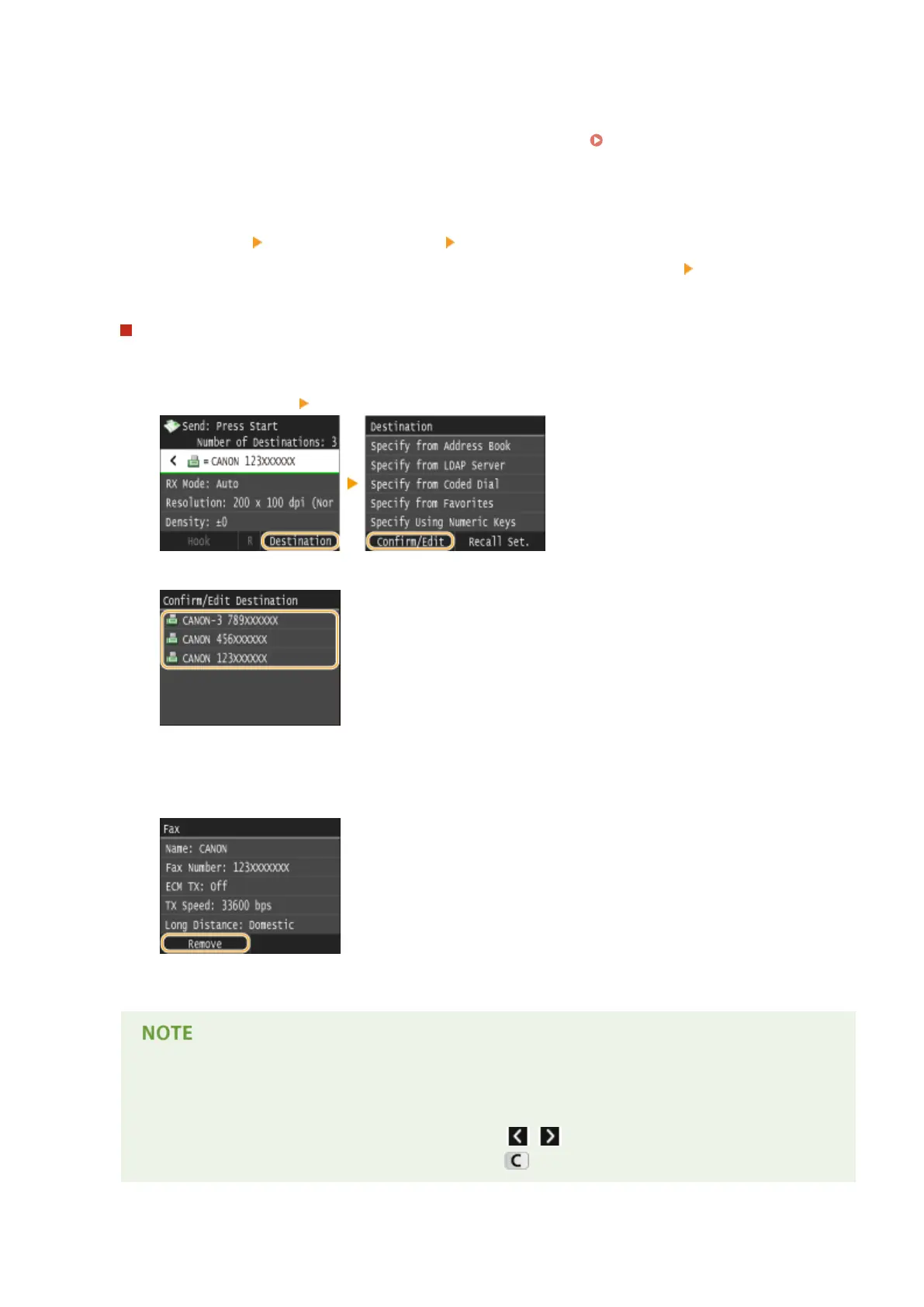
To delete destinations
If you specied multiple destinations, you can delete destinations as necessary.
1
Select <Destination> <Conrm/Edit>.
2
Select a destination you want to delete.
3
Tap <Remove>.
● If you select Group Dial in step 2, <Number of Destinations: XX> is displayed. Tapping this item
displays destinations registered in the group.
4
Tap <Yes>.
If you want to easily and quickly delete destinations without displaying a list of
destinations
● Before tapping <Destination> in step 1, you can tap / to toggle the destinations you specied.
Display a destination you want to delete, and press .
Faxing
157











 To Next Page