Registering Destinations for Favorites
0UWX-019
You can register frequently used destinations as Favorites in the Address Book. Destinations can be edited or deleted
after they have been registered( Registering Destinations in the Address Book from Remote UI(P. 624) ). You can
register up to 19 destinations in Favorites.
● Three-digit numbers are not assigned to Favorites.
1
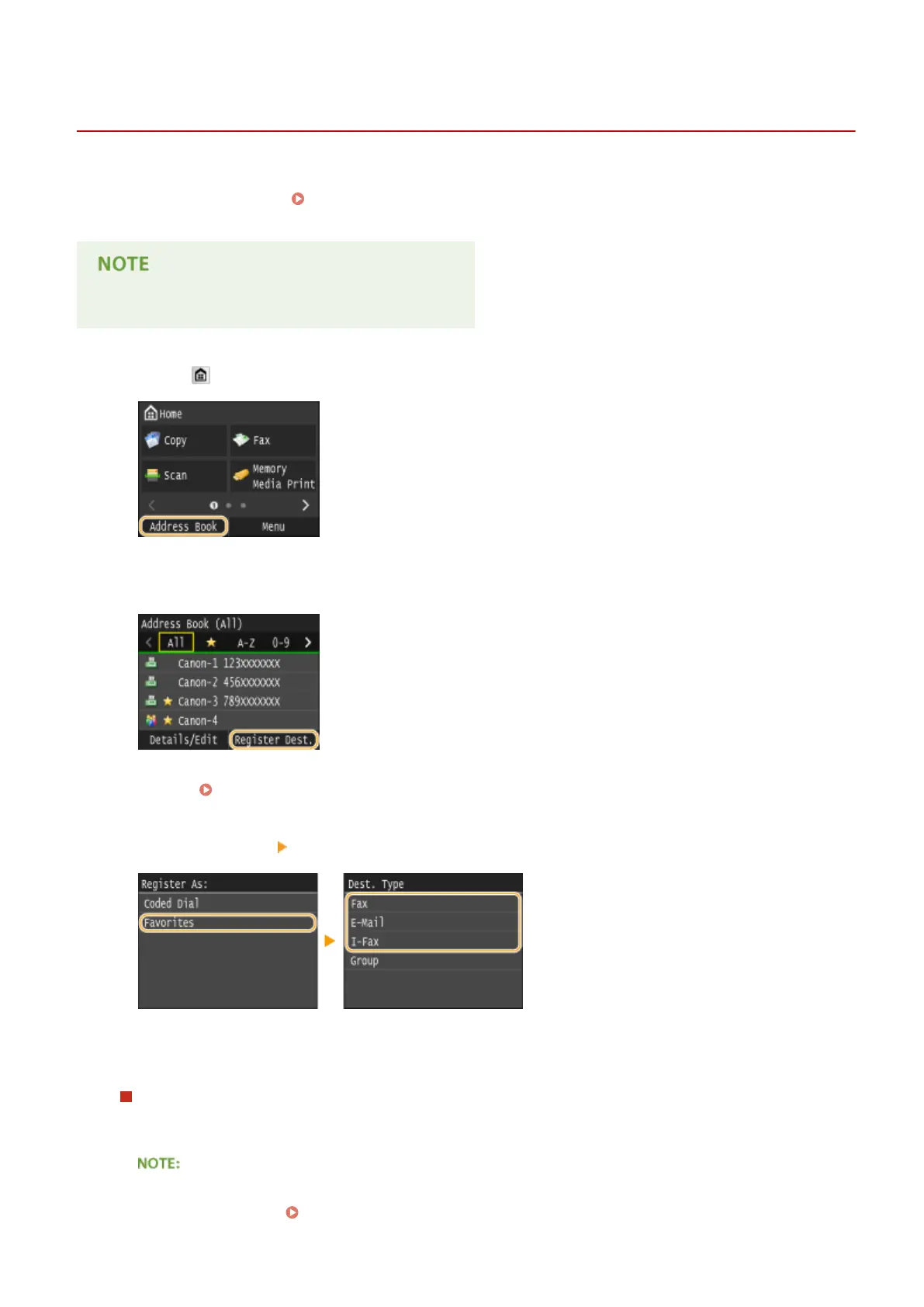
Press and tap <Address Book>.
2
Tap <Register Dest.>.
● If a screen appears prompting you to enter a PIN, enter the correct PIN using the numeric keys, and tap
<Apply>. Setting a PIN for Address Book(P. 556)
3
Tap <Favorites> Select type of address to register.
● According to the address being registered, tap <Fax>/<E-Mail>/<I-Fax>.
● The types of destinations that can be selected vary depending on the machine model.
Registering destinations with the LDAP server
If your oce has an LDAP server installed, you can make search to nd user information on the server and
register it in the Address Book.
● To make registration from the LDAP server, you need to specify the settings for connecting to the LDAP
server beforehand. Registering LDAP Servers(P. 499)
Basic Operations
87











 To Next Page