6
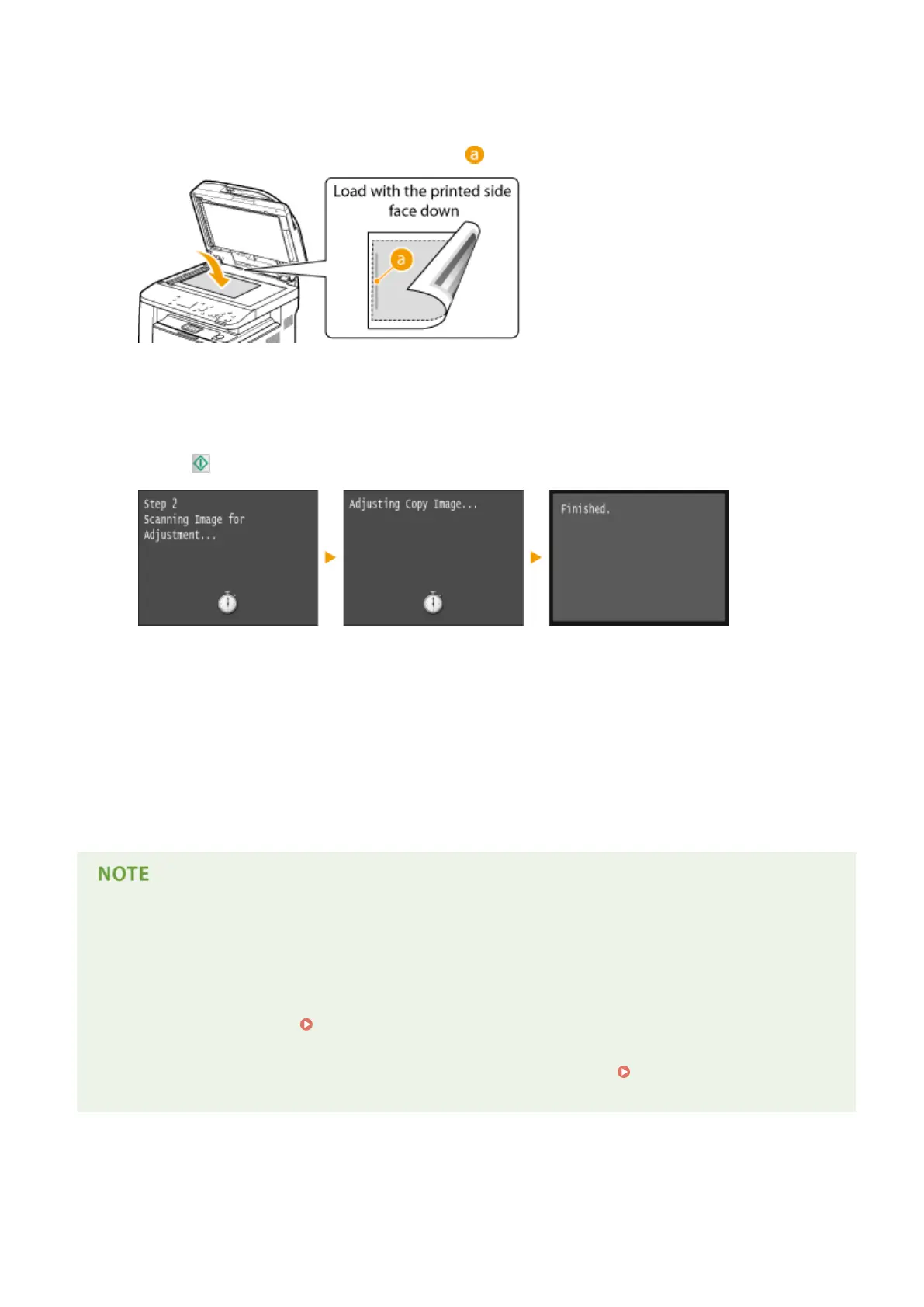
Place the printed adjustment sheet on the platen glass with the print side face down.
● Place the adjustment sheet so that the black line ( ) is toward the left side of the machine.
7
Gently close the feeder.
8
Press .
➠
The adjustment image is scanned and adjustment starts. In approximately 8 seconds, the adjustment is
nished.
9
Open the feeder, and remove the adjustment image.
10
Gently close the feeder.
If the <Could not perform correction.> message is displayed
● Did you load plain/recycled/heavy paper or label of A4 or Letter size?
● Did you place the adjustment sheet on the platen glass with the adjustment image printed side face down,
with the black line toward the left side of the machine?
● Has a paper jam occurred?
Clearing Jams(P. 723)
● Is the amount remaining in toner cartridge required for correction sucient? If the amount remaining in a
toner cartridge is low, it is recommended that you replace toner cartridges.
Checking the Amount
Remaining in the Toner Cartridge(P. 794)
Maintenance
805



 To Next Page