000 299 119 5 - BA ROLLANT 240 - 250 - 254 - 255 10.4.3
Control Terminal
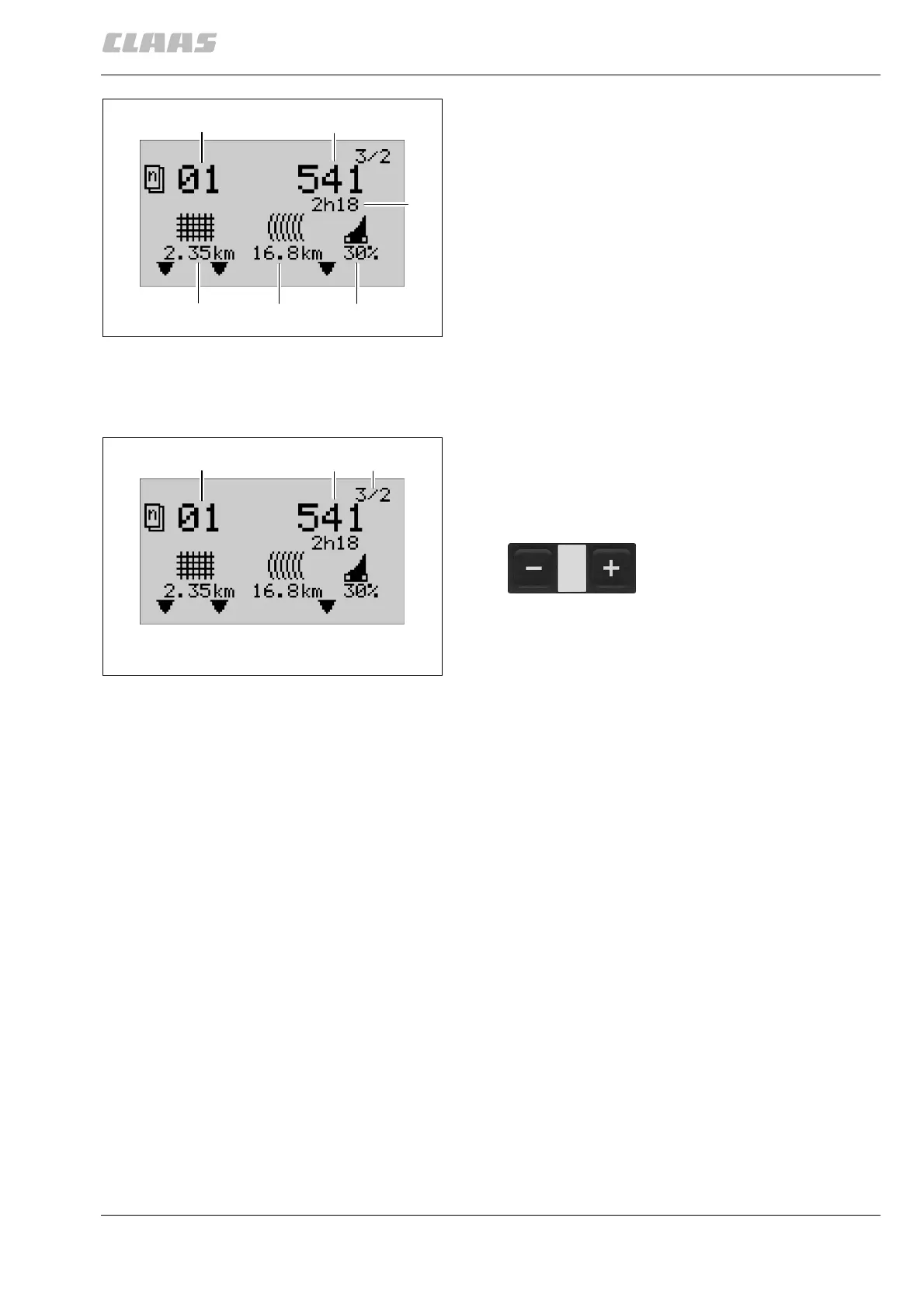
Special counter
The special counter enables the counting and display
of job-related data.
18 Current job: up to 20 jobs can be counted and
displayed.
19 Number of bales produced
20 Elapsed time
21 Net length used
22 Twine length used
23 Percentage of bales which were made using the
cutting knives.
(Fig. 7)
Start special counter
Before beginning a job, open the “Special counter”
menu. The menu display (F) shows “3/2”, symbol (18)
blinks.
Number of bales, net or twine length and elapsed time
should show zero.
If necessary, select another job or reset the current job
displayed. See also “Reset job”.
Perform the job.
When the job is complete, the number of bales
produced, the net or twine length used, and the
elapsed time are displayed in the “Special counter”
menu.
Any faulty bales can be subtracted from the display of
the number of bales produced (19). See “Correct bale
count”.
(Fig. 8)
18
19
20
21
22
23
200419
7
18
19
F
200420
8
Select the new job with the (+) or
(–) keys.



 To Next Page
 Loading...