000 299 119 5 - BA ROLLANT 240 - 250 - 254 - 255 11.2.1
CLAAS COMMUNICATOR
OPERATOR SETTINGS
Select type of wrapping
The baler may be equipped with two wrapping
systems: Net wrapping and twine wrapping.
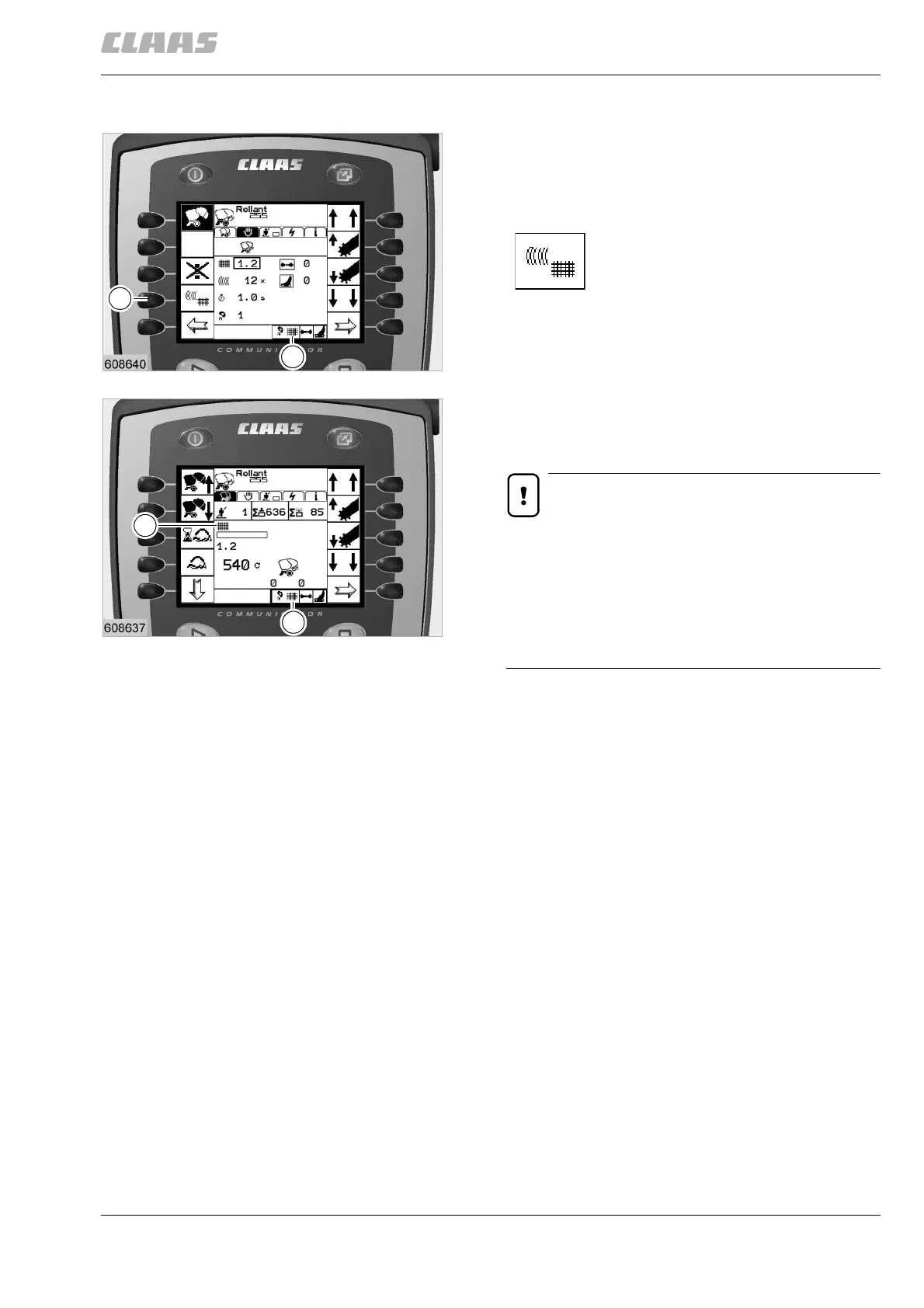
Press key (J) to select the desired
wrapping system. The symbol (K)
displays the active wrapping system.
In the application menu, the wrapping system, i.e.
twine or net, is indicated by the symbols (K) and (L).
Note!
If a baler is originally equipped with net
wrapping and then is retrofitted with twine
wrapping, please consult your dealer to
configure the module for both wrapping
systems. The standard equipment of the baler is
just one wrapping system and it is only
configured for the installed system.
(Fig. 1, 2)
J
K
1
L
K
2
CLAAS COMMUNICATOR


 To Next Page
 Loading...