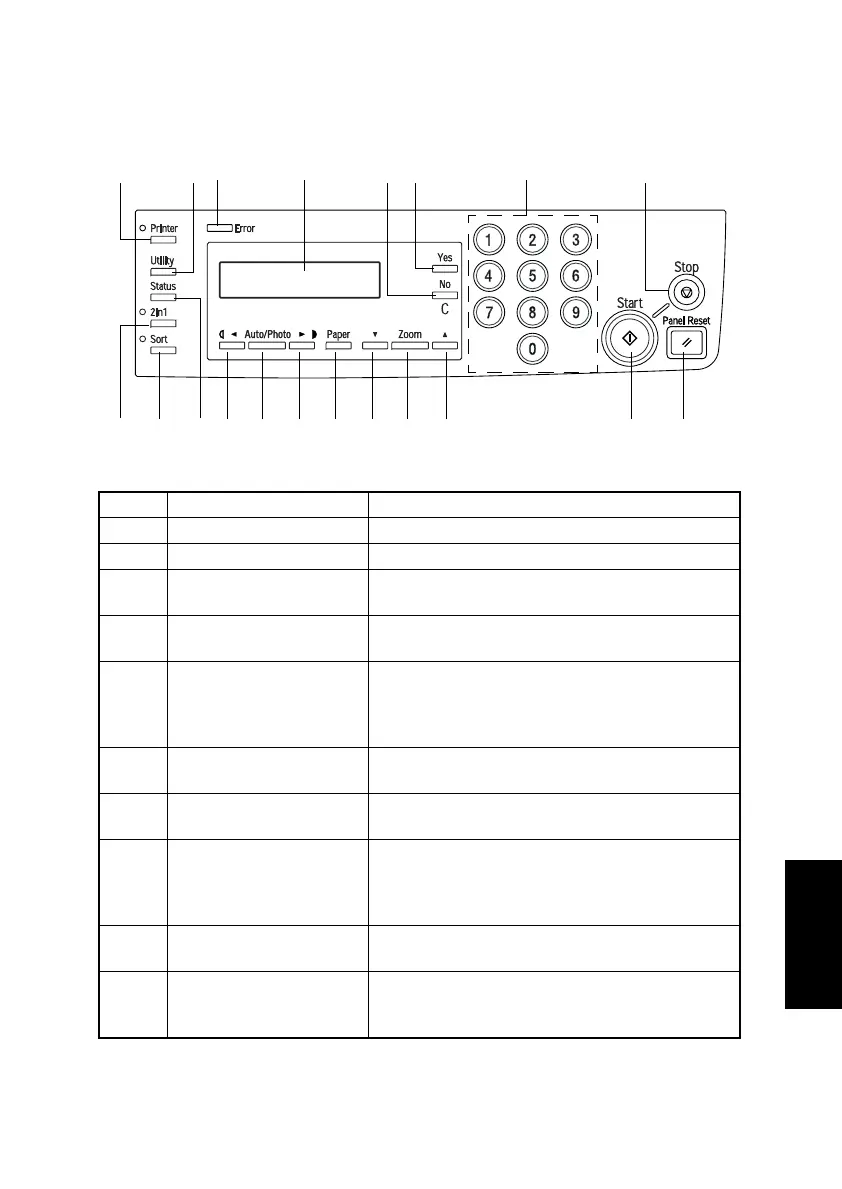
S-1
1. CONTROL PANEL DESCRIPTIONS
1-1. Names of Control Panel Parts and Their Functions
No. Key Name Function
1 Printer key Press to enter Printer mode.
2 Utility key Press to enter Utility mode.
3 Error lamp
The indicator lights up if an error or malfunction
occurs.
4Display
Shows the number of copies to be made, the zoom
ratio, and other settings.
5No/C key
• Press to reset the number of copies to “1”.
• Press to clear various settings.
• Press to return to the previous screen.
• Press to specify various settings.
6Yes key
• Press to apply the specified setting.
• Press to specify various settings.
7 10-Key Pad
Use to type in the number of copies to be made and
any other numeric data.
8 Stop key
• Press to stop the print operation.
• Press to stop the scan operation.
• The indicator lights up in orange when the
machine is paused or while copying.
9 Panel Reset key
Press to reset all copy functions to their default set-
tings.
10 Start key
• Press to start a scanning operation.
• Press to start a print operation.
• Press to specify various settings.
21 3 4 65 7 8
9
101111 12131415141618 17
4980S001AA












 To Next Page