E-5
3. REPLACEMENT OF UNITS
(1) Replacement of the Toner Cartridge
<Removal Procedures>
<Installation Procedures>
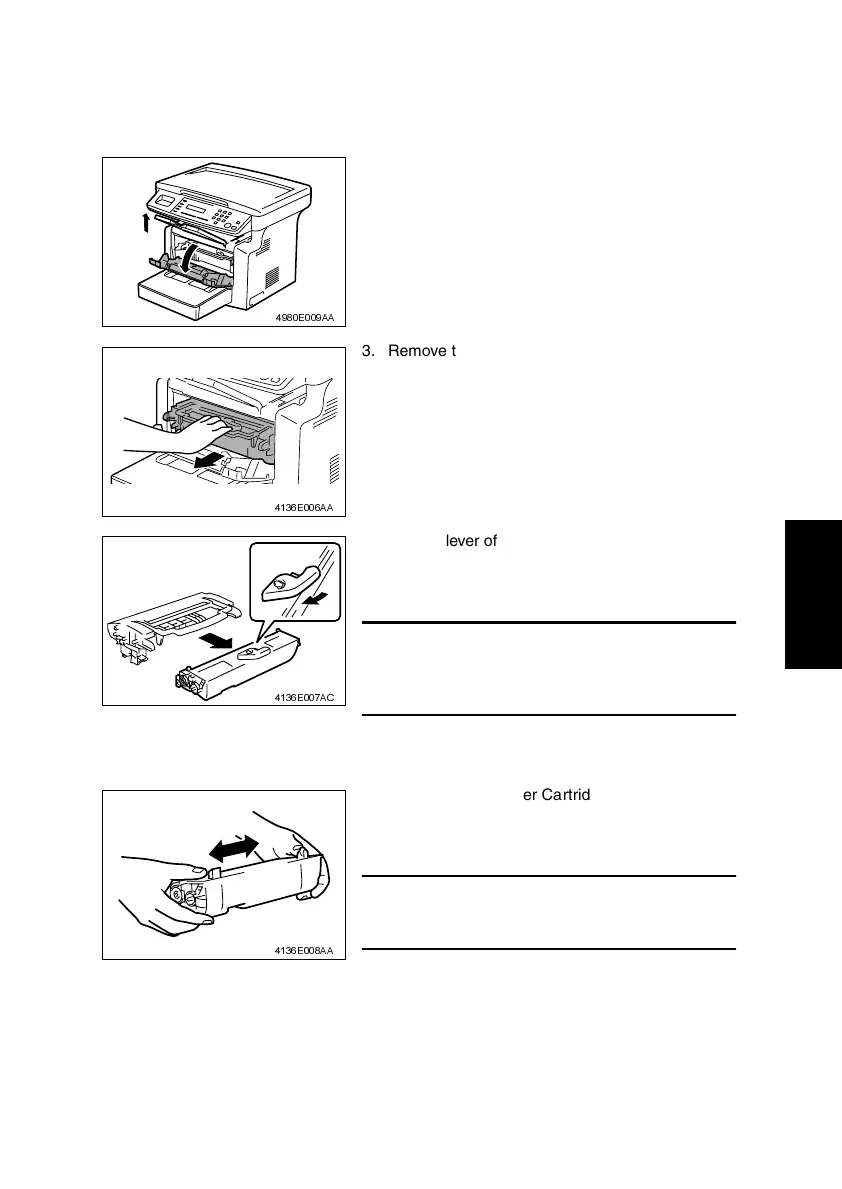
1. Lift up the Exit Tray and remove it.
2. Open the Front Door.
4980E009AA
3. Remove the Imaging Cartridge.
4136E006AA
4. Pull the lever of the Toner Cartridge in the direc-
tion shown in the illustration and disconnect the
Toner Cartridge from the Drum Cartridge.
NOTE
• If the Drum Cartridge is to be placed on a floor or
similar place, use care to prevent toner from scat-
tering around.
4136E007AC
1. Take out a new Toner Cartridge and shake it in
the horizontal direction sufficiently so that toner is
agitated.
NOTE
• Placing the Toner Cartridge in an upright position
or shaking it vigorously will spill toner.
4136E008AA












 To Next Page