E-6
Precautions for Replacing the Toner Cartridge
• Different types of Toner Cartridges are available for different regions. Therefore, check
the Toner Cartridge type before replacing it.
<Toner Cartridge Types for Each Region>
US & Canada: Toner Cartridge 101 C
Europe: Toner Cartridge 101 A
Other regions: Toner Cartridge 101 B
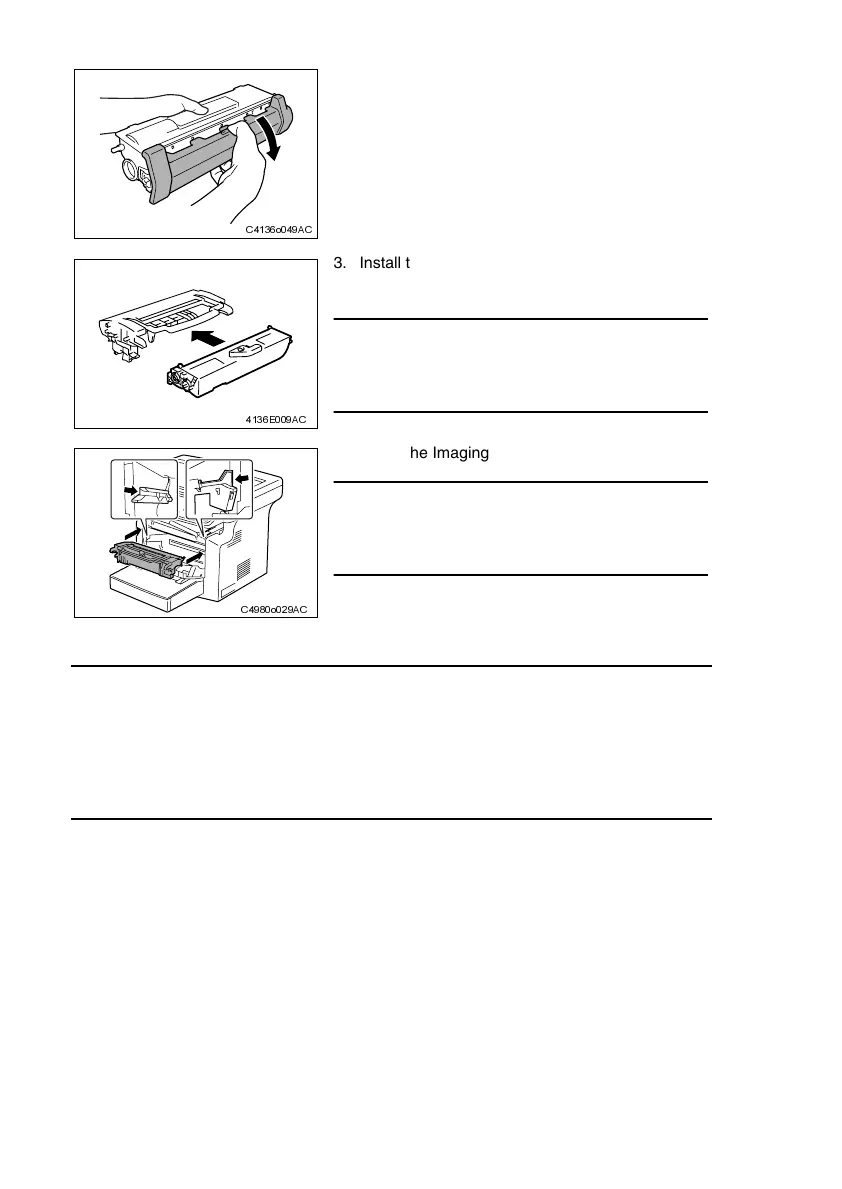
2. Remove the protective cover from the Toner Car-
tridge.
C4136o049AC
3. Install the new Toner Cartridge to the Drum Car-
tridge.
NOTE
• Insert the Toner Cartridge along the guide provided
on the Drum Cartridge side and make sure that the
Toner Cartridge is not tilted when inserted.
4136E009AC
4. Install the Imaging Cartridge in the printer.
NOTE
• Insert the Imaging Cartridge along the guide pro-
vided on the printer side. Ensure that the Imaging
Cartridge is not slid obliquely.
5. Close the Front Door.
C4980o029AC












 To Next Page