D-43
5-3. Procedure for Updating the GDI Firmware
1. Turn on the printer.
2. Start up the host computer (Windows 98 or later).
3. Copy the “Update Software” folder and “Update” file to drive C. (Copy them into the
highest directory on drive C.)
4. Use a USB cable to connect the printer to the host computer. (Wait until the hardware is
detected.)
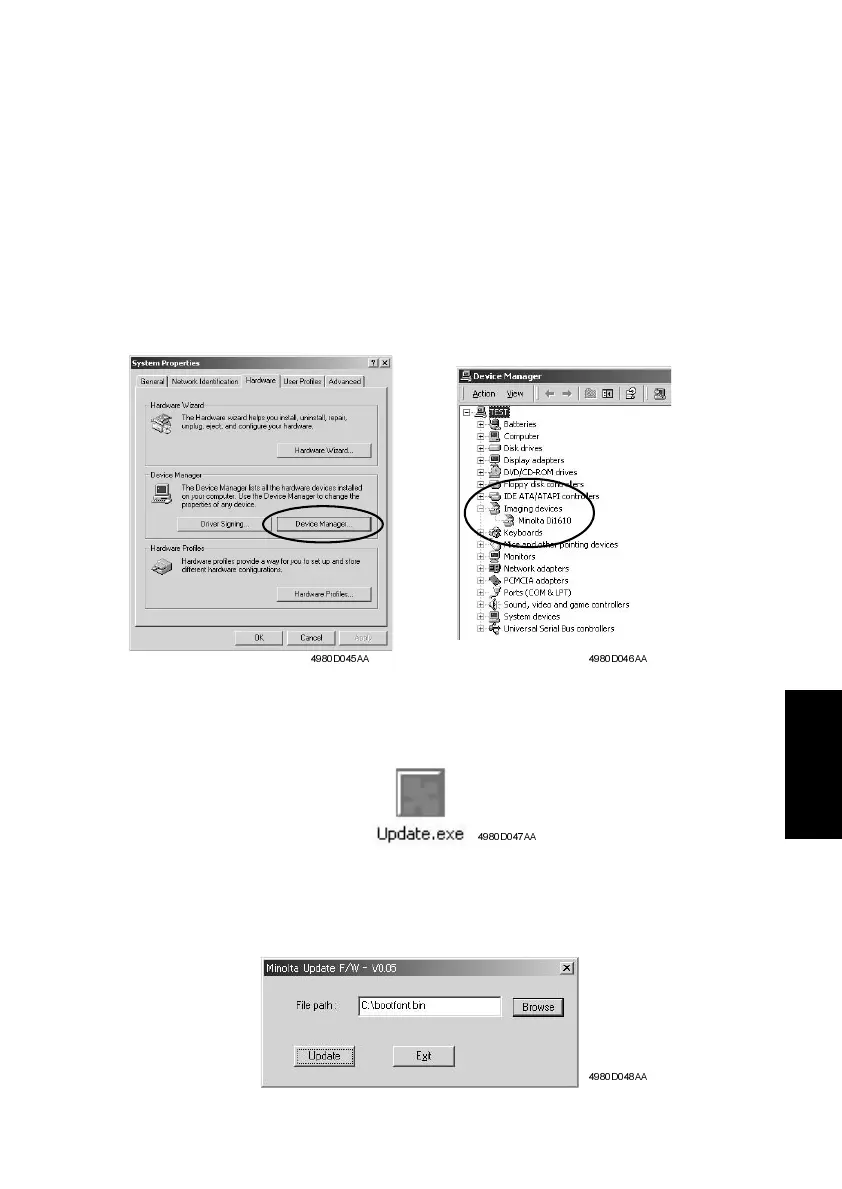
5. Display the “System Properties” dialog box (“Properties” for “My Computer”), click the
“Hardware” tab, click the [Device Manager] button, select “Imaging devices”, and then
check that “Develop D 16G” has been added.
6. Double-click “Update” file in the “Update Software” folder.
The “Develop Update F/W-V1.XX” dialog box appears.
7. Click the [Browse] button, and then select “Update” file, which was copied onto drive C
in step 3.
4980D045AA 4980D046AA
4980D047AA
4980D048AA












 To Next Page