M-24
11. IMAGE TRANSFER
11-1. Overview
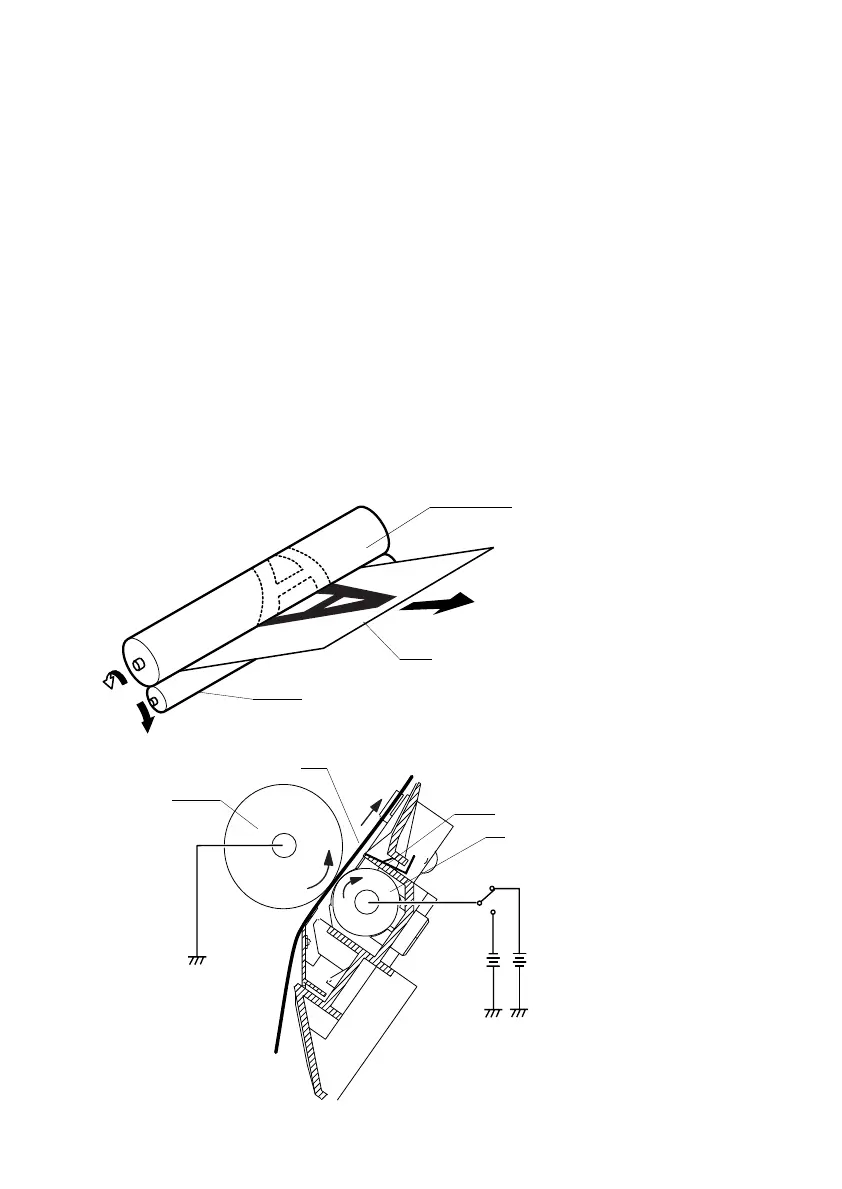
• The toner image formed on the surface of the PC Drum during the developing process is
transferred onto the paper.
• This printer adopts the roller image transfer system, in which the Image Transfer Roller is
used to transfer the image onto the paper.
• In the roller image transfer system, the paper is pinched between the PC Drum and the
Image Transfer Roller at all times during the print cycle. This results in a very little
amount of ozone being produced and there is a little chance of a double transferred
image occurring.
• To clean the Image Transfer Roller, reverse bias is applied to the Image Transfer Roller.
• The cleaning sequence is carried out when the printer is started, a print command is
issued, a print cycle is completed, and when the printer is started after a misfeed has
been cleared.
• There is the Charge Neutralizing Needle installed for neutralizing the paper after image
transfer.
4121s034
Paper
PC Drum
Image Transfer Roller
Charge Neutralizing Needle
PC Drum
Image Transfer Roller
4136M515AA
Paper
Image Transfer Bias
Reverse
Bias












 To Next Page