Programming manual.
CNC 8070
GEOMETRY ASSISTANCE
11.
Work zones.
·217·
(REF: 1709)
11.11 Work zones.
The work zones define a restricted area for tool movement, either forbidding it to exit the
programmed zone (no-exit zone) or forbidding it to enter it (no-entry zone). The CNC lets
set five of these work zones that may be active at the same time.
During the movement of the axes, either in jog or automatic mode, the CNC monitors the
theoretical position values (coordinates) to check whether the tool gets into a no-entry zone
or gets out of a no-exit zone. If so, the CNC stops the movement of the axes and issues the
corresponding error message.
During the movement, the CNC can either monitor the tool tip or the tool base or both. This
vigilance (monitoring) works with and without tool radius and length compensation. When
the CNC monitors the tool tip, it takes into account its dimensions.
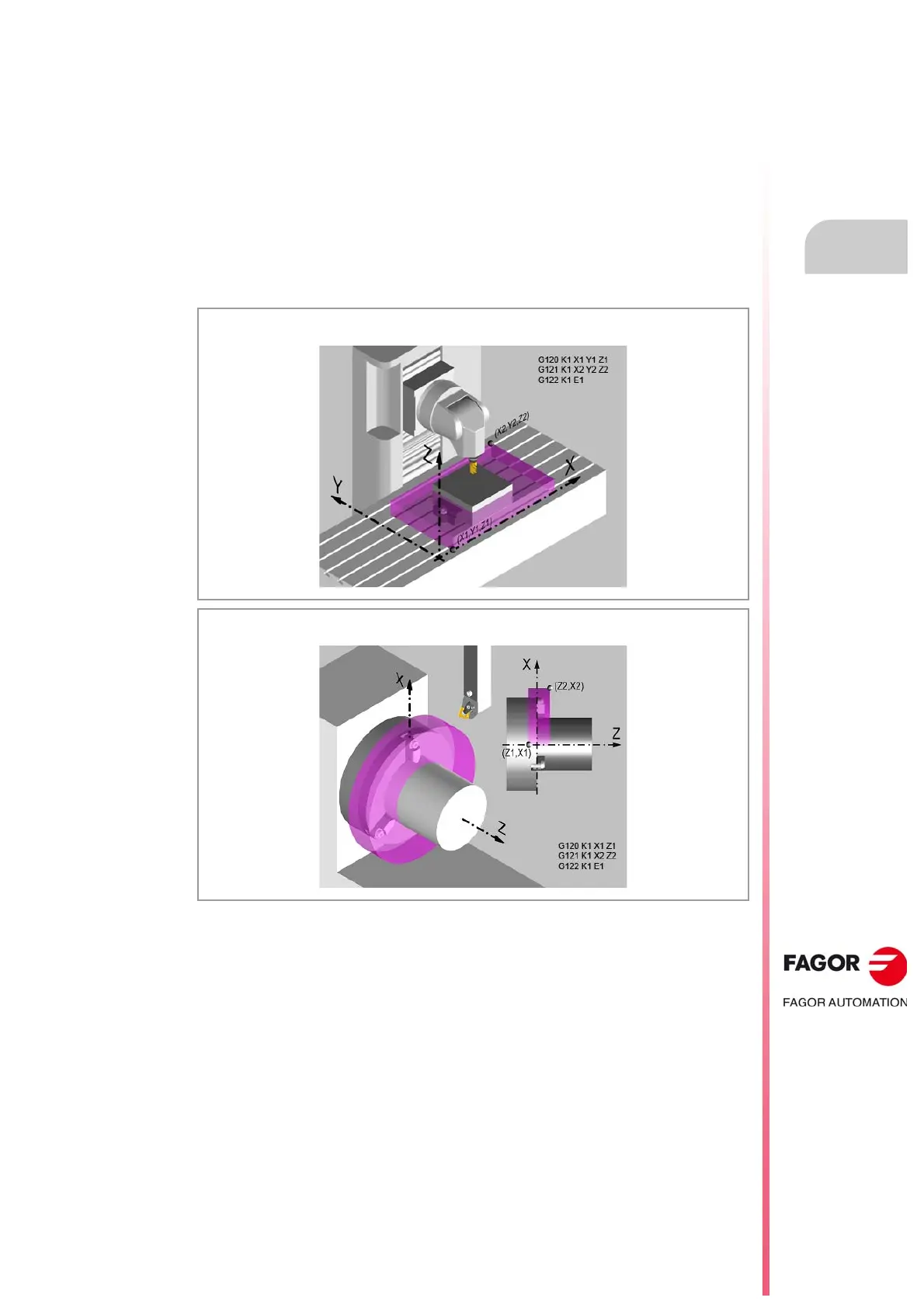
The limits of the work zones are defined in machine coordinates. Basically, a work zone is
defined by programming the lower limit coordinate and the upper limit coordinate in one or
several axes of the channel. It is also possible to combine a circular area in two of the axes
with lower limits and upper limits in other axes of the channel.
Work zone in milling, defined in three linear axes.
Work zone in lathe, defined in two linear axes.



 To Next Page