Programming manual.
CNC 8070
STATEMENTS AND INSTRUCTIONS
22.
Programming statements
·409·
(REF: 1709)
22.1.13 Collision detection
With this option, the CNC analyzes in advance the blocks to be executed in order to detect
loops (intersections of the profile with itself) or collisions in the programmed profile. The
operator may define up to 200 blocks on an 8065 CNC and 40 blocks on an 8060 to be
analyzed.
When detecting a loop or a collision, the CNC will not execute the blocks that cause it and
the screen will display a warning to let the operator know that the programmed profile has
been modified. It will display a warning for each loop or collision eliminated.
The information contained in the eliminated blocks, not being the moving in the active plane,
will be executed (including the movements of the axes).
Considerations for the collision detecting process.
• Collision detection may be applied even when tool radius compensation is not active.
• Being collision detection active, it is possible to apply zero offsets, coordinate presetting
and tool changes. However, home searches and measurements are NOT possible.
• Changing the work plane will interrupt the collision detecting process. The CNC checks
for collisions in the blocks stored so far and resumes the process with the new plane
starting with the new motion blocks.
• The collision detecting process will be interrupted when programming a instruction
(explicit or implicit) that involves synchronizing block preparation and execution (e.g.
#FLUSH). The process will resume after executing that instruction.
• Collision detection cannot be activated if a Hirth axis is active and it is part of the main
plane. Likewise, while collision detection is active, an axis cannot be activated as a Hirth
axis and the work plane cannot be changed if one of the axis is a Hirth axis.
#CD ON
Activate collision detection
It activates the collision detecting process. Being collision detection already active, it lets
modify the number of blocks to be analyze.
The programming format is as follows:
#CD ON [<blocks>]
Defining the number of blocks to be analyzed is optional. If not defined, the CNC assumes
the maximum (200 blocks). The horizon of blocks may be changed at any time, even while
collision detection is active.
Parameter Meaning
<blocks> Optional. Number of blocks to analyze.
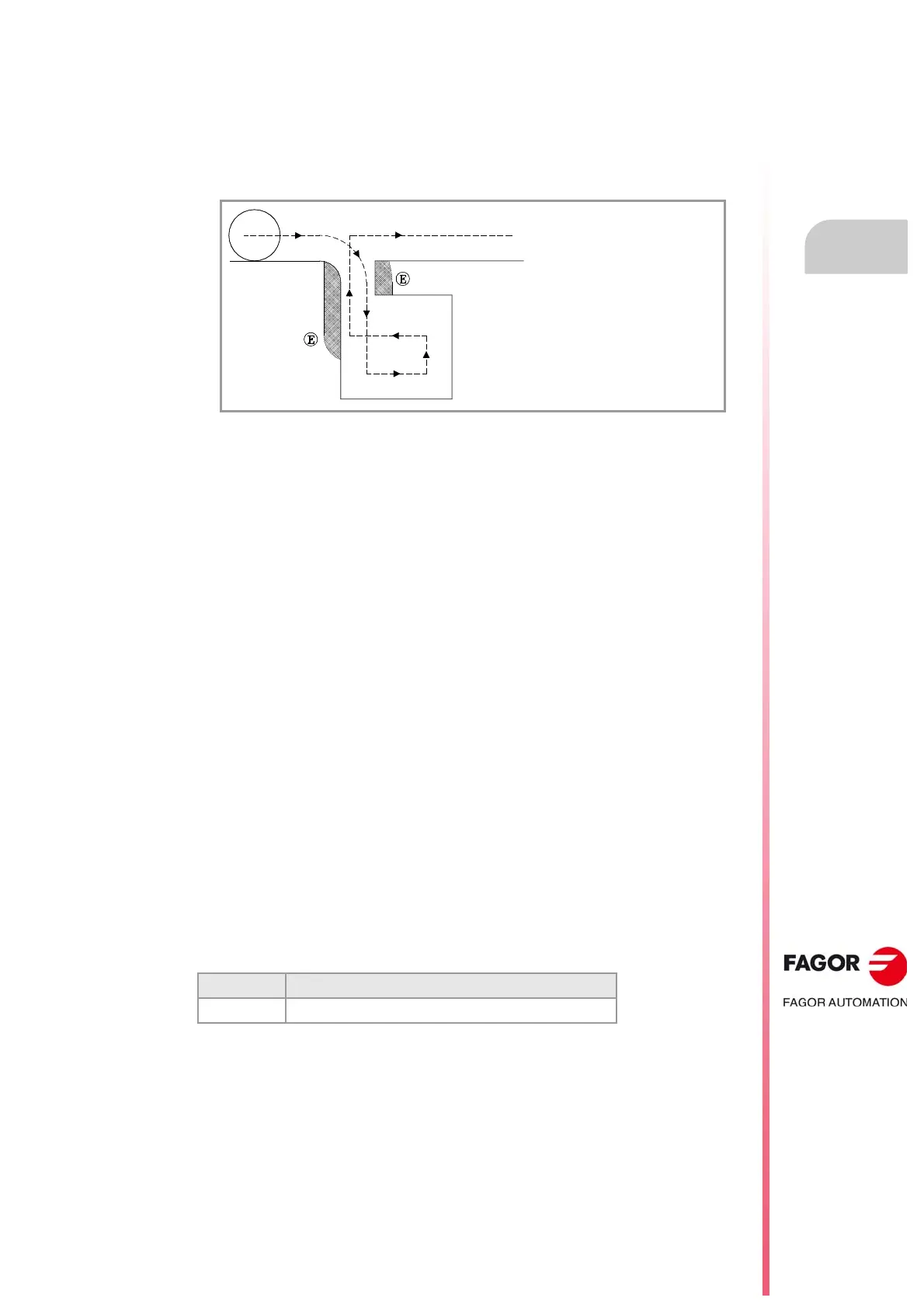
The example shows machining errors (E) due
to a collision in the programmed profile. This
type of errors may be avoided using collision
detection.



 To Next Page