EasyManua.ls Logo

FORESIGHT TIMS MVP - Auto-SYNC Video Settings Tabs; Changing Pixel Adjustments Settings

FORESIGHT TIMS MVP
285 pages
Print Icon
To Next Page IconTo Next Page
To Previous Page IconTo Previous Page
Loading...
Using Auto-SYNC for Digital Input Connections
TIMS MVP Setup and Configuration Guide 189
Auto-SYNC Video Settings Tabs
Changing Pixel Adjustments Settings
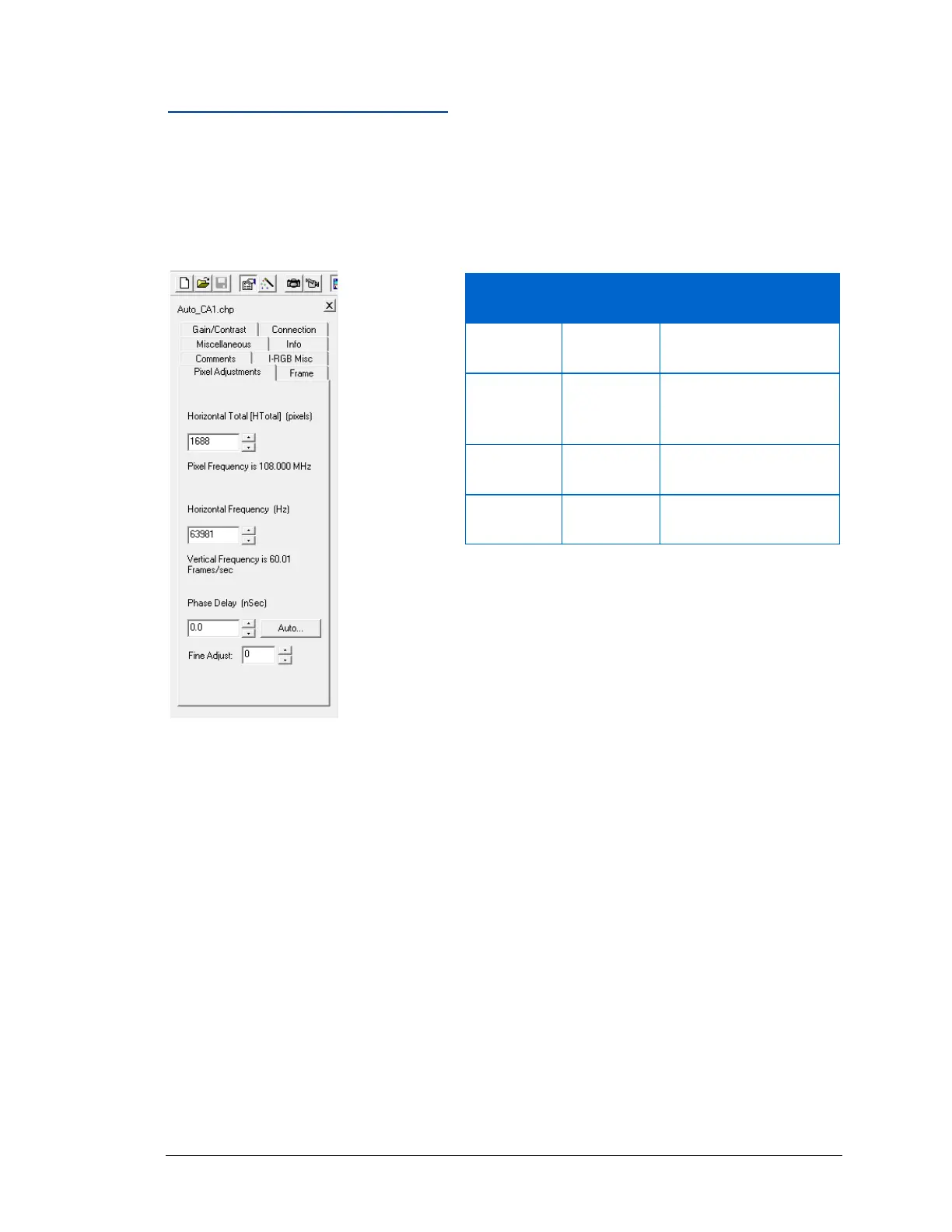
Options available under the Pixel Adjustments tab.
The following table defines some of the terms available under the Pixel Adjustments tab.
Figure 90: Pixel Adjustment video settings

Option
Default
Value
Description
Horizontal
Total
1688 pixels
Total number of pixels
in one video scan-line.
Horizontal
Frequency
63981 Hz
Number of scan lines
transmitted per second
in the video signal.
Phase Delay
0.0 nSec
Not Applicable with
digital video sources.
Fine Adjust
0.0
Not Applicable with
digital video sources.

Table of Contents