Chapter 7: Stream Configuration Menu Stream Filtering Configuration
© Harmonic Inc. Manual p/n 101543/Ver 1.0 7-15 ProView 2900 Series/SW Version 1.94
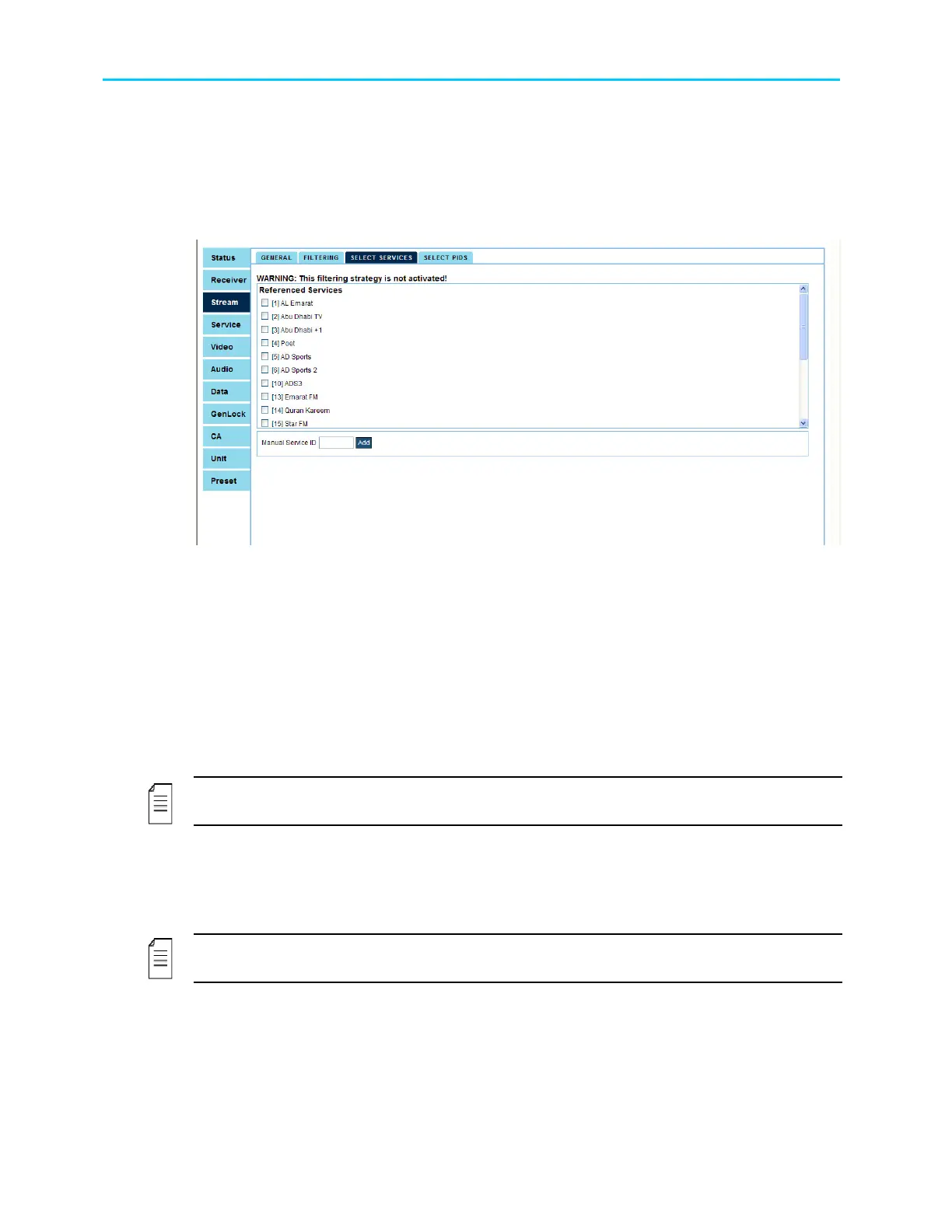
7.5.4.2. Select Services Using the Web Interface
Select Services is the corresponding web-management screen that allows the user to select
Services for the filtering mode.
Figure 7-5 displays the corresponding Select Services Parameters (Web Management
screen).
Figure 7-5: Select Service Menu Screen
Select Services screen includes the following parameters:
• Referenced Services - This parameter lists all available services on the ProView 2900. It
allows selection of specific service. The parameters displayed as the service' ID next to
the service' name tag. In order to select a service, select the service' check box and click
Submit.
• Unreferenced Services- This parameter lists all selected unreferenced services' IDs on
the ProView 2900. The parameters displayed as the service' ID and name. It allows
removal of an unreferenced service. In order to remove an unreferenced services, select
the service' check box and click Submit.
NOTE
Unreferenced Services is unavailable when no unreferenced services have been selected
• Manual Service ID - This parameter allow the user to manually add service-to-filter by
entering the service' ID in the text box and click on Submit.
• Clear - Clicking on Clear button empty all selected fields.
NOTE
Service menu is applicable only when service filtering is selected from Strategy menu



 To Next Page