Chapter 8: Service Configuration Menu TV1 Select (and TV2 Select)
© Harmonic Inc. Manual p/n 101543/Ver 1.0 8-4 ProView 2900 Series/SW Version 1.94
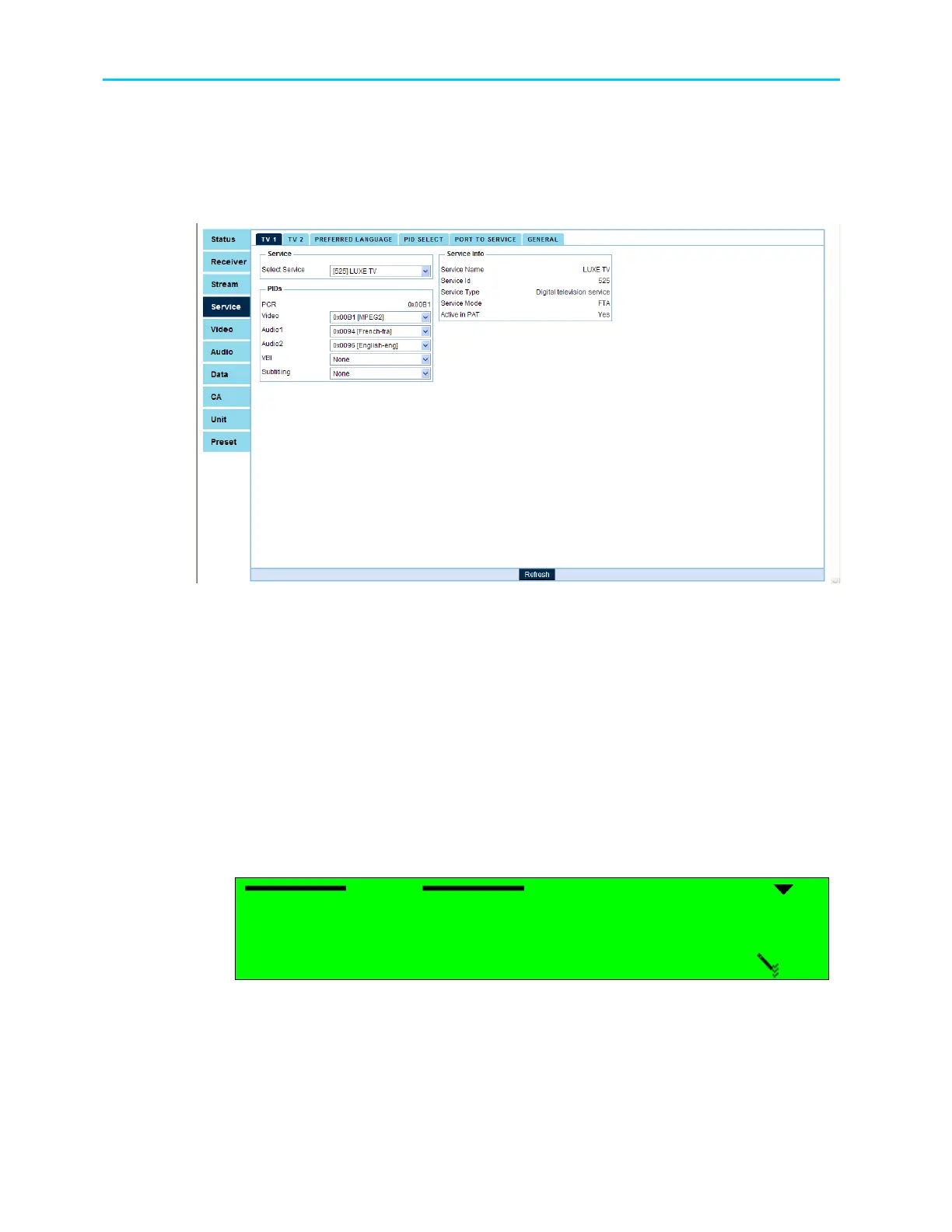
Figure 8-3 displays the corresponding TV1 Menu in the Web Management.
Selecting a service in the Service roll-down window displays the service parameters in the
Service Info window. Configuring the service PIDs is done from the PIDs window.
Figure 8-3: TV1 Menu Screen
The following sub-paragraphs details the configuration of the Service parameters, using the
ProView 2900 Front Panel Service Configuration menu tree (Configuration
Service
TV1
Select (or TV2 Select)
[service name]).
Same parameters can be configured in the ProView 2900 Web Manager in the PIDs Window
(Service
TV1 Select (or TV2 Select)
[service name]).
8.2.1. PCR
The PCR elementary stream is a read only parameter.
8.2.2. Video
The following figure displays the TV1 Video screen:
Video
Video Video
Video
1
11
1
None
None None
None
2
22
2
Video1
Video1 Video1
Video1
The available options are:
• None – Video 1 (or Video 2 correspondingly) is not assigned to this Service.
• Video 1 (or Video 2) – Video 1 (or Video 2 correspondingly) is assigned to the Service.



 To Next Page