Chapter 14: Unit Configuration Menu Licensing Menu
© Harmonic Inc. Manual p/n 101543/Ver 1.0 14-10 ProView 2900 Series/SW Version 1.94
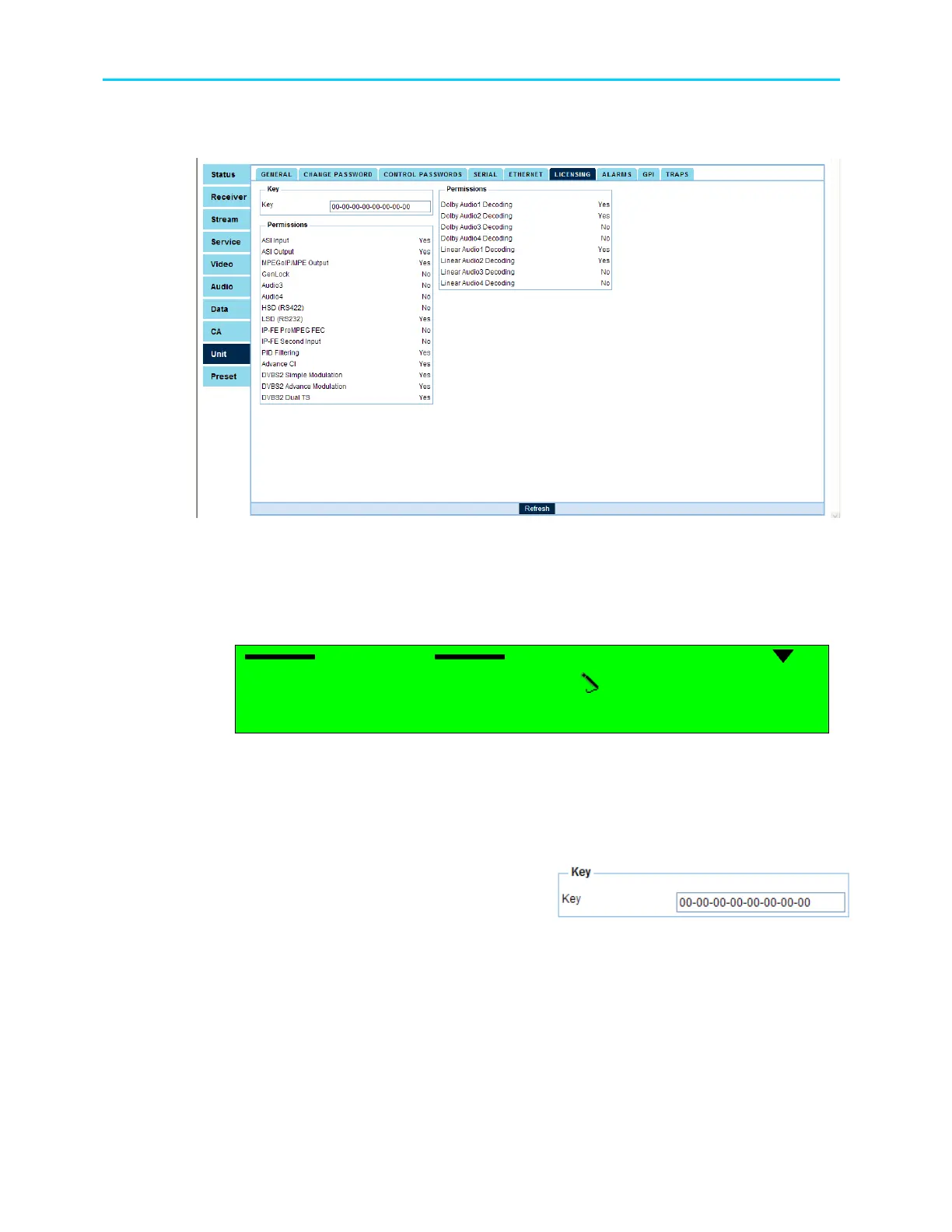
Figure 14-8 displays the corresponding Licensing Web management screen. It also detail the
status of all licensed option for the ProView 2900 version.
Figure 14-8: ProView 2900 Licensing Screen
14.7.1. Entering A Serial Key Thru The Front Panel
To enter a Licencing serial key thru the front panel access Key option in the Licensing menu
screen.
Licensing
Licensing Licensing
Licensing
1
11
1-
--
-2
22
2-
--
-8
88
8-
--
-4
44
4
1
1 1
1 Key
KeyKey
Key
00
0000
00-
--
-00
0000
00-
--
-00
0000
00-
--
-00
0000
00-
--
-00
0000
00-
--
-0..
0..0..
0..
Use the [Up]/[Down] keys to change a characters value. User the [LEFT]/[RIGH] keys to
move to a different character.
14.7.2. Entering A Serial Key Thru The Web-Managment
To enter a serial key thru the web-management
access the Licensing tab at the Unit menu
screen.
Fill in the appropriate field with the serial key
number.



 To Next Page