Chapter 5: Operation and Management ProView 2900 Status Menu
© Harmonic Inc. Manual p/n 101543/Ver 1.0 5-29 ProView 2900 Series/SW Version 1.94
5.4.9. Unit Status Menu
This menu displays the Unit Menu parameters status.To access the Unit menu in the front
panel control interface go to Status
Unit.
The following screen displays the Unit Status menu:
Unit
UnitUnit
Unit
1
11
1-
--
-3
33
3-
--
-9
99
9
1
1 1
1 Identity
Identity Identity
Identity
2 Versions
2 Versions2 Versions
2 Versions
3 Monitoring
3 Monitoring3 Monitoring
3 Monitoring
5.4.9.1. Unit Identity
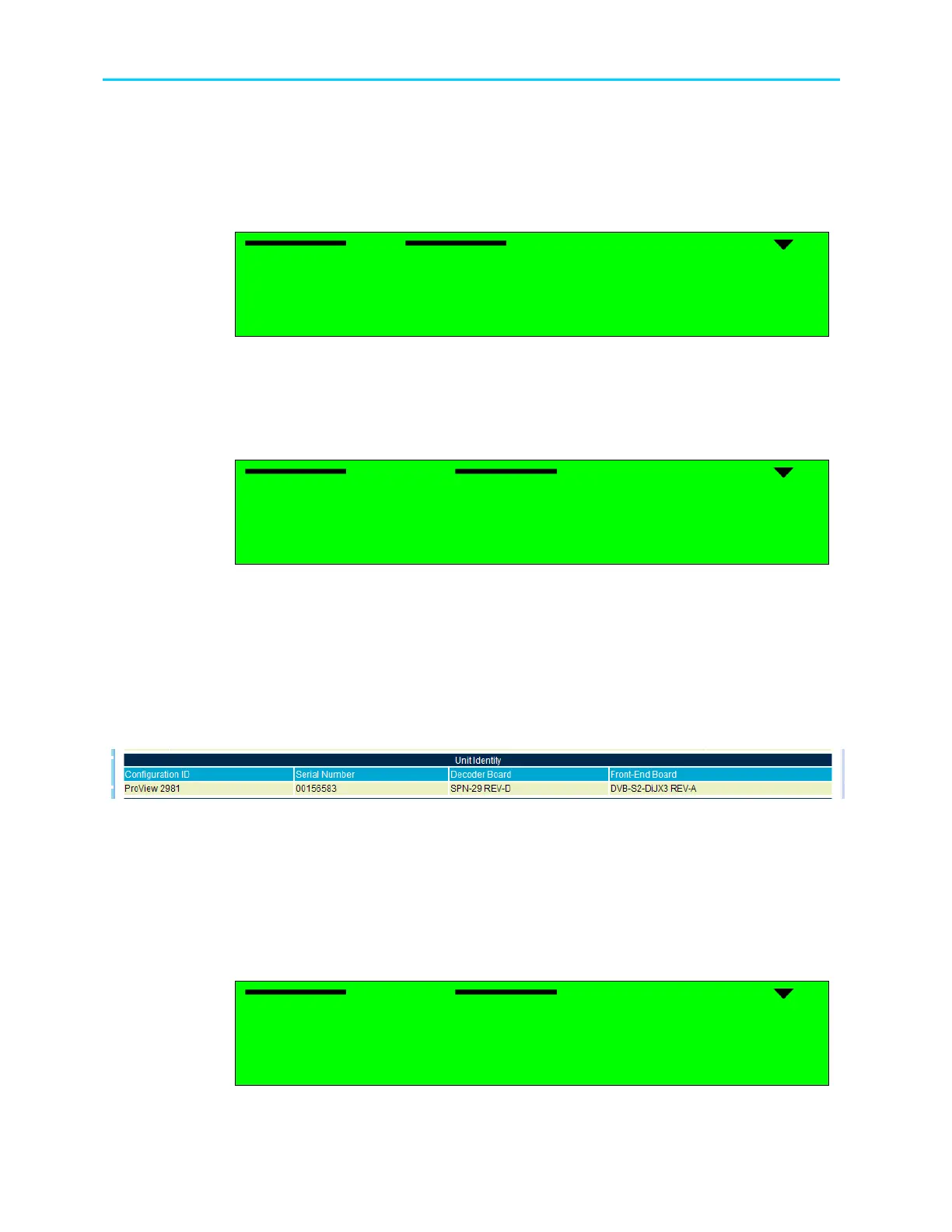
The Identity Menu displays information regarding the ProView 2900 hardware. To access the
Identity Menu in the front panel control interface go to Status
Unit
Identity
The following screen displays the Identity Status menu:
Identity
Identity Identity
Identity
1
11
1-
--
-3
33
3-
--
-9
99
9-
--
-1
1 1
1
1 Configuration ID
1 Configuration ID 1 Configuration ID
1 Configuration ID
ProView
ProViewProView
ProView
29
2929
2983
8383
83
2 Serial Number
2 Serial Number2 Serial Number
2 Serial Number
00000920
0000092000000920
00000920
3 Decoder Board
3 Decoder Board3 Decoder Board
3 Decoder Board
SPN
SPNSPN
SPN-
--
-29 REV
29 REV29 REV
29 REV-
--
-C
CC
C
4 Front
4 Front4 Front
4 Front-
--
-End Board
End BoardEnd Board
End Board
QPSK
QPSKQPSK
QPSK-
--
-29 REV
29 REV29 REV
29 REV-
--
-A
AA
A
The available options are:
• Configuration ID – Displays the ProView 2900 software configuration model as
recognized by the software.
• Serial Number – Displays the ProView 2900 serial number
• Decoder Board – Displays the hardware revision of the ProView 2900 main board
• Front-End Board – Displays the hardware revision of the ProView 2900 Front-End
Figure 5-14 displays the corresponding Web management screen.
Figure 5-14: Unit Identity Status Screen
5.4.9.2. Unit Versions
The Version Menu displays information on the ProView 2900 software versions.
To access the Versions Menu in the front panel control interface go to
Status
Unit
Versions.
The following screen displays the Versions Status menu:
Ver
Ver Ver
Versions
sions sions
sions
1
11
1-
--
-3
33
3-
--
-9
99
9-
--
-2
2 2
2
1 Boot Application
1 Boot Application 1 Boot Application
1 Boot Application
00.03
00.0300.03
00.03
2 Main Application
2 Main Application2 Main Application
2 Main Application
00.07
00.0700.07
00.07
3 Main Application Date
3 Main Application Date3 Main Application Date
3 Main Application Date
Dec 19 2004
Dec 19 2004Dec 19 2004
Dec 19 2004
4 Main Application Time
4 Main Application Time4 Main Application Time
4 Main Application Time
15:50:26
15:50:2615:50:26
15:50:26
The available options are:



 To Next Page