Chapter 5: Operation and Management ProView 2900 Status Menu
© Harmonic Inc. Manual p/n 101543/Ver 1.0 5-22 ProView 2900 Series/SW Version 1.94
5.4.3. Service Status
The Service Info is a section in the Status web-interface screen. It provides information of
service's status and parameters.
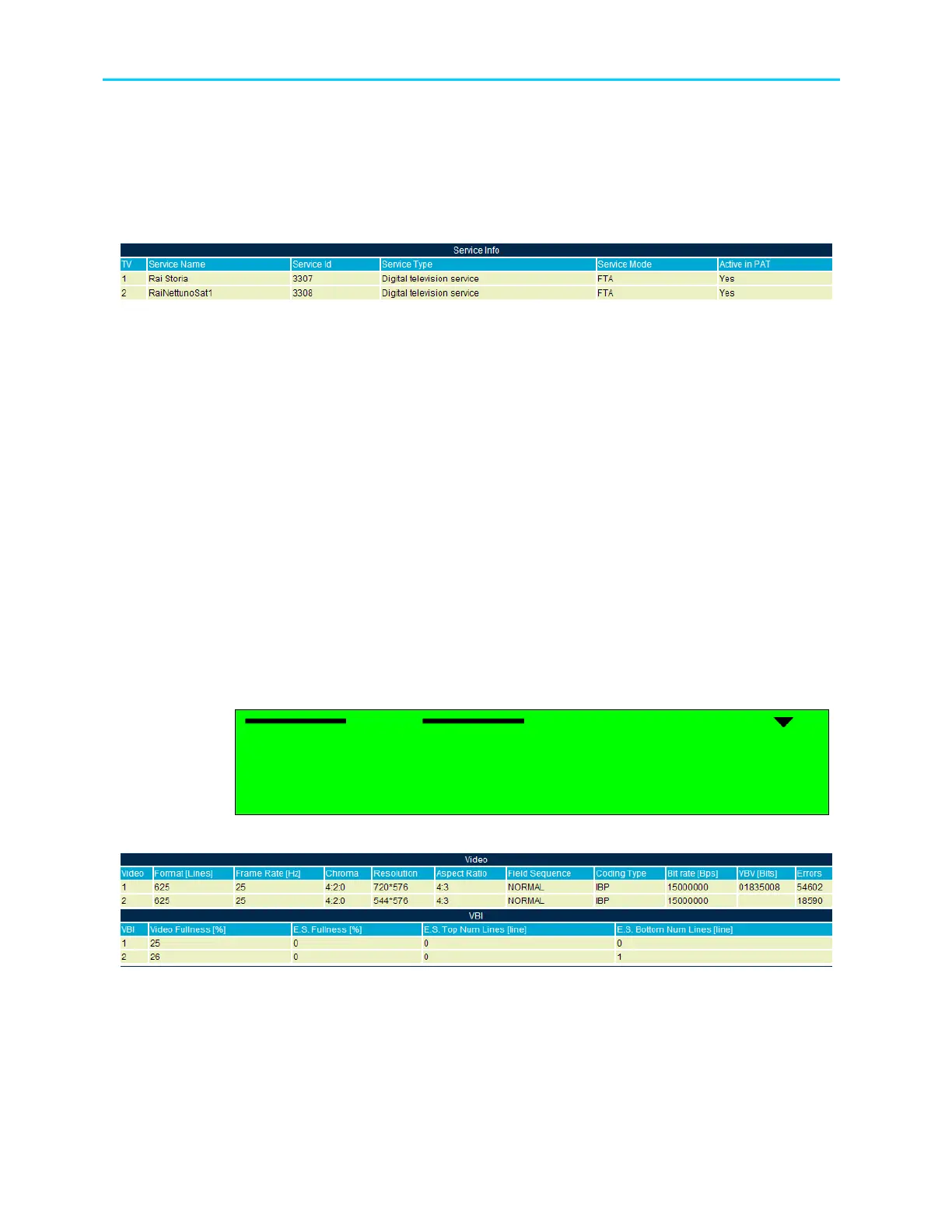
Figure 5-10 displays the Service Status Web management screen.
Figure 5-10: ProView 2900 Service Status Screen
The following parameters are displayed:
• TV – This parameter indicates the active decoder as TV1 (or TV1/TV2 in case of a dual
decoder unit).
• Service Name – This parameter displays the service's name.
• Service Type – This parameter indicates the service type: TV, Radio, TLTX, NVOD,
MOSAIC, PAL, SECAM, MAC, FM, NTSC, and Data.
• Service ID – This parameter displays the service identification symbol [Hex].
• Service Mode - Indicates if the service is encrypted (CAS) or free to air (FTA).
• Active in PAT – this parameter indicates whether the service is included in the PAT table
or not.
5.4.4. Video Status Menu
The Video status menu displays the status of Video and VBI parameters. It provides an
extended menu of status monitoring options on Video and VBI data. To access the Video
status menu in the front panel control interface go to Status
Video.
The following screen displays the Video Status menu:
Video
Video Video
Video
1
11
1-
--
-3
33
3-
--
-4
4 4
4
1 Video 1
1 Video 11 Video 1
1 Video 1
2 VBI 1
2 VBI 12 VBI 1
2 VBI 1
3
3 3
3 OSD 1
OSD 1OSD 1
OSD 1
Figure 5-11 displays the corresponding Web management screen.
Figure 5-11: ProView 2900 Video Status Screen
The Video status menu parameters are as follows:
• Video 1 / Video 2 (if applicable) – This group displays information about the video for
Decoder #1 / Decoder #2 (see Section 9.2).
• VBI 1 / VBI 2 (if applicable) - This group displays information about the VBI for Decoder
#1 / Decoder #2 (See Section 9.3).



 To Next Page