Chapter 5: Operation and Management ProView 2900 Status Menu
© Harmonic Inc. Manual p/n 101543/Ver 1.0 5-24 ProView 2900 Series/SW Version 1.94
Vbi (1)
Vbi (1) Vbi (1)
Vbi (1)
1
11
1-
--
-3
33
3-
--
-4
44
4-
--
-2
2 2
2
1 Vi
1 Vi1 Vi
1 Video
deo deo
deo
Fullness
Fullness Fullness
Fullness
020 [%]
020 [%]020 [%]
020 [%]
2 E.S
2 E.S 2 E.S
2 E.S
Fullness
Fullness Fullness
Fullness
012 [%]
012 [%]012 [%]
012 [%]
3 E.S Top
3 E.S Top3 E.S Top
3 E.S Top
Num Lines
Num Lines Num Lines
Num Lines
05 [Ln]
05 [Ln] 05 [Ln]
05 [Ln]
4 E.S Bottom
4 E.S Bottom4 E.S Bottom
4 E.S Bottom
Num Lines
Num Lines Num Lines
Num Lines
05 [Ln]
05 [Ln]05 [Ln]
05 [Ln]
The available information is:
• Video Fullness – Fullness level of the buffer containing VBIs derived from the video
stream
• E.S Fullness – Fullness of the buffer containing VBIs derived from the elementary
stream
• E.S Top Num Lines – Counts the number of E.S VBI lines in a field
• E.S Bottom Num Lines – Counts the number of E.S VBI lines in a field
5.4.4.3. OSD 1 (and OSD 2)
This feature will be supported in the future software releases.
5.4.5. Audio Status Menu
The Audio Status Menu displays information on the audio channels. To access the Audio
Status Menu in the front panel control interface go to Status
Audio.
The following screen displays the Audio Status menu:
Audio
Audio Audio
Audio
1
11
1-
--
-3
33
3-
--
-5
5 5
5
1 Audio 1
1 Audio 11 Audio 1
1 Audio 1
2 Audio 2
2 Audio 22 Audio 2
2 Audio 2
3 Audio 3
3 Audio 33 Audio 3
3 Audio 3
4 Audio 1
4 Audio 14 Audio 1
4 Audio 1
Select Audio 1 through 4. The Audio (1..4) Menu displays information on the audio decoding
process. When Musicam mode is activated, the following screen is displayed:
Audio (
Audio ( Audio (
Audio (1..4
1..41..4
1..4)
) )
)
1
11
1-
--
-3
33
3-
--
-5
55
5-
--
-1
1 1
1
1 ID
1 ID1 ID
1 ID
MPEG
MPEGMPEG
MPEG
2 Layer
2 Layer2 Layer
2 Layer
LAYER2
LAYER2LAYER2
LAYER2
3 Bit Rate
3 Bit Rate3 Bit Rate
3 Bit Rate
129000 [Bps]
129000 [Bps]129000 [Bps]
129000 [Bps]
4 Sample Rate
4 Sample Rate4 Sample Rate
4 Sample Rate
48 [KHz]
48 [KHz]48 [KHz]
48 [KHz]
5 Mode
5 Mode5 Mode
5 Mode
STEREO
STEREOSTEREO
STEREO
6 Decoding Errors
6 Decoding Errors6 Decoding Errors
6 Decoding Errors
000894
000894000894
000894
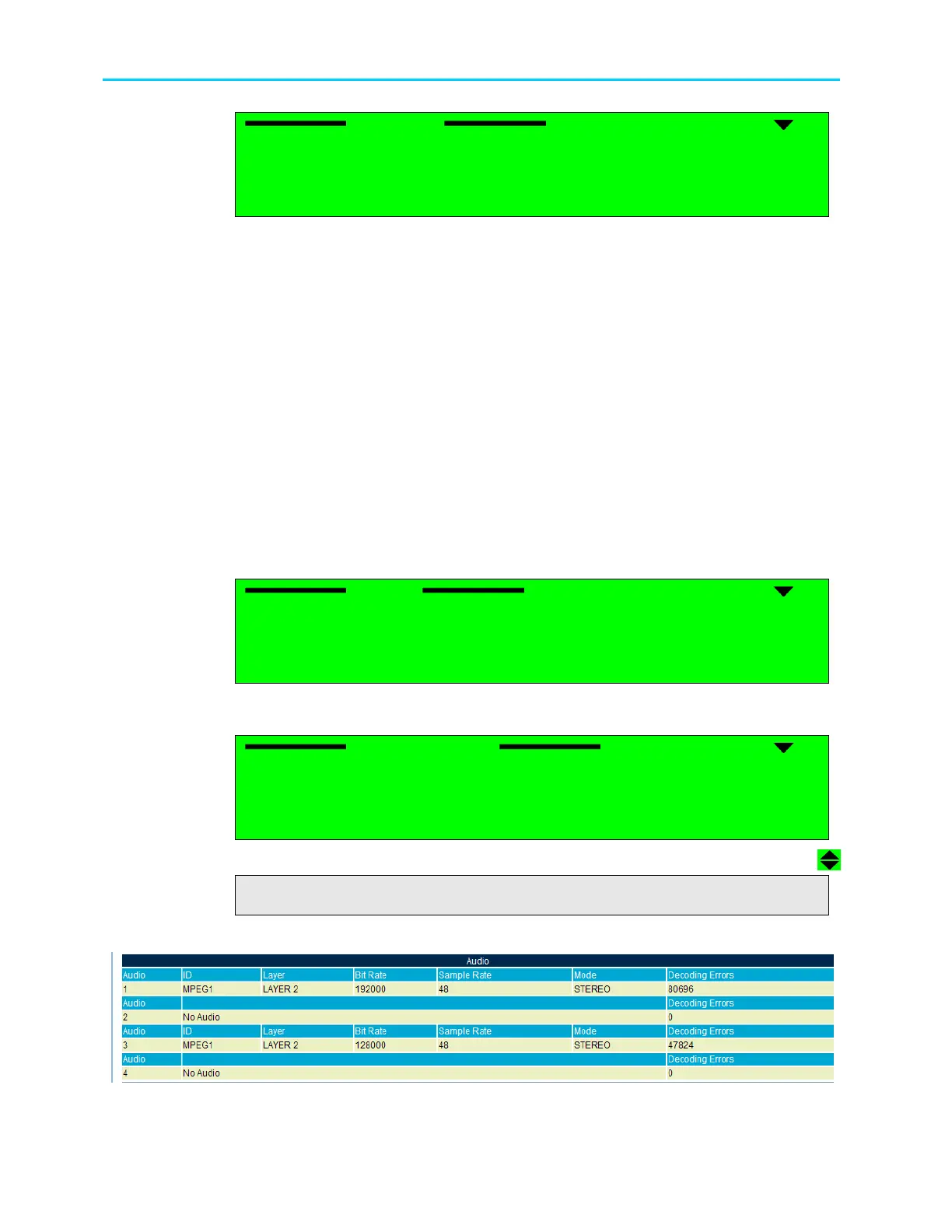
Figure 5-12 displays the corresponding Web management screen.
Figure 5-12: ProView 2900 Audio Status Screen



 To Next Page