© Harmonic Inc. Manual p/n 101543/Ver 1.0 C-1 ProView 2900 Series/SW Version 1.94
Appendix C
Aspect Ratio Configuration Process
This Appendix details ProView 2900 configuring for the fitting of Aspect Ratio (A/R) of the
incoming Video to the A/R of the destination monitor.
C.1 Aspect Ratio Conversion Machine
The ProView 2900 provides the ability, using interpolation, to produce different image
formats, enabling the display of the incoming Video on either a 4:3 or a 16:9 monitor.
16:9 Video Streams can be fitted for display on 4:3 monitors, and vice versa, in more than
one format, as summarized in Table C-1 and Table C-2.
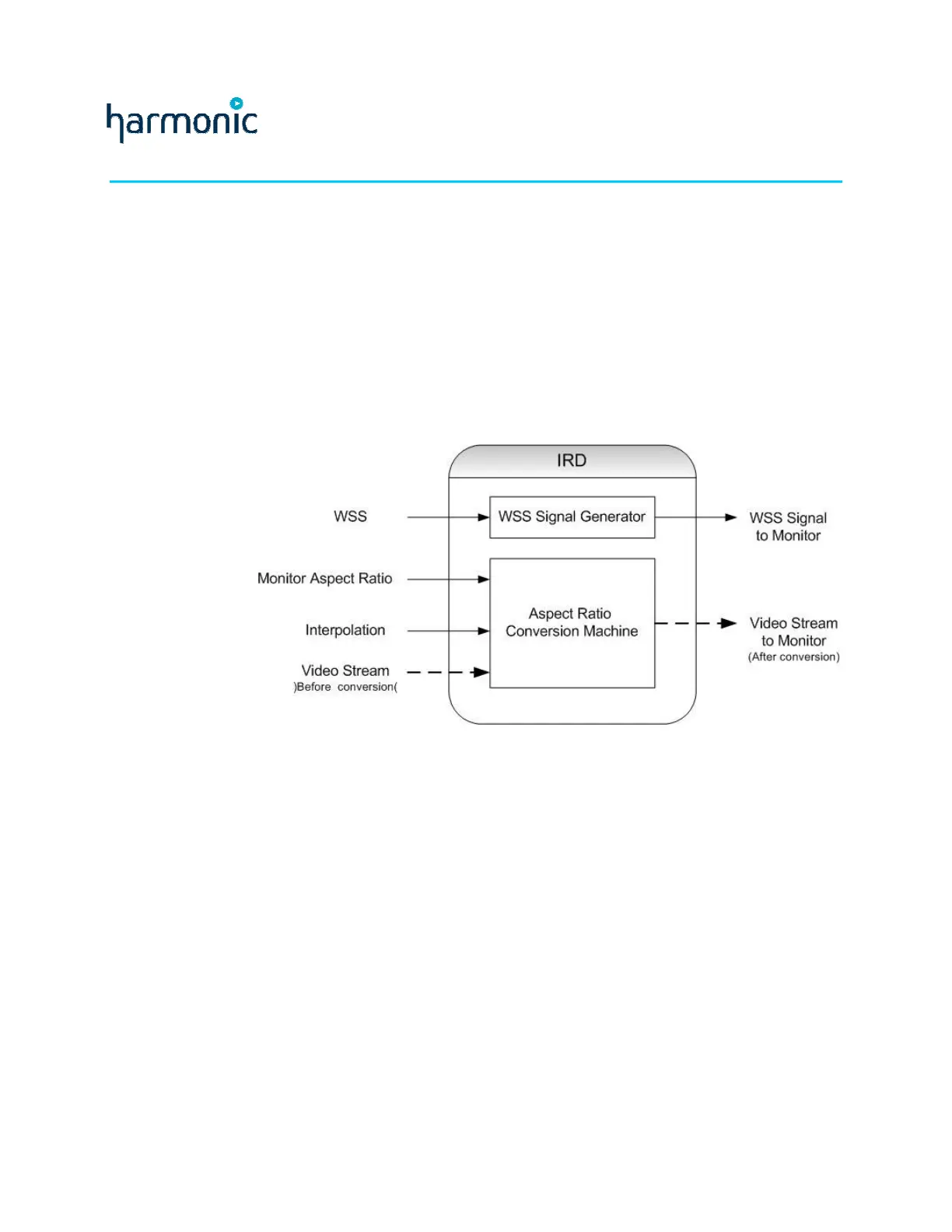
A/R fitting is referred to as Conversion. The ProView 2900 contains an “Aspect Ratio
Conversion Machine” responsible for all image conversions.
Figure C-1 displays a simplified illustration of this machine.
Figure C-1: Aspect Ratio Conversion Machine
When fitting the received Video signal A/R to the monitor A/R, the following three
ProView 2900 parameters values must be set to achieve the required conversion:
• WSS
• Monitor Aspect Ratio
• Interpolation
C.1.1 WSS (Wide Screen Signaling)
The purpose of the WSS signal is to inform the destination monitor of the received Video A/R.
The ProView 2900 extracts the WSS information from an operator-selected source,
generates a new WSS signal (see ‘WSS Signal Generator’ in Figure C-1), and outputs it to
the monitor.
The WSS menu in the ProView 2900 contains two items (see WSS explanation in Section 9.3
for further details):
Source – from which the ProView 2900 extracts the WSS information. The available options
are: DISABLE, TV MONITOR, E.S. (EN-301-775), and VIDEO.



 To Next Page