Wireless LAN – WLAN
BAT54-Rail/F..
Release
7.54
06/08
3.7
IEEE 802.11i for point-to-point connections
103
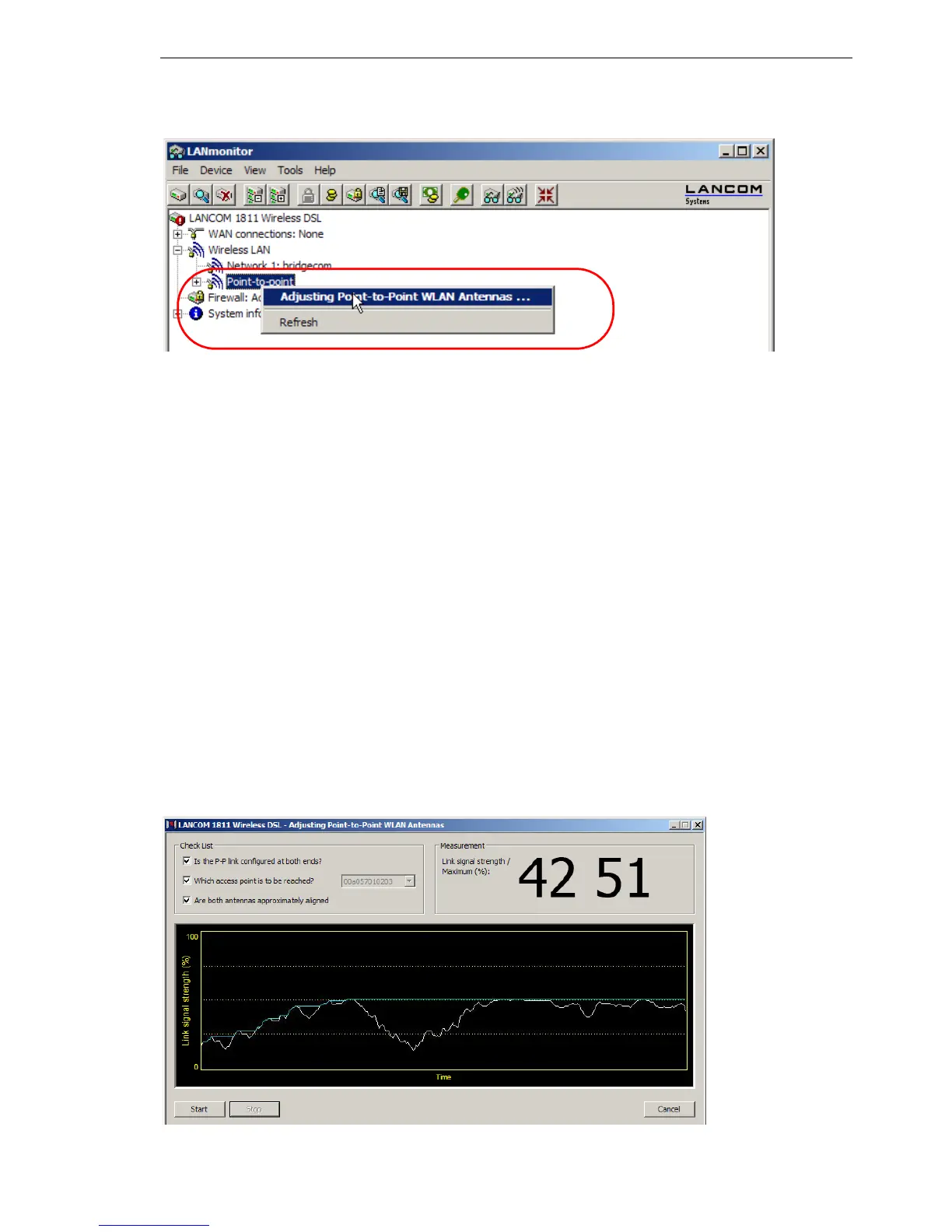
Note: The 'Point-to-point' entry is only visible in the LANmonitor if the moni-
tored device has at least one base station defined as a remote station for
a P2P connection (LANconfig: Wireless LAN
General Physical
WLAN settings
Point-to-Point).
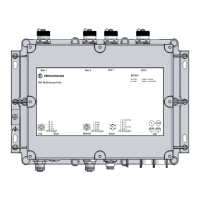
In the dialog for setting up point-to-point connections, LANmonitor prompts
for the information required to establish the P2P connection:
D Is the P2P connection configured at both ends (remote base station de-
fined with MAC address or station name)?
D Is the point-to-point mode of operation activated?
D Which access point is to be monitored? All of the base stations defined as
P2P remote stations in the device concerned can be selected here.
D Are both antennas approximately aligned? The basic P2P connection has
to be working before fine-tuning can be performed with the aid of
LANmonitor.
Once signal monitoring has commenced, the P2P dialog displays the abso-
lute values for the current signal strength and the maximum value since start-
ing the measurement. The development of the signal strength over time and
the maximum value are displayed in a diagram, too.



 To Next Page