18 User’s Manual INNOMAR Parametric Sub-Bottom Profilers / SESWIN
18 Innomar Technologie GmbH (2023-01)
2.3 SESWIN Setup – Start & Interfaces
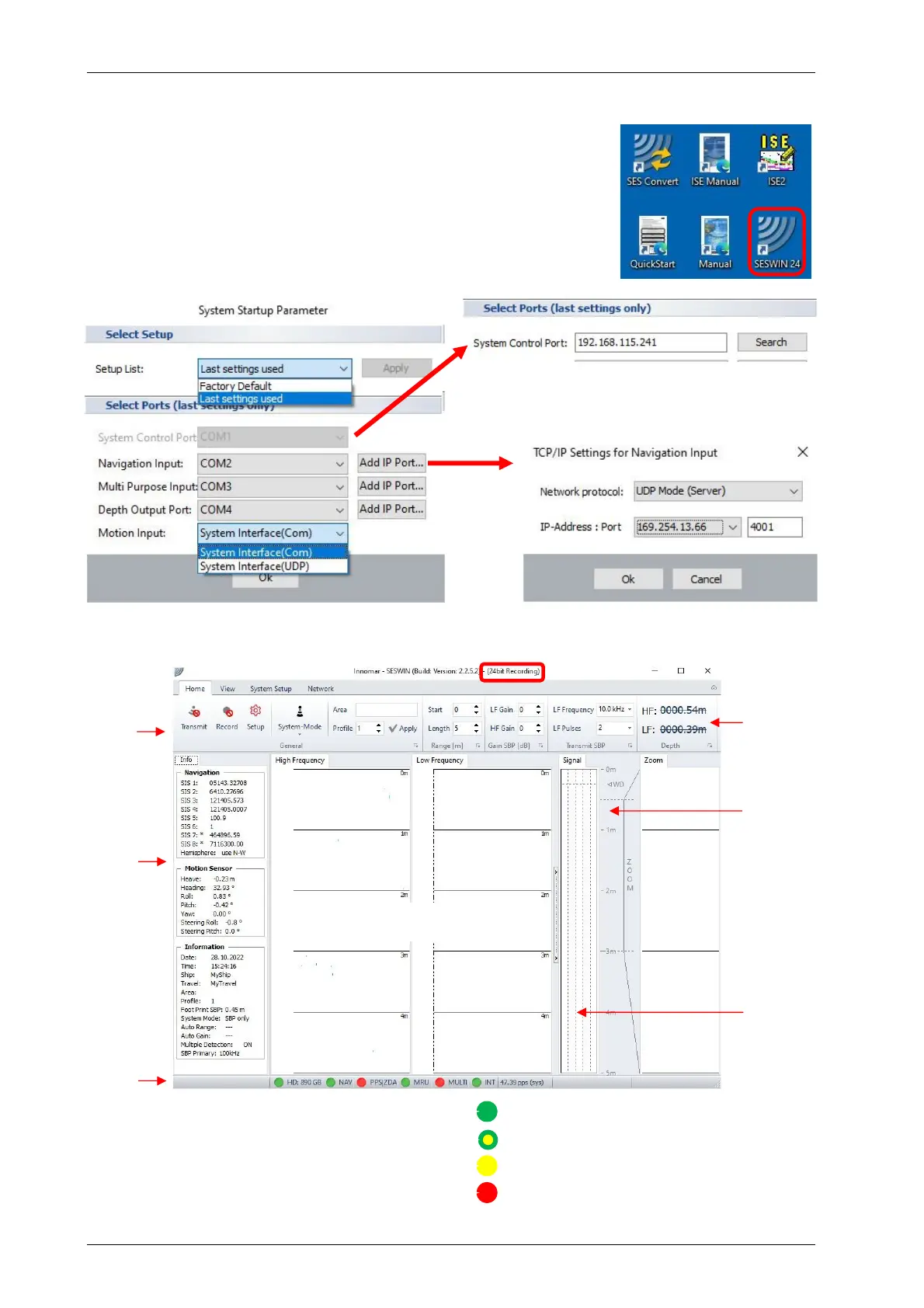
Preferably use “seswin24bit.exe”
records 24-bit SES3 files (6)
Start SESWIN from Windows desktop (1)
SESWIN start screen opens:
o optional: select setup / reset to factory defaults (2)
o select “system control port” (for models with external PC) (3)
o set interface ports (COM / UDP) (4)
Click “OK” button SESWIN app starts (5)
For models with external control PC, use the
“Search” button to find the actual IP address of
the topside unit.
Please see section 5.2 on page 38 for more details.
Menu
Bar
Info
Sidebar
Status
Bar
Depth
Display
Depth
Ruler
Signal
Window
Please see section 5.3 to 5.8 on pages 41 to
45 for more details.
The indicators in the Status Bar give a quick
overview on the interface conditions.
Data received and interpreted OK
Data received, but warning
Traffic seen, but no usable data found
Port not available or no data / traffic
(1)
(4)
(4)
(5)
SBP echo plot area
Zoomed
LF SBP
echo plot
(6)
(2)
(3)



 To Next Page