92 User’s Manual INNOMAR Parametric Sub-Bottom Profilers / SESWIN
92 Innomar Technologie GmbH (2023-01)
7.3 How to set up Navigation Data Interface (SIS)
For recording navigation data within the INNOMAR data files there are 8 so-called SIS strings
available that can hold up to 11 characters each. This section describes how to set up the
contents of these SIS strings.
7.3.1 Serial interface settings
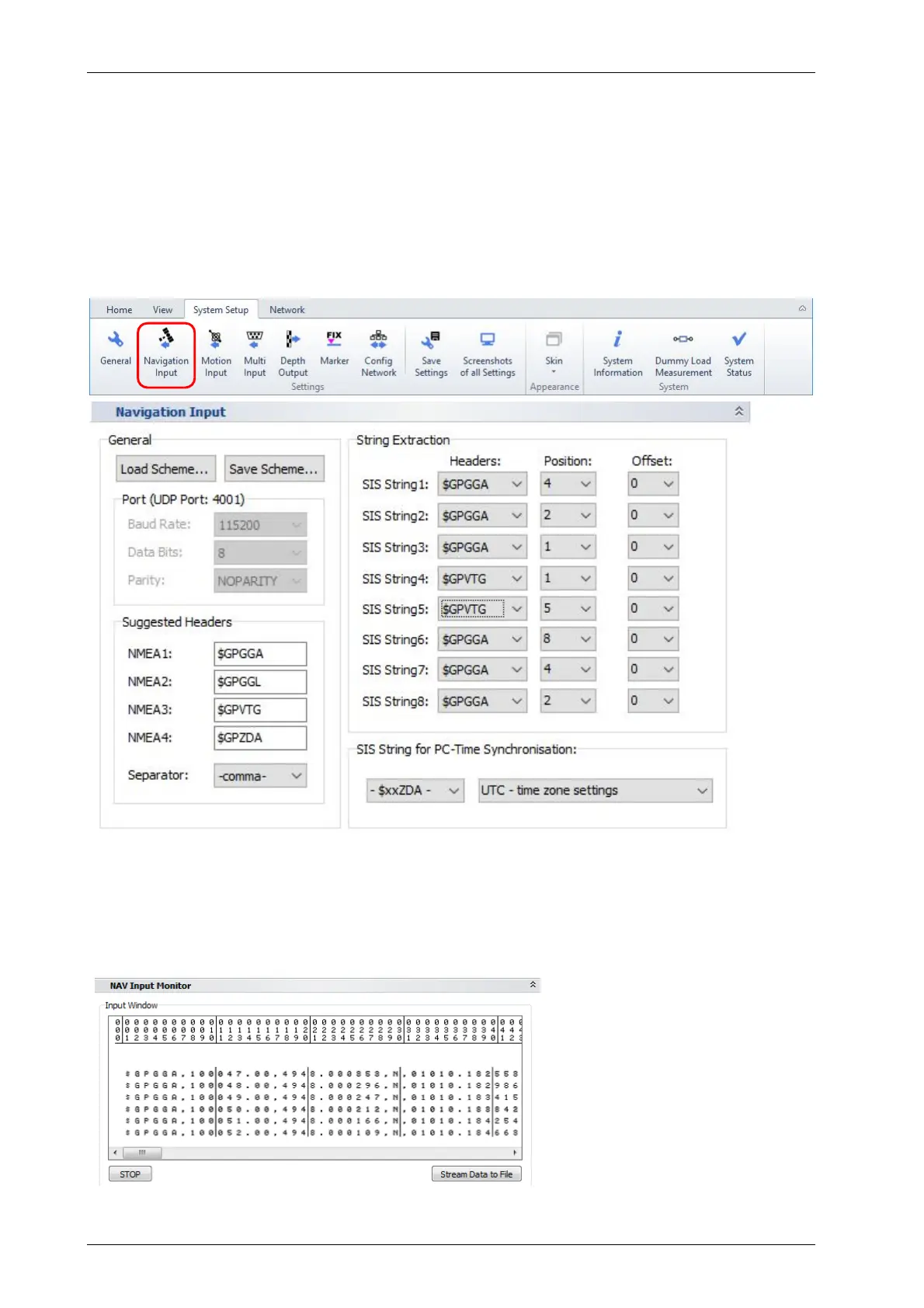
First you have to set up the serial interface used for the navigation data within SESWIN “System
Setup – Settings – Navigation Input”:
Parameters have to be set according to the data fed into the “Navigation In” COM port at the
control computer. The serial port used is set in the box showing up when SESWIN starts, see
section 5.2 on page 38.
If the port settings are correct (and applied to the system by pressing the “Apply” button) you
should see incoming data from the attached GNSS receiver in the “NAV Input Monitor”:
This tool can be used to set up
which values are to be recorded
with the SBP data. For this press
button “Stop” after the monitor is
filled with data and follow the
steps below.



 To Next Page