112 User’s Manual INNOMAR Parametric Sub-Bottom Profilers / SESWIN
112 Innomar Technologie GmbH (2023-01)
7.10 How to use SESWIN’s documentation and report tools
There are several tools available within SESWIN that may be used to document system settings,
creating profile lists and for troubleshooting.
7.10.1 Document SESWIN system and interface settings
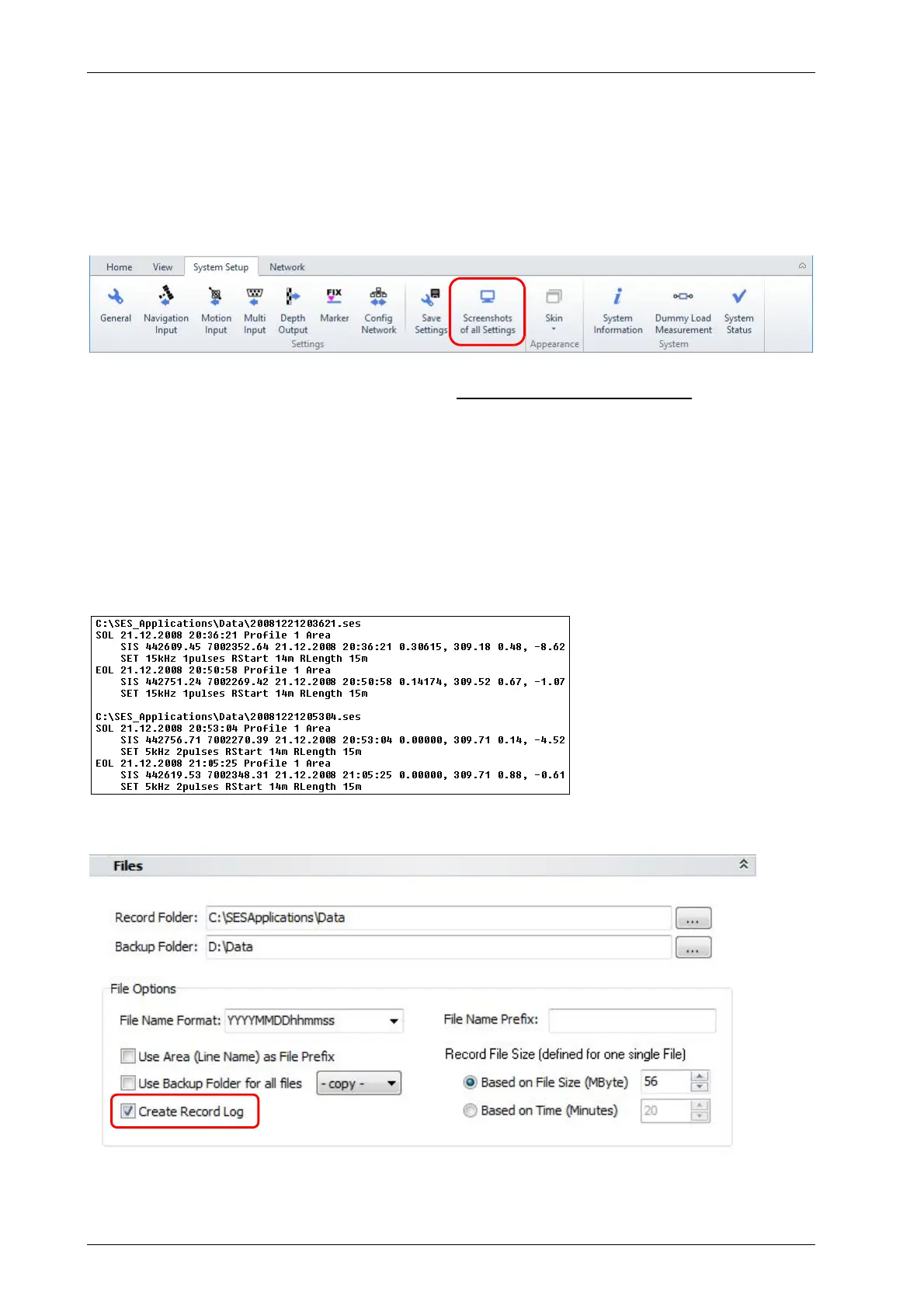
There is a button “System Setup” menu to produce screenshots of all settings:
Pressing this button will generate screenshots of all SESWIN menus and dialogs. File names are
set automatically. The Folder can be changed; default is set to the SESWIN folder.
Using this feature, you need just two clicks to document all system settings for future reference.
7.10.2 Log files for work reports / profile lists
It is possible to automatically log all data records within a log file called “sesrec.log” that is placed
within the SESWIN folder. The generated log file will show the file name (incl. path) and date,
time, profile number, area, SIS values, transmitter and range parameters for both, start (SOL)
and end (EOL) of line/record. This is shown in the screen shot below.
To get this log file you have to activate logging within the “System Setup - General - Files” dialog:
Profile lists can also be generated in post-processing using INNOMAR’s ISE software.



 To Next Page