90 User’s Manual INNOMAR Parametric Sub-Bottom Profilers / SESWIN
90 Innomar Technologie GmbH (2023-01)
7.2 How to set up transducer draught and sound velocity
7.2.1 Where to set up transducer draught and sound velocity
Depth values given in the SESWIN software are related to water surface: D=T+½ c t
(with D: depth below water surface; T: transducer draught below water surface; t: sound pulse
two-way travel time from transducer and back to transducer; c: sound velocity in water).
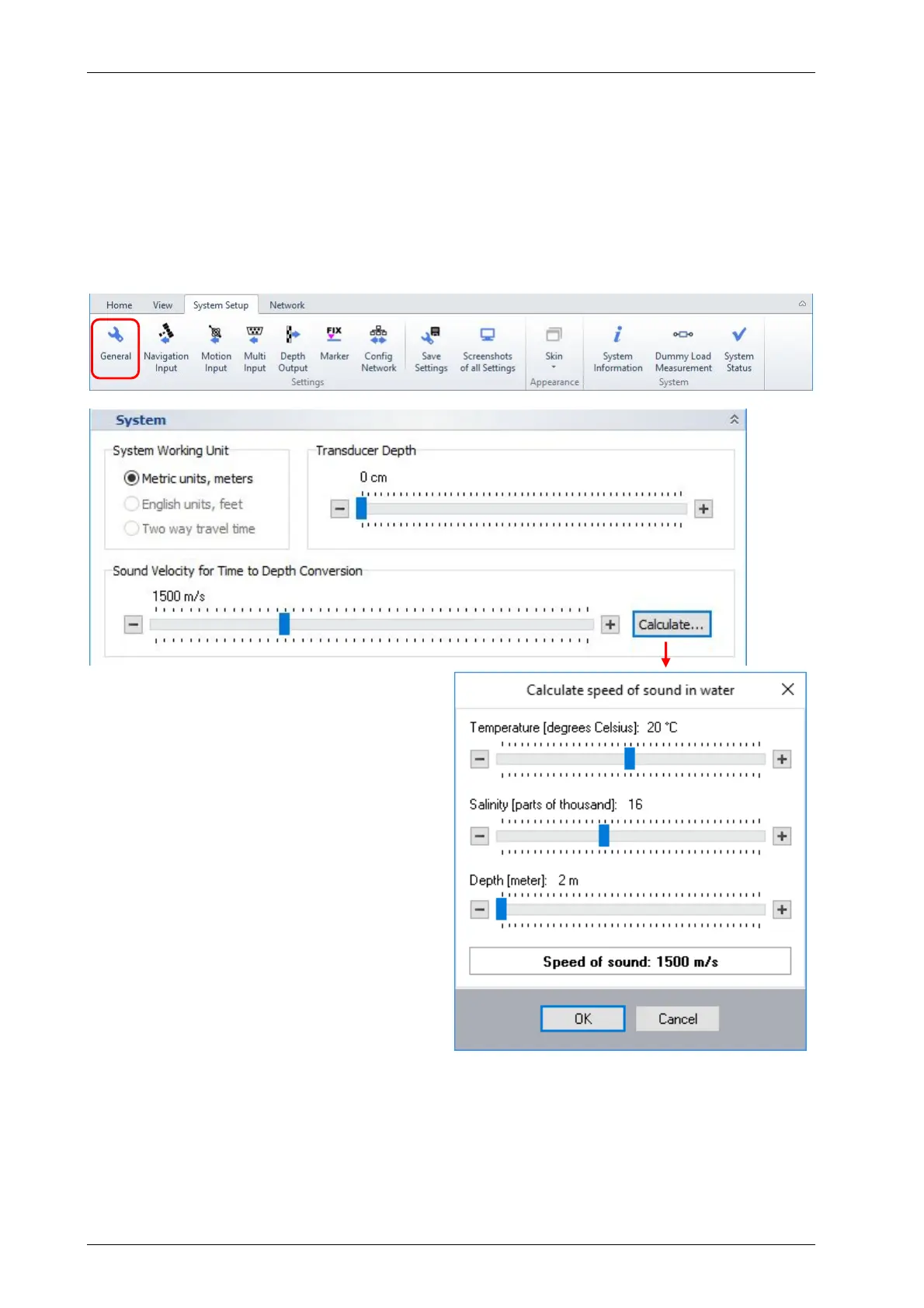
To get correct depth values it is necessary to know and to set up transducer draught and sound
velocity within the SESWIN software properly. Both values have to be set in “System Setup –
Settings – General – System” as shown in the figure below.
Transducer draught has to be set in cm,
measured from water surface to the bottom of
the transducer.
Sound velocity has to be set in meter per
second.
Both values are set by sliders that can be
moved by mouse or the arrow keys on your
keyboard.
7.2.2 How to get the transducer draught
Transducer depth below water level should be known from the transducer installation. For mobile
installations this value should be measured and noted during the installation. For hull-mounted
installations the transducer draught can be obtained from the ship drawings.
It is also possible to get the transducer draught from a “bar check”, see section 7.2.4 below.



 To Next Page