User’s Manual INNOMAR Parametric Sub-Bottom Profilers / SESWIN 109
Innomar Technologie GmbH (2023-01) 109
7.9 How to broadcast data from SESWIN to Beamworx NavAQ
®
If the BeamworX software NavAQ
®
survey software is used, the INNOMAR data can be sent to to
this via Ethernet using the SESWIN Broadcast Server, see section 5.14.1 on page 80.
SESWIN and BeamworX
®
software should run on separate computers. An active ethernet
connection should be established.
!
Please note: This connection cannot be used for remote controlling the INNOMAR SBP!
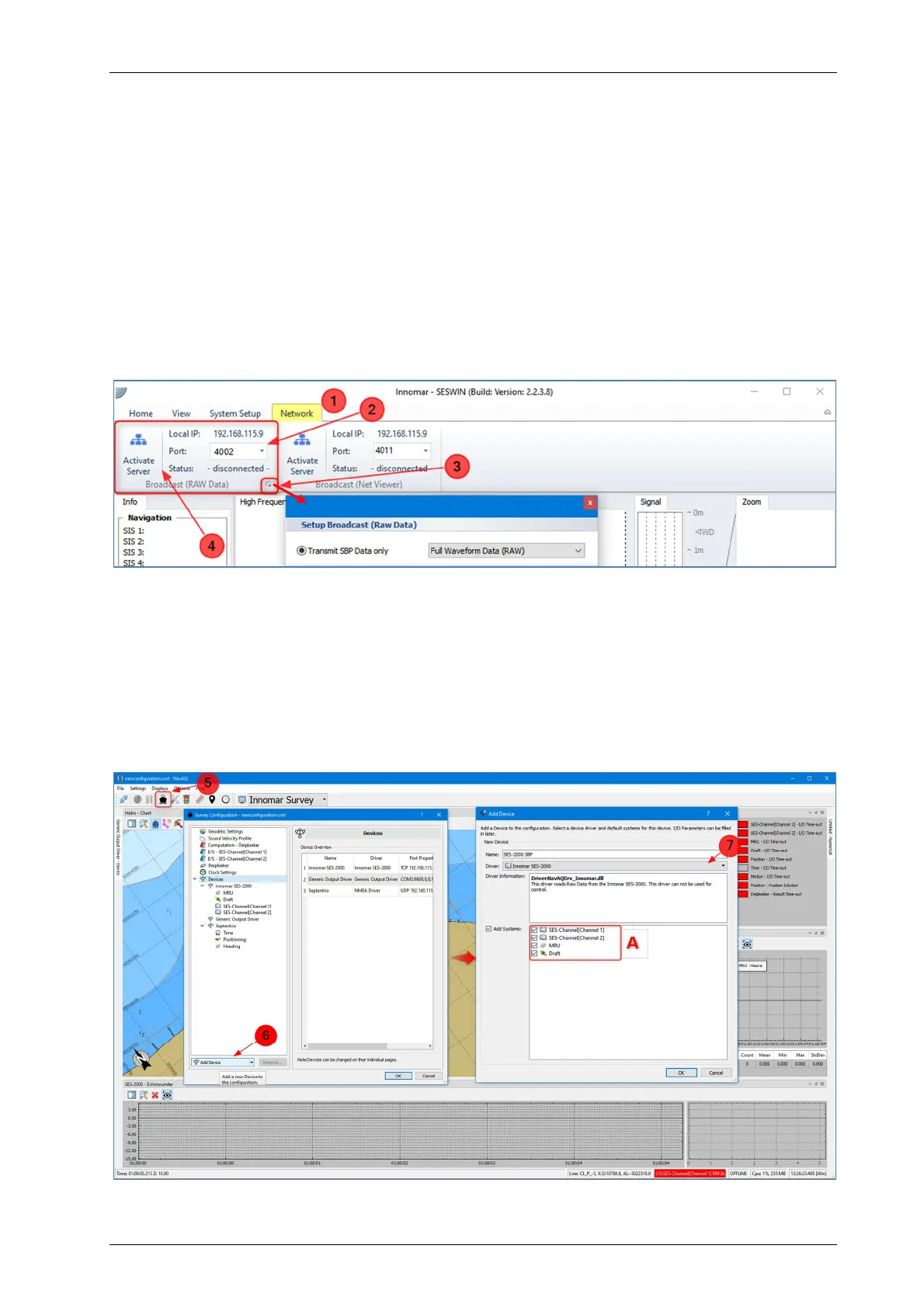
In the SESWIN software, inside the network tab (1), the Broadcast server can be set up. Before
the server can be activated, a free network port number should be entered (2). It is recommended
to transmit the full wave form data (3) to transmit the maximum available data resolution. Then
you can activate the Broadcast Server (4):
In NavAQ, open the “Survey Configuration Manager” (5) and press the “Add Device” button (6).
Select the “Innomar SES-2000” device driver from the dropdown list (7) and name the new device
appropriately. There are a few options which can be selected (A), such as the channels to be
used (Channel 1 is the Innomar the low frequency data and Channel 2 the high frequency data).
If a motion sensor is connected to the Innomar SBP, motion data will be passed to NavAQ as
well and can be used to compensate heave in the echo data. The last option is to use either the
draft which has been entered in the Innomar SBP or use the entered offsets from NavAQ. If
everything is set up properly the OK button will add the new SBP to the device list.



 To Next Page