40 User’s Manual INNOMAR Parametric Sub-Bottom Profilers / SESWIN
40 Innomar Technologie GmbH (2023-01)
5.2.2 Innomar SBPs with integrated PC (“light”, “standard”, “medium”, “deep”)
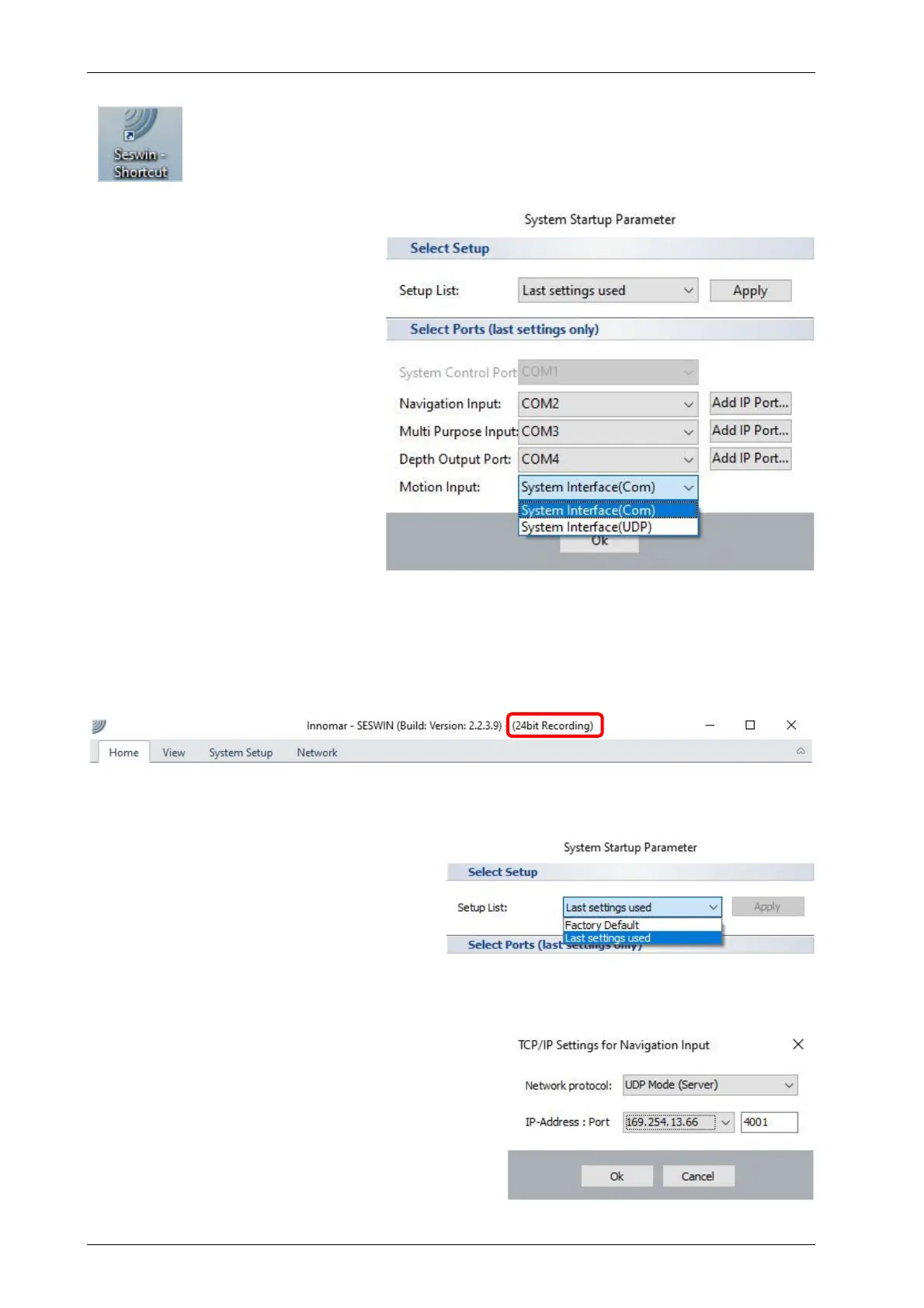
Usually there is a SESWIN shortcut placed on the Windows desktop.
To start the software, just double-click the icon.
There might be a Windows message box popping up and asking if the
application is allowed to make changes to the system; simply press “Yes”.
After starting SESWIN a “System
Start-up Parameter” dialog is shown
where all interface settings are
listed. You should check if these
settings are correct.
The “system control port” (COM1)
cannot be changed.
Standard port assignment is:
Navigation: COM2
Multi-Purpose: COM3
Depth Output: COM4
Note: motion data go to an internal
microcontroller and not to the PC.
After pressing “OK”, the SESWIN
main screen shows up, see next
page.
5.2.3 SESWIN with 24-bit data recording
!
For the “standard-xx” “medium-xx” and “deep-xx” models, 24-bit data recording (*.ses3
data files) is possible and should be used as standard. For this SESWIN version
“Seswin24bit.exe” is provided. This version shows a hint in the application bar:
5.2.4 User Profiles / Reset to Factory Defaults
It is possible to store and re-use settings
via “user profiles”. If there are user profiles
stored previously, they will be shown in the
“Setup list” drop down box (default: “last
settings used”). It is also possible to reset
the system to “factory default” settings.
5.2.5 Serial/UDP Input/Output Connections
For the Navigation data input, “multi-purpose” input
and the depth output of the INNOMAR system it is
possible to assign COM or IP (TCP or UDP) ports.
Factory defaults are COM2–4. These settings
cannot be changed later; this is possible at the
program’s start only.
If the SESWIN PC has more than one Ethernet
adapter, you have to select the correct IP address.



 To Next Page