User’s Manual INNOMAR Parametric Sub-Bottom Profilers / SESWIN 39
Innomar Technologie GmbH (2023-01) 39
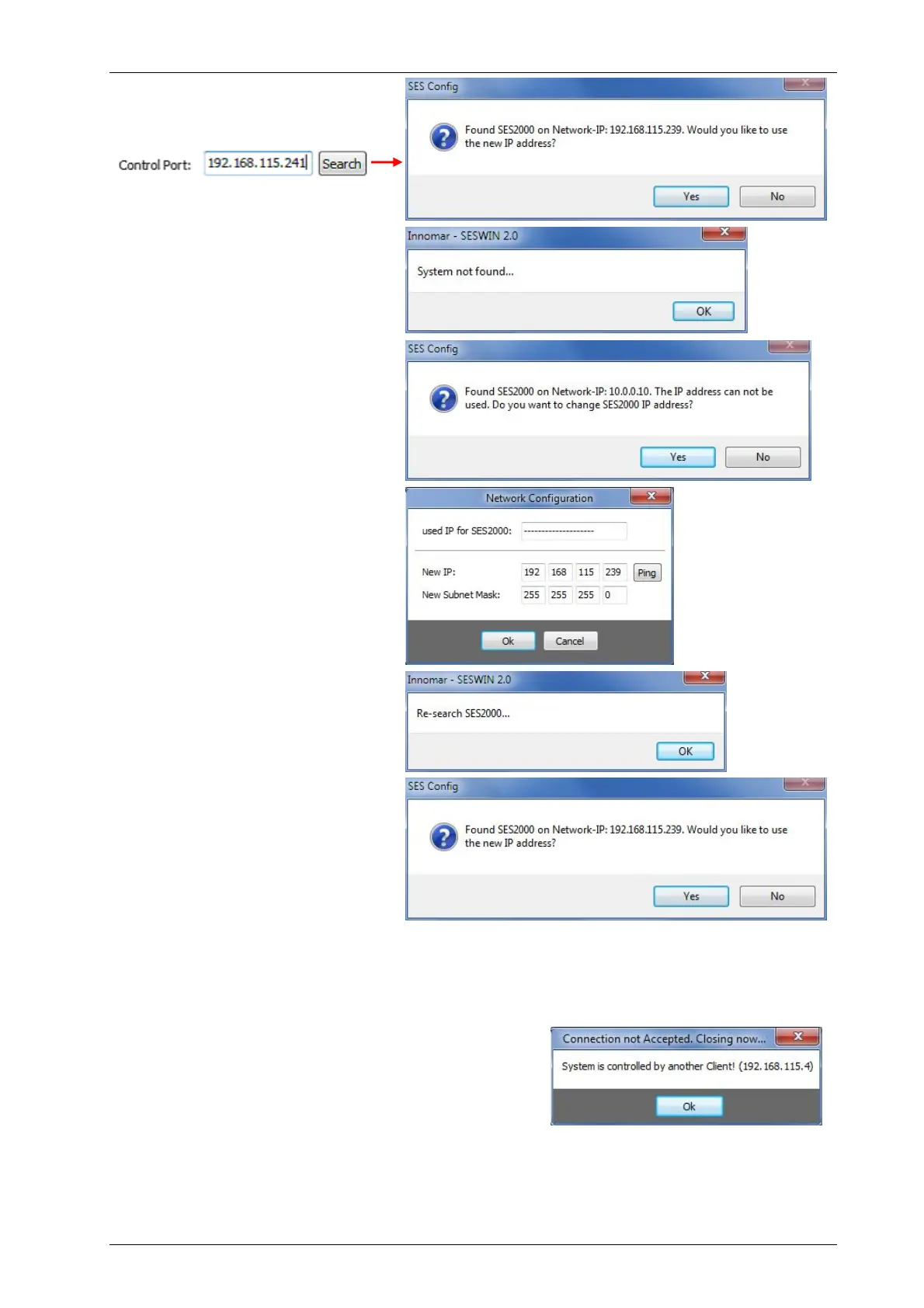
After pressing the “Search” button,
the connected (and powered) topside
unit should be found:
If the topside unit is not found, you
will get this message:
In case the system is found, but in
another IP address range than the
control computer, you need to
change the IP address of the topside
unit:
After pressing “YES” the software
suggests a new IP address.
You can check if the suggested
address is free or already used by
pressing the “Ping” button. (On
Windows 7/8/10 this “ping” needs to
run the SESWIN application with
administrator privileges!)
If the address is specified by the user
the system changes the topside
unit’s address and performs a new
search:
After pressing the “OK” button SESWIN starts up and connects to the topside unit see section
5.3 on page 41.
If the topside unit is already controlled by another
computer, you will get an error message:



 To Next Page