User’s Manual INNOMAR Parametric Sub-Bottom Profilers / SESWIN 33
Innomar Technologie GmbH (2023-01) 33
GNSS / 1-PPS sync pulse
GNSS position data has to be feed into a serial input at the control computer (DB9 male
connector) or via Ethernet UDP.
The serial COM port is also used to receive a 1-PPS time sync pulse from the GNSS receiver
(positive TTL with 1ms high at pin 1 or pin 9). Newer systems also have a BNC connector for the
1-PPS pulse. For details of the 1-PPS pulse connection see also section 6.5 on page 88.
To use the position data within the INNOMAR systems, some settings have to be made within the
SESWIN software. This is described in detail in section 7.3 on page 92.
To avoid position errors caused by antenna offsets, the GNSS antenna should be placed on top
of the transducer. If this is not possible, an antenna offset correction can be applied within the
SESWIN software.
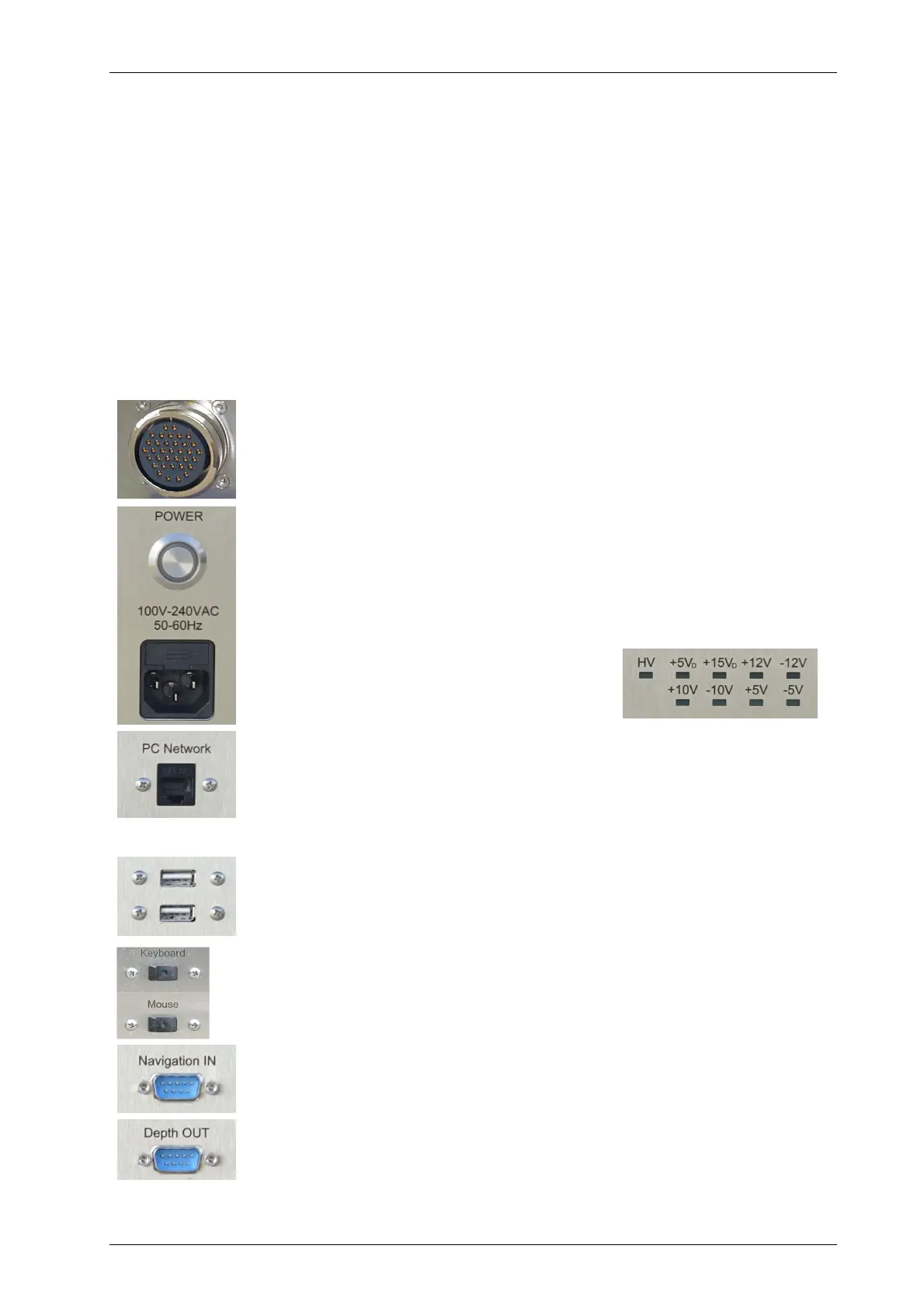
3.4 Innomar SBP Front Panel: Connectors and Switches
Transducer connector(s)
Connect the transducer(s) to the topside unit before switching on the power!
The transducer cable has a sea water resistant polyurethane sheet and are
moulded non-removable to the transducer.
Power connector, main fuse and switch
The main switch is used to switch the INNOMAR topside unit on and off. Prior
to that the AC cable must be connected to the ship’s power supply.
Please note that the switch will not disconnect from the power lines. There
is high voltage inside the unit if the power cable is plugged in!
Power control LEDs
There are LEDs in the front panel, indicating if
all voltages that are needed by the system are
available.
Ethernet Connector
For the “smart”, “compact” and “xx-usv” models the Ethernet interface is
used for connecting to the external control PC. For all other models this
interface can be used for data transfer / backup and for UDP data of external
sensors (e.g. GNSS position, heading).
USB connectors
There are USB connectors to attach external hard disks for data
backup/transfer.
Mouse and Keyboard connectors
For INNOMAR SBP models with integrated data acquisition PC there are a
mouse device and a keyboard connected to the topside unit via USB.
GNSS / Navigation Data Input
There is a RS232 input for navigation data from a GNSS receiver. It is also
possible to use UDP data via Ethernet (connector “PC Network”).
Depth Data Output
There is a RS232 output for the water depth values obtained from the HF-
and LF-channel.



 To Next Page