32 User’s Manual INNOMAR Parametric Sub-Bottom Profilers / SESWIN
32 Innomar Technologie GmbH (2023-01)
3.3 Topside Unit Installation
Topside Unit Handling
As any electronic device the topside unit should be handled with care.
The topside unit has to be placed in a dry and safe location.
Fix the topside unit with a suitable method to avoid mechanical destructions during
rough seas.
Make sure not to cover the cooling slots. There are fans inside the unit and a proper
airflow is necessary to avoid overheating during operation.
The topside unit is NOT water protected. Therefore, avoid all situations where water can
get into the system.
During transport and storage, the transport cases provided by INNOMAR should be used.
These boxes are splash-water proof and filled with anti-shock foam. Make sure the foam
is dry and was not sprayed with water when the box was open on deck.
Unauthorized persons must not open the topside unit!
!
Protect the unit against splash water!
!
Make sure that the cooling slots are open and the fans can get air! There are
openings for air-intake at the front panel and at the bottom of the topside unit. Fans
are installed in the rear panel.
!
Connect all external devices to the INNOMAR SBP before you plug the power cable
into the topside unit. Use only the specified plugs and sockets.
Do not plug and unplug transducer connectors while the system is running!
The power supply voltage has to be in the range 100 – 240 V AC, 50 – 60 Hz. Having activated
the INNOMAR system by switching the power on, check first if all power-supply LEDs are lit. If not,
switch the system off immediately and contact your dealer/supplier or INNOMAR directly.
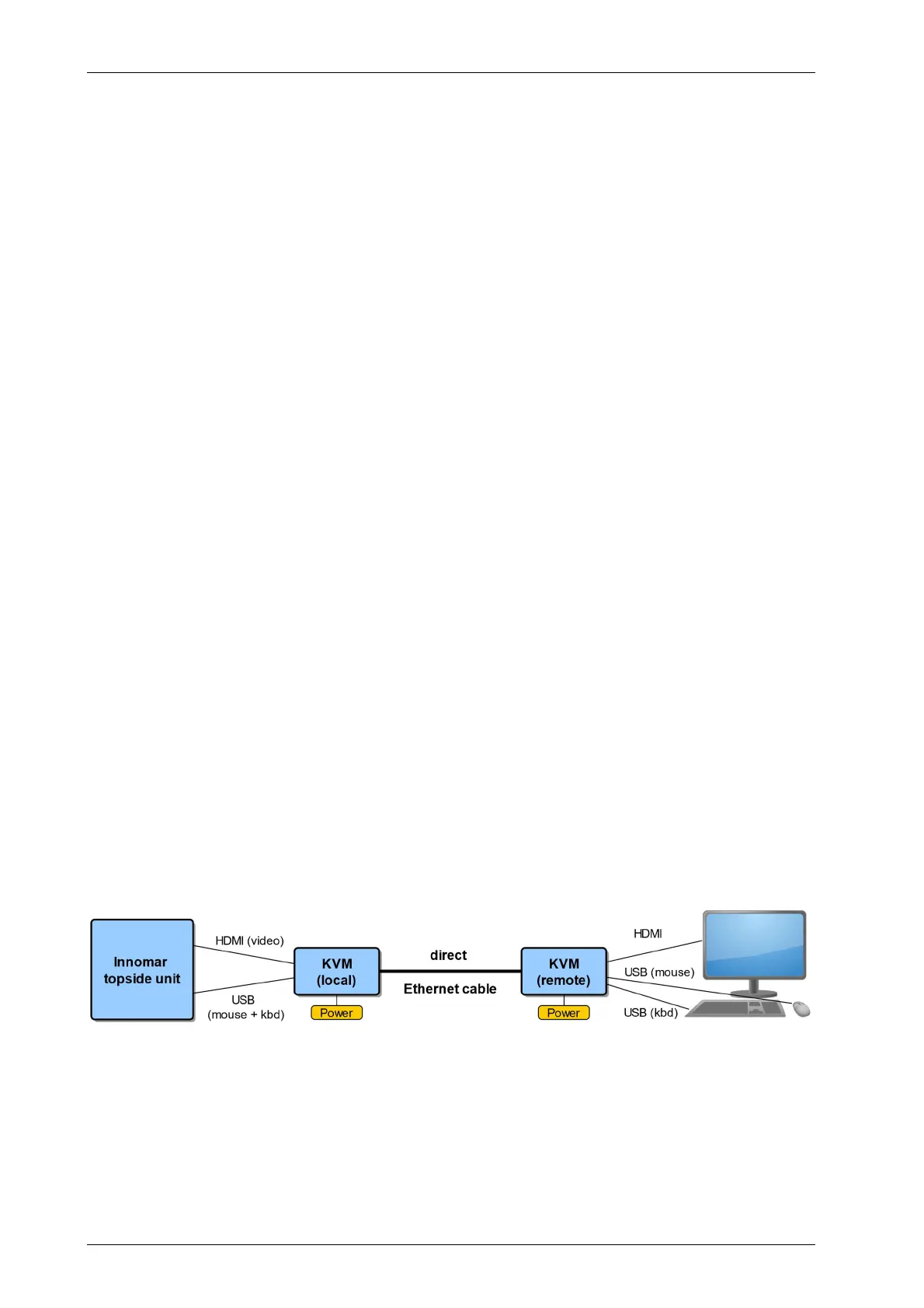
KVM Extender
On larger vessels the operator is often not in the same place as the topside unit. In theis case
keyboard, mouse and monitor are usually connected to the unit via KVM extender. This consists
of two parts (local and remote), both powered by its own power supply. Keyboard and mouse
connections are USB; monitor connection is HDMI. Maximum Ethernet cable length is 50 m.
Make sure a direct cable connection; the Ethernet cable must not be connected to a network.
Motion Sensor
There is a serial input for motion sensors at the topside unit (DB9 male socket), a UDP Ethernet
connection (RJ45 socket) is possible for most INNOMAR models, too. For motion sensor
installation see chapter 7.5 on page 98. After installing the motion sensor some settings are
necessary within the SESWIN software (System Setup – Settings – Motion Input), see section
5.11.14 on page 70.



 To Next Page