User’s Manual INNOMAR Parametric Sub-Bottom Profilers / SESWIN 51
Innomar Technologie GmbH (2023-01) 51
5.9.2 Home – Range Settings (“smart” model only)
This defines the length of data to be recorded and the duration of the
transmitted sound pulse. It strongly affects the recorded data: Any
data outside of the specified window will not be recorded.
The menu shown is for the “smart” model only, it combines the
“Range” and “Transmit” menus of the other models.
Range Length sets the (depth) range of the displayed and recorded SBP data. This cannot be
changed while recording data. Data record starts (“Range Start”) at zero and cannot be changed
by the user. Thus the entire water column data is recorded.
Signal Length sets the length (duration) of the transmitted sound pulse. The centre frequency is
fixed to 10 kHz for the “smart” model.
5.9.3 Home – Range (all other models)
This defines the starting point and length of data to be recorded and strongly affects the recorded
data: Any data outside of the specified window will not be recorded.
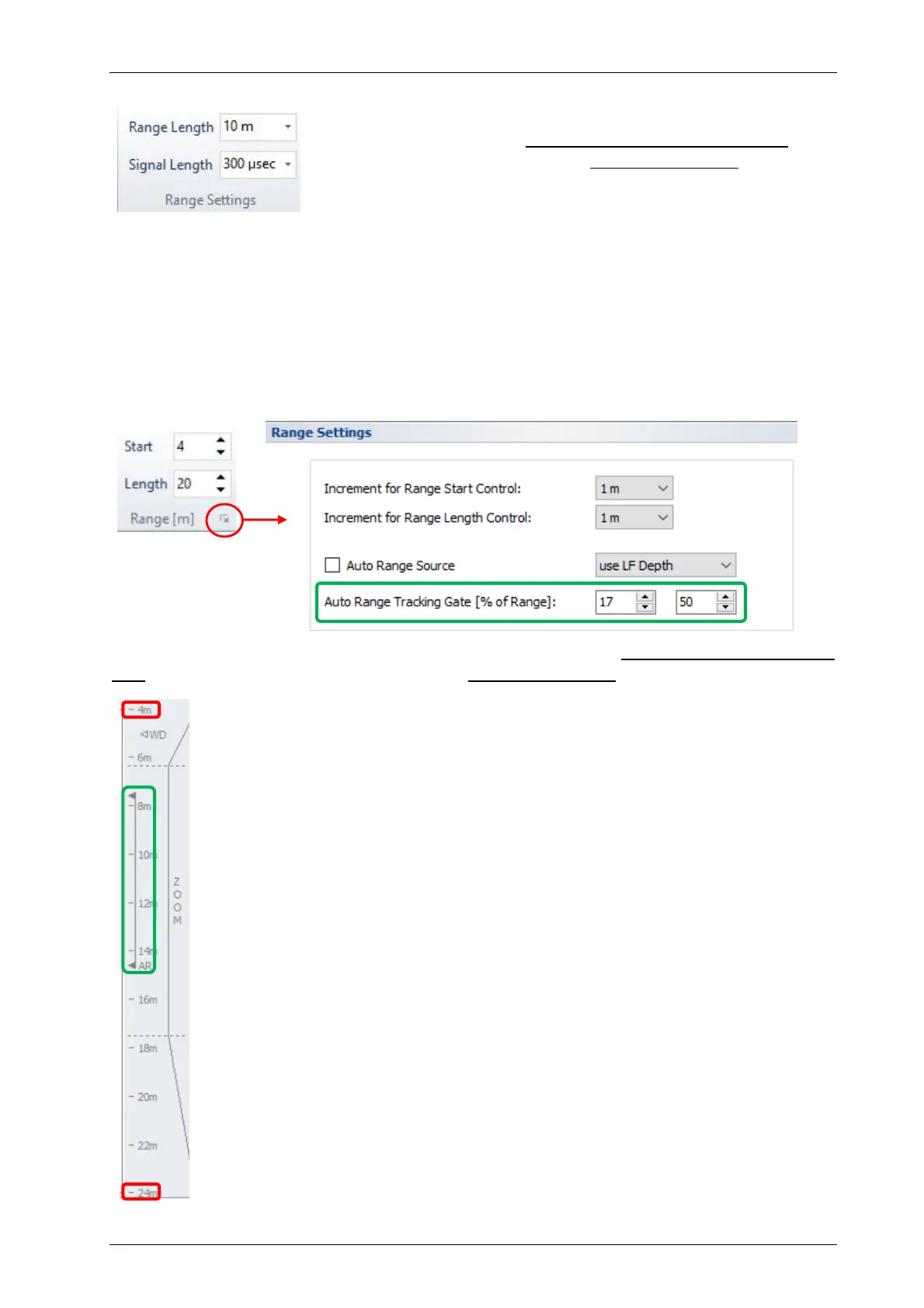
Start (RS) defines the start depth of the displayed echo print and the recorded data.
This can be changed at any time (increment is defined in the range context menu).
This is to prevent recording the entire water column in deeper waters and thus
reducing the amount of data to process.
Length (RL) sets the (depth) range of the displayed and recorded SBP data. This
cannot be changed while recording data. This “Length” starts at the given “Start”,
thus the recorded data is within the interval [RS … (RS+RL)], see picture.
If the water depth is not known, then initially a shallow starting point (Start) with
large range (Length) should be used to determine the water depth. This will ensure
that the true seabed (and not a multiple) will be recorded. Once the true water depth
is known, the range should be reduced to record only the area of interest.
The Increment for range “Start” and “Length” settings can be defined separately.
The Auto Range (AR) function controls the automatic “Range Start” depending on
the water depth. It should not generally be used. Be aware: if the system loses the
seabed while using the “auto range” function, the continued seabed searching can
result in data gaps. This may happen for instance at steep slopes. If the seabed is
known to be relatively flat and you get a good bottom track, the auto-range function
can be used safely. You can choose a SBP channel whose bottom track should be
used (“LF”, “HF”, “External”). The “auto range” will keep the seabed (bottom track
value) within the specified “tracking gate”. This is given in percentage of range and
visualised in the depth ruler, see picture.
RS
RS+RL
AR



 To Next Page