36 User’s Manual INNOMAR Parametric Sub-Bottom Profilers / SESWIN
36 Innomar Technologie GmbH (2023-01)
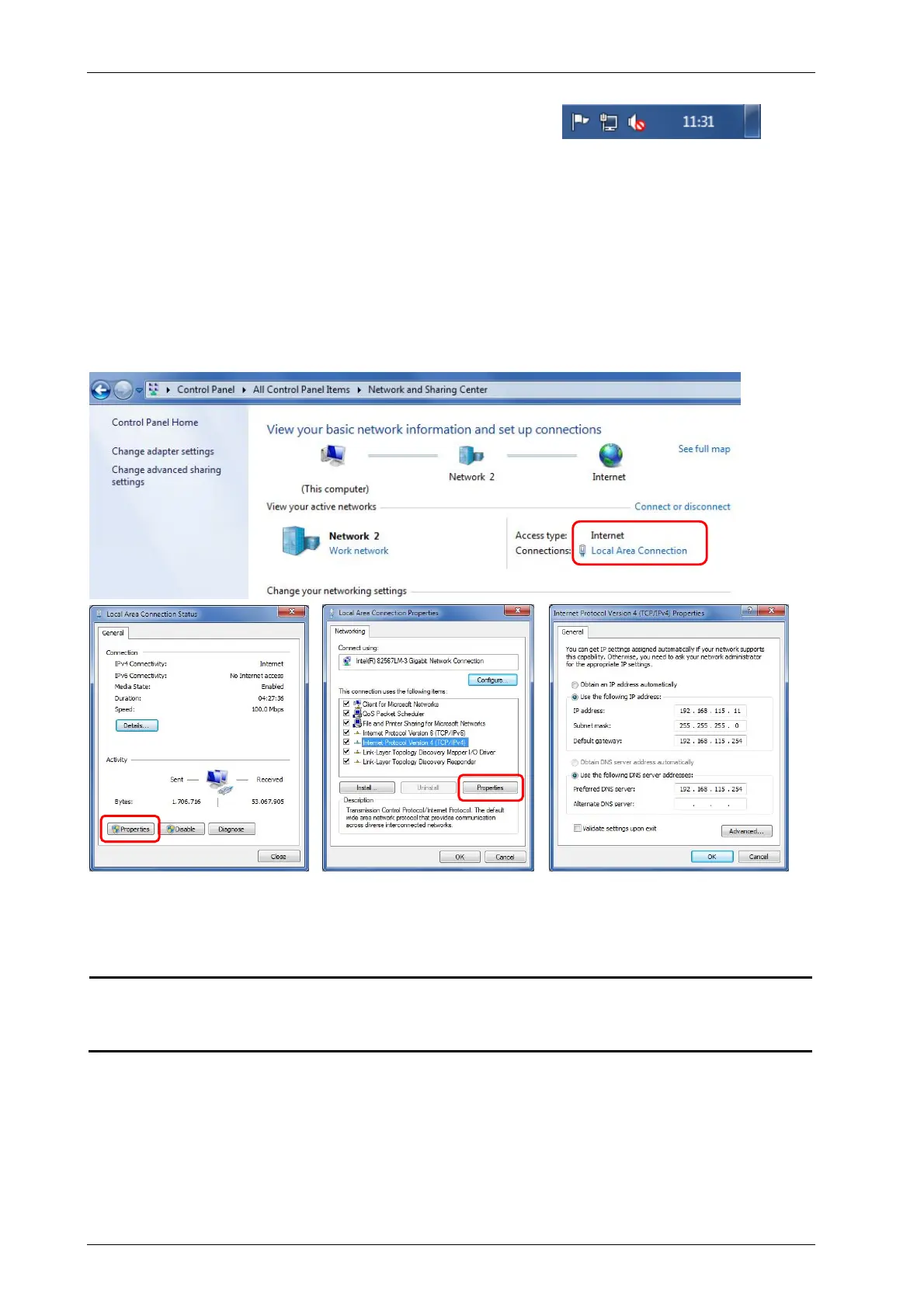
On the Windows based control computer, the IP address is to be set up as follows:
Right-click ‘Local Area Connection’ symbol in tool bar
Press “Open Network and Sharing Center” and click the active network
Open the “Internet Protocol (TCP/IP)” Properties settings
Set IP address range (first 3 numbers) as above. The last number has to be unique in
your network.
Subnet mask has to be ‘255.255.255.0’
Please note: ‘Obtain IP address automatically’ as set on many computers will only work
if a DHCP server is running. If the control computer is connected to the topside unit
directly, you have to specify a unique IP address!
Innomar “smart” WiFi Settings (optional)
Security WPA2-AES
SSID airGateInnoX (X = last two numerical characters of serial number);
example: airGateInno1 for S/N 2017/10/C/
/R
Password (WPA Key)



 To Next Page