Data Management
R&S
®
FSPN
204User Manual 1179.4363.02 ─ 01
Remote command:
SYSTem:COMMunicate:PRINter:ENUMerate[:NEXT] on page 473
SYSTem:COMMunicate:PRINter:ENUMerate:FIRSt on page 473
SYSTem:COMMunicate:PRINter:SELect<1|2> on page 473
Print to file
If a printer is selected as the Destination , use this option to store the data in a .prn
file using the selected printer driver.
Remote command:
To enable: HCOP:DEST1 'MMEM'
To disable: HCOP:DEST1 'SYSTem:COMMunicate:PRINter'
Install Printer
This softkey opens the standard Windows dialog box to install a new printer. All print-
ers that are already installed are displayed.
Only user accounts with administrator rights can install a printer.
For further information, refer to the Microsoft Windows documentation.
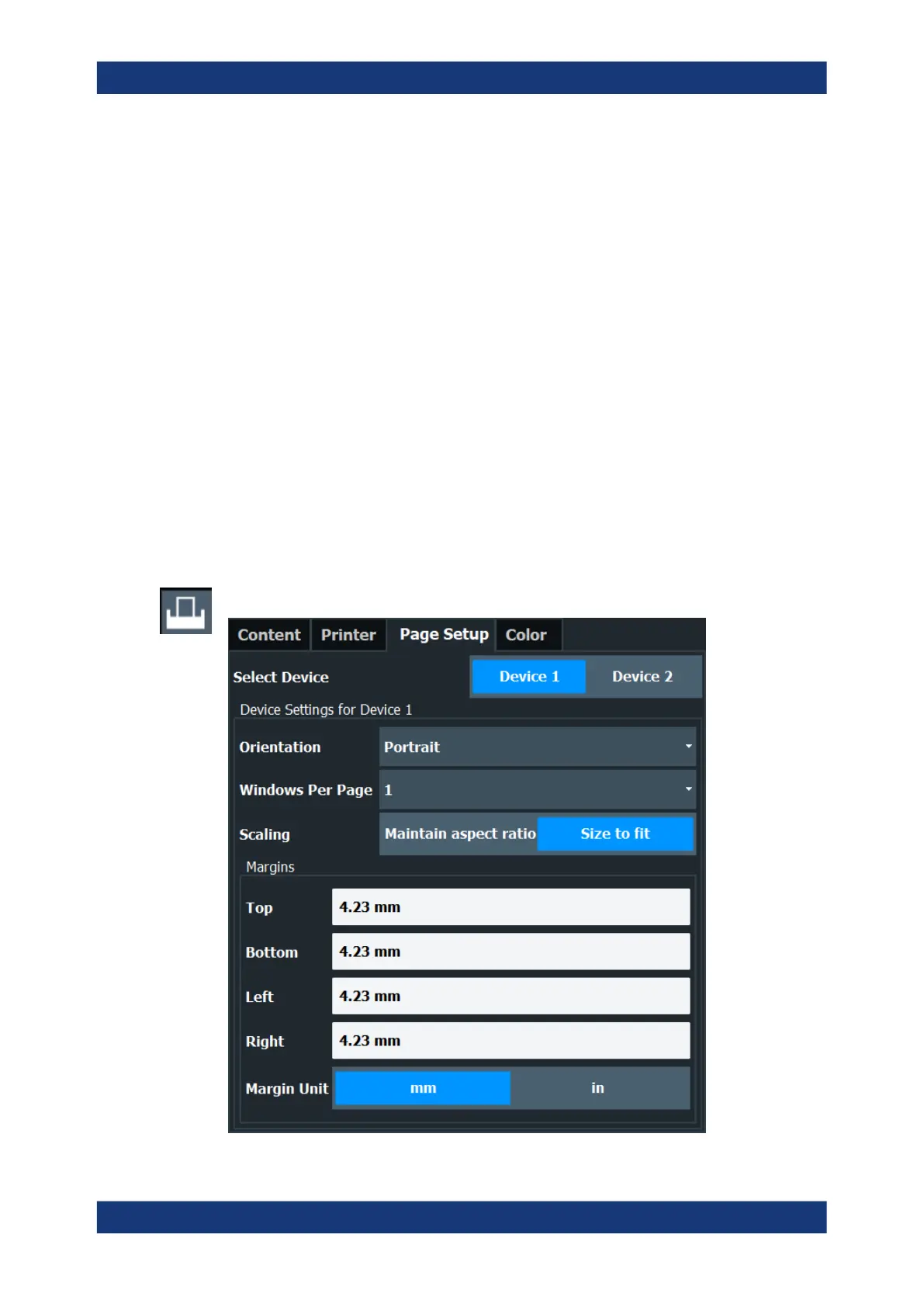
8.4.1.4 Page Setup
Access: "Print" > "Print Config" > "Page Setup" tab
Creating Screenshots of Current Measurement Results and Settings


 To Next Page