SVAN 948 USER MANUAL
5 - 39
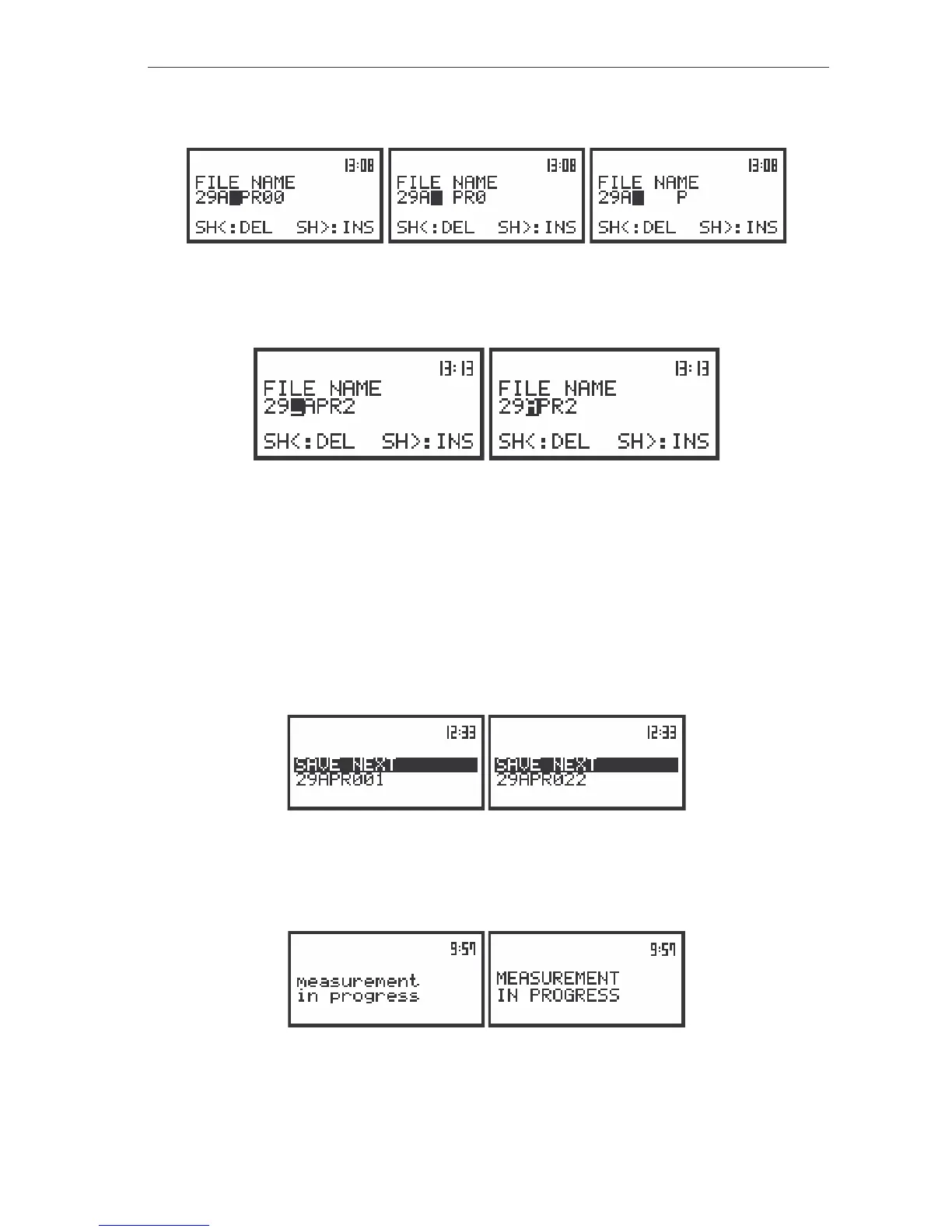
The empty space is created for the introduction of a new character in the edited name (the INS
operation is executed) when the <SHIFT> push-button is pressed together with the <
>.
The view of the displays in the FILE NAME edition after pressing the <SHIFT> and <
> push-buttons
The character, which is displayed inversely, is deleted from the edited name (the Del operation is
executed) when the <SHIFT> and <
> push-buttons are pressed.
The view of the displays in the FILE NAME edition after pressing the <SHIFT> and <
> push-buttons
The edited name is accepted and the file is saved after pressing the <ENTER> push-button (cf. the
description of the SAVE NEXT function). The instrument waits then for a reaction of the user (any push-
button should be pressed except the <SHIFT> one). All changes introduced to the file name during the
edition are ignored after pressing the <ESC> push-button. This pressing causes the return to the list from
which the SAVE option was entered.
The simplified edition consists in the addition at the end of the file name the natural number. The
increase by one of the number is achieved by each pressing the <
> push-button together with the
<SHIFT> one and the decrease – by pressing the <
> push-button together with the <SHIFT>. The
number can be changed from 0 to N, when the only limitation of the N value is the length of the file name,
which cannot be longer than 8 characters.
The view of the displays in the simplified edition of the file name
The instrument attempts to save a file after pressing the <ENTER> push-button. The saving is not
possible in the case when the instrument is measuring the signal. The message with the changing letters
from big to small and small to big is displayed on the display in this case (see below).
The view of the displays with the message stating the reason for unfeasibility of the required operation
The SAVE position is displayed once more after about 3 seconds. The presented below message
(Fig. a) is displayed after pressing the <ENTER> push-button in the case when no measurements were


 To Next Page