SVAN 948 USER MANUAL .
3 - 2
a)
b)
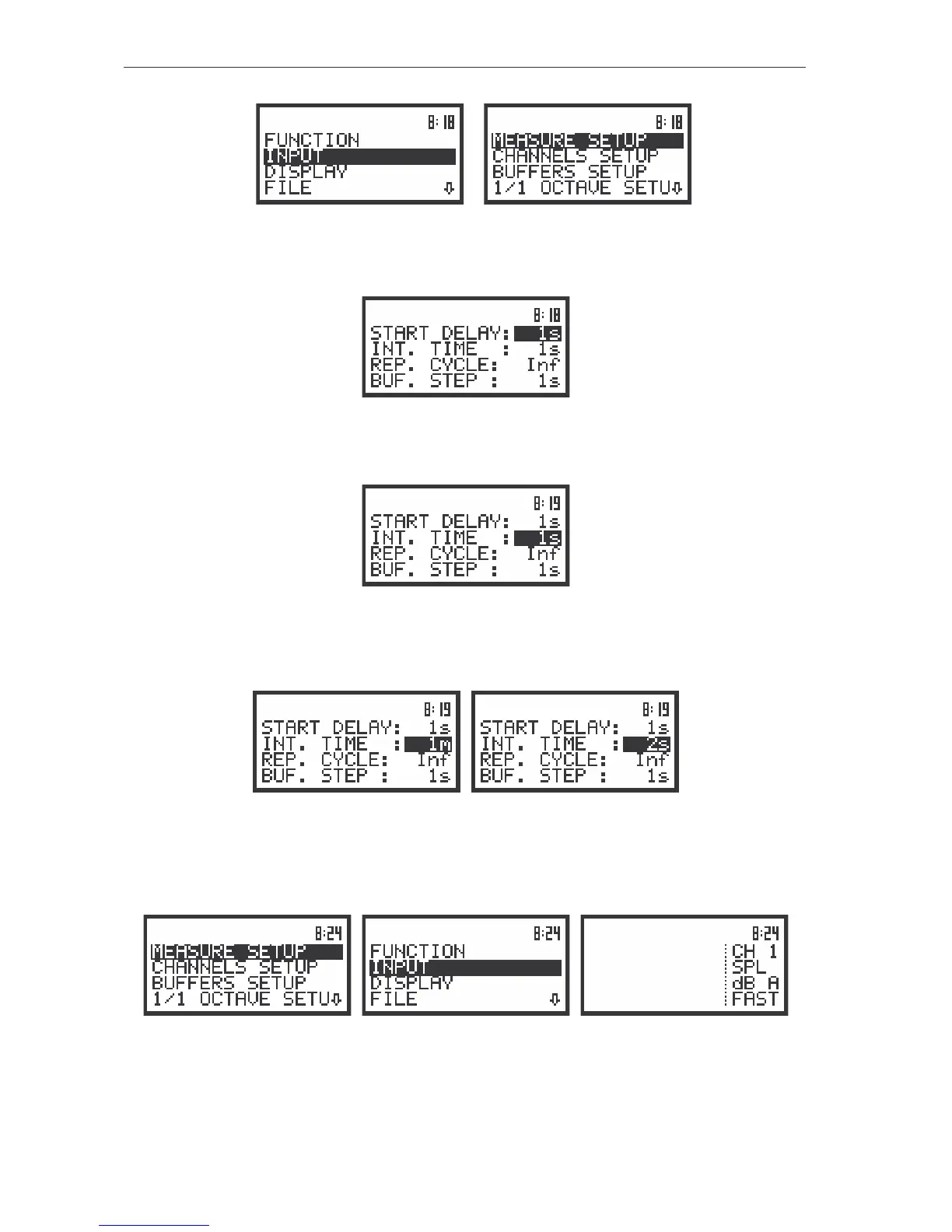
The view of the displays with the main list (a) and the elements of the INPUT list (b)
Next pressing of the <ENTER> push-button enables one to access mentioned above sub-lists.
The view of the display with the opened MEASURE SETUP sub-list (path: MENU / INPUT / MEASURE SETUP)
The desired position of a list is accessed after pressing the <
> or <
> push-button.
The display with the opened MEASURE SETUP sub-list; the INT.TIME position accessible
The change of the value in a selected position is performed by pressing the <
> or <
> push-
buttons.
The displays with the accessed INT.TIME position after pressing the <
> or <
> push-buttons, respectively
The <ENTER> push-button is used for the confirmation of the selection in a position and for closing
the opened sub-list. The sub-list is closed ignoring any changes made in a sub-list by pressing the <ESC>
push-button.
The displays after three consecutive pressing of the <ESC> push-button from the MEASURE SETUP sub-list
As it was mentioned, some of the sub-lists end with the windows informing the user about the state
of the instrument, available memory, not existing files or buffers, standards fulfilled by the unit, etc.



 To Next Page