Using theControl Box and Lightbars 2
Angle sensor calibrations are performed when the system is first installed on the
excavator. Sensors also need to be recalibrated when:
l The sensor mounting position has been changed. This is typically when a
sensor is damaged and a new sensor mounting bracket has been installed.
l The machine dimensions have changed.
For more information, talk to your site supervisor or refer to the GCS900 Grade
Control System for Excavators Installation Manual.
Note – When using an LC450 laser catcher, ensure the laser transmitter is
correctly set up in a suitable location, and that the laser transmitter is turned on.
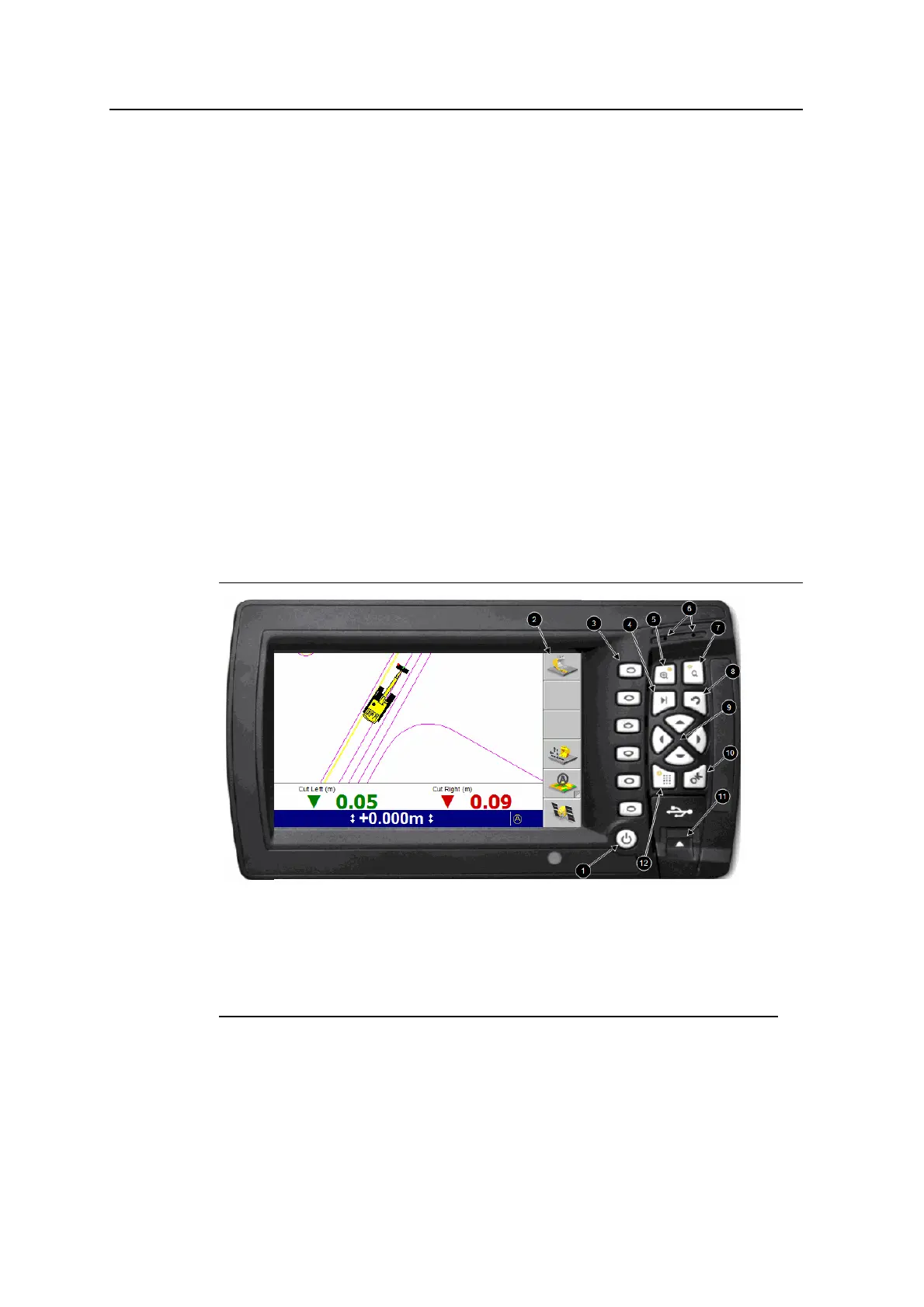
2.4 Control box basics
The control box has a color LCD screen to display guidance and other information,
and push button controls to operate the system. In addition, the control box has
internal lightbars, and a USB flash drive port for loading and saving machine and
display configuration data, and for loading and saving data. See the following figure,
and the following table that describes the items in the figure.
1
Power button
2
Softkey label area
3
Softkeys
4
Next key
5
Zoom-in key
6
Beeper
7
Zoom-out key
8
Escape key
9
Arrow keys
A
OK key
B
USB flash drive port
C
Menu key
Figure 2.1 The control box
GCS900 Grade Control System for Excavators Operator's Manual 21



 To Next Page