11
TECHNICAL MANUAL
3000
3P
3000
2000
1000
6000
4P
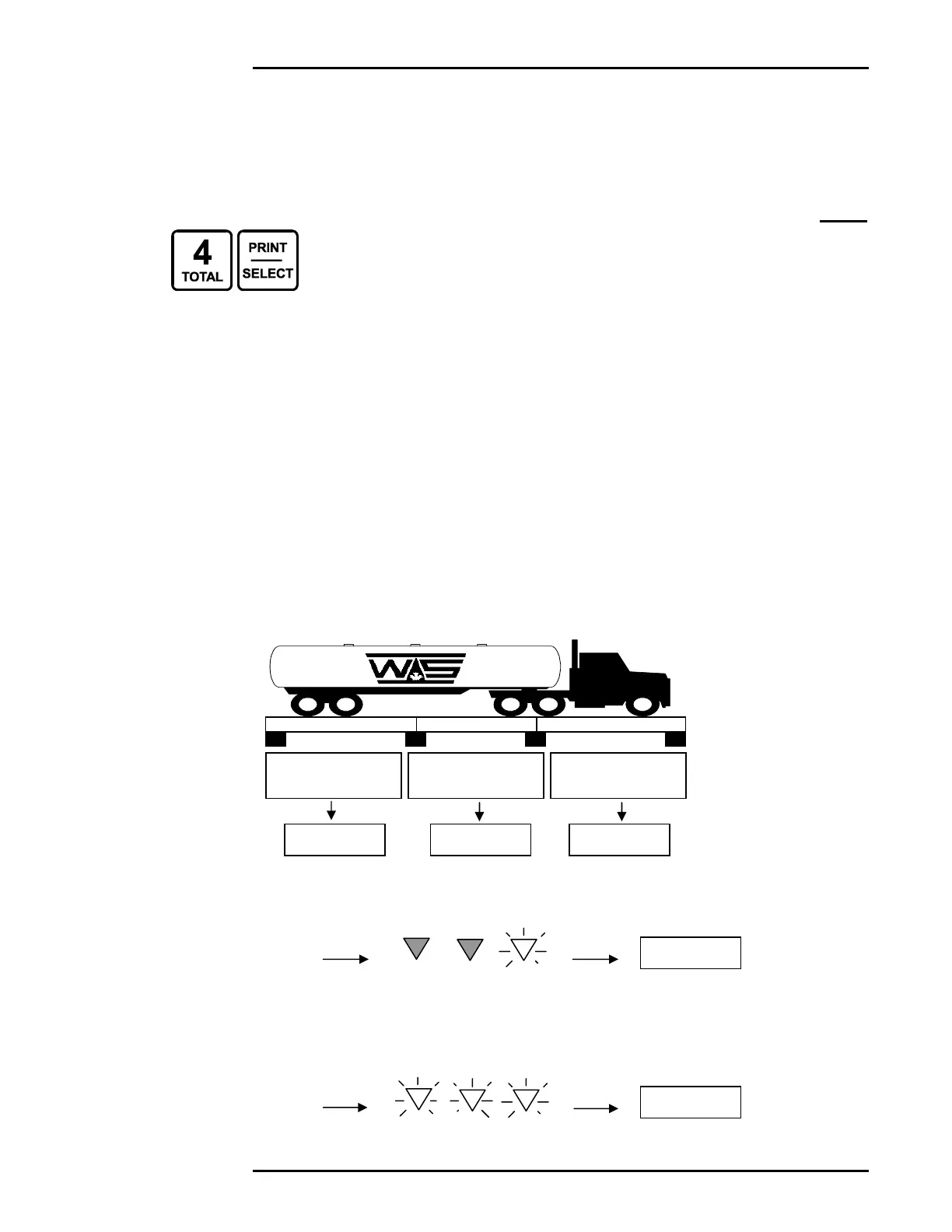
TOTAL MODE (SUMMING CHANNELS)
• Up to 3 channels may be summed together to display a total
weight.
• Only channels that are enabled and calibrated with the same
grad size, decimal places, and units of weight will be
displayed in TOTAL MODE.
• Channel 1 is always included in TOTAL MODE.
• TOTAL MODE is indicated when more than one of the Scale
Channel LEDs are illuminated.
• To return the M2000 to Single Channel Mode, select a
channel followed by the [PRINT/SELECT] key.
TOTAL MODE EXAMPLE 1:
• A Truck scale with 3 sections.
• Each section is wired to a separate channel on the M2000, allowing the
operator to record the total weight of the vehicle along with the individual axle
weights.
1. To view the rear axle weight (Section 3), select Scale Channel 3.
(CH3 LED will illuminate)
2. To view the total weight (Sum of all sections), enter TOTAL MODE.
Press [4], followed by the [PRINT/SELECT] key. (CH1, CH2, & CH3 LEDs
will illuminate)
SECTION 1 WIRED
TO CHANNEL 1
SECTION 2 WIRED
TO CHANNEL 2
SECTION 3 WIRED
TO CHANNEL 3
CH1
CH2 CH3
CH1
CH2 CH3



 To Next Page