HIGH SPEED DIGITAL WEIGHT INDICATORS
70
TRANSMITTING CALIBRATION INFORMATION (UPLOADING)
TRANSMIT CALIBRATION INFORMATION TO PC - PARAMETER 75
Description: Transmits the M2000’s full calibration structure information as an
ASCII string to the designated serial port. The data structure is
protected by a CRC checksum embedded inside the data. The
ASCII string can be captured with any serial terminal program.
PARAMETER VALUE ACTION
1
Output calibration data to COM1.
2
Output calibration data to COM2.
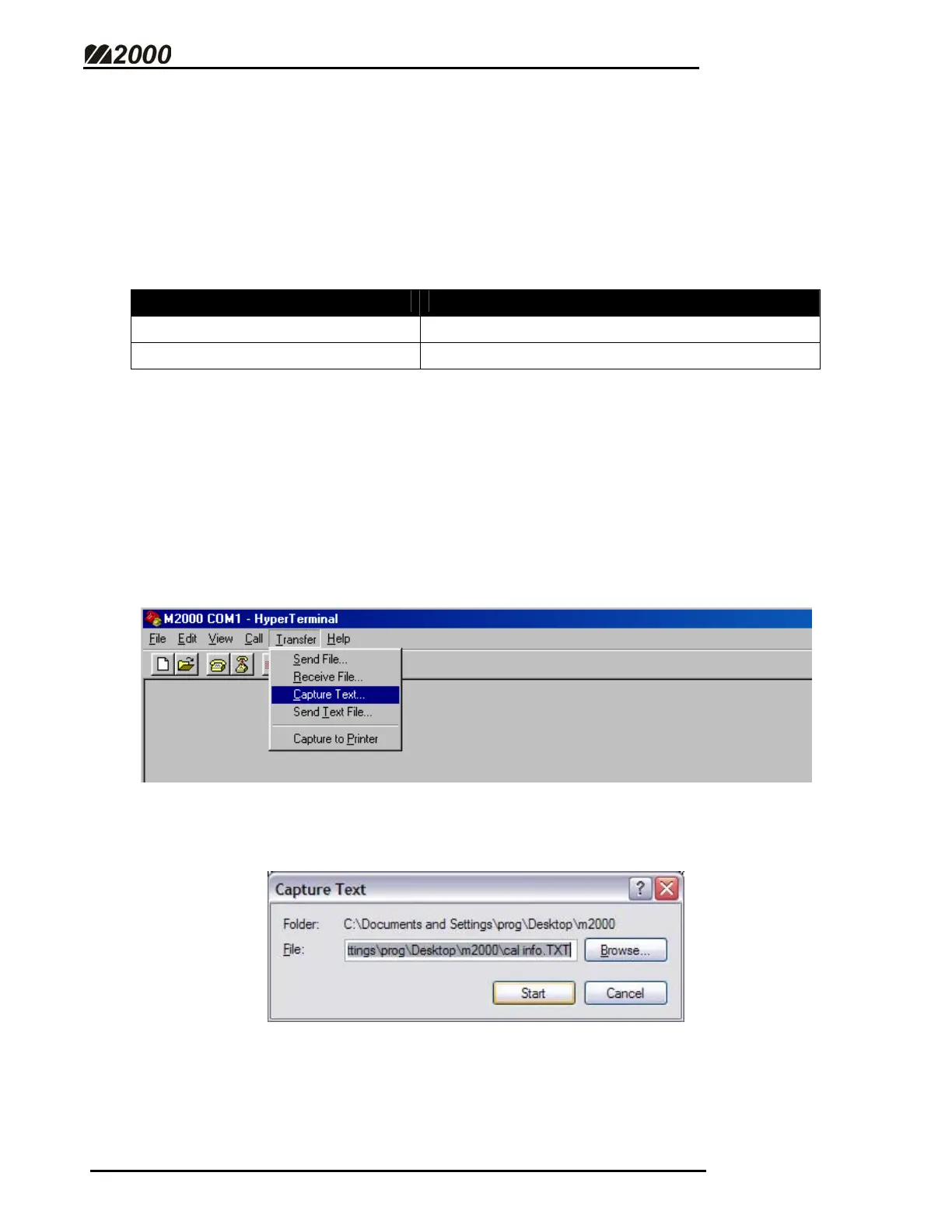
CAPTURE A TEXT FILE FROM THE M2000 USING HYPER TERMINAL
This feature is useful for capturing and saving the Calibration Information or
Ticket Buffer Information from the M2000 for creating back-ups.
• Click on the “TRANSFER” menu and then click on “CAPTURE
TEXT” as shown below.
• Enter a file name save the ticket or calibration data under. Use logical
names to help keep track of your files.
• Click “START”.



 To Next Page