Apx-7
Appendices
C.2. Connecting DB-9M DTE Devices
The DX9F-DTE-RJ Snap Adapter can be used with a Straight RJ-45 cable to attach the
following DB-9M DTE devices to the RJ-45 Serial Ports on standard TSM Series units
and RSM-8R8 Series units:
• PCs and Laptops
• Console Ports on WTI RSM Series Units
• Console Ports on WTI MPC Series Units
• Other Devices with a DB-9M DTE Console Port
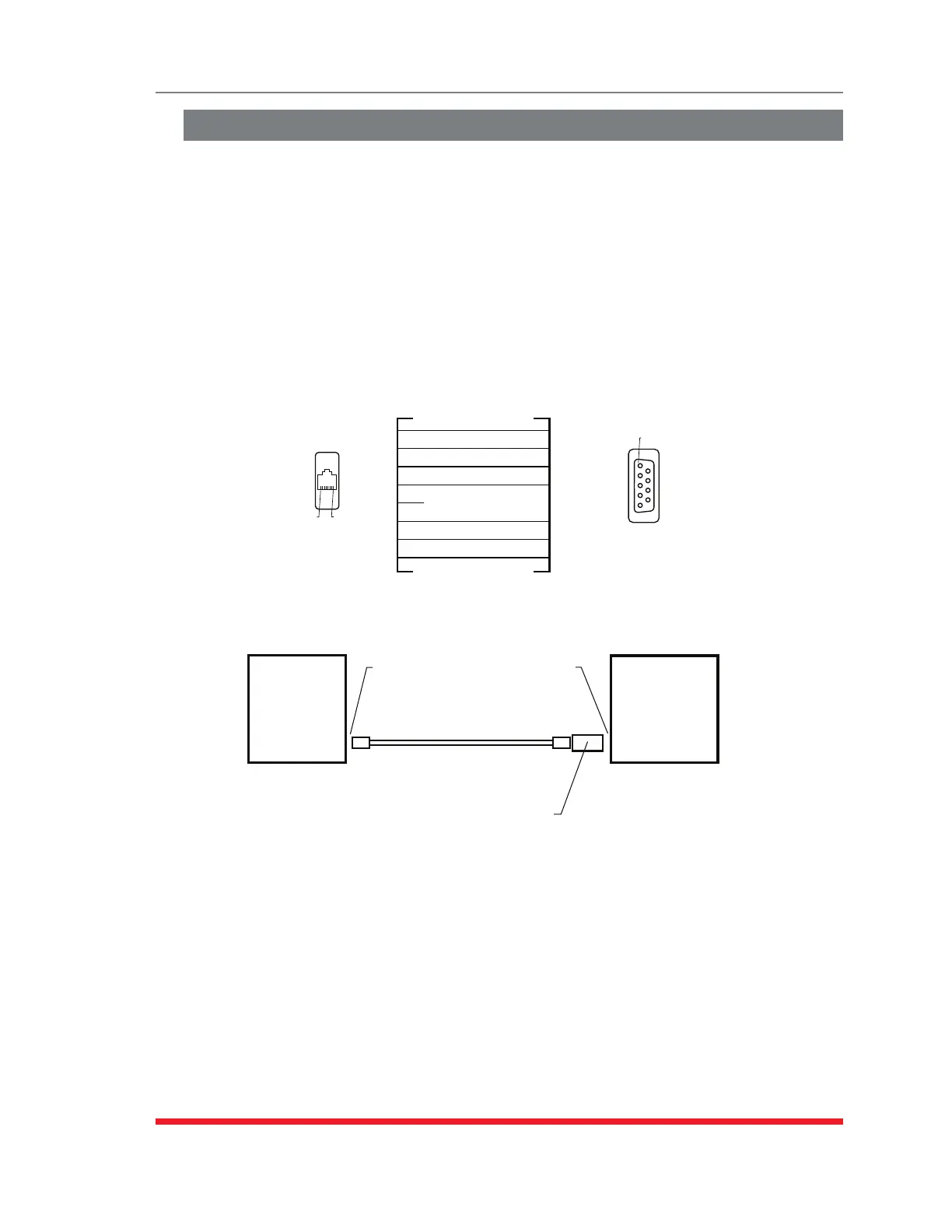
When connecting a DB-9M DTE device to an RJ-45 Serial Port on the RSM-8R, please
refer to Figure C.3 and Figure C.4 below:
RJ-45
DB-9F
Pin No. Pin No. Signal
1
2
3
4
5 X
6
7
8
8
1
2
5
3
4
7
CTS
DCD
RXD
TXD
GND
DTR
RTS
Pin 8
Pin 1
Pin 1
Female
Figure C.3: DX9F-DTE-RJ Snap Adapter Interface
TSM Series
Unit or
RSM-8R
Series Unit
RJ-45 DCE
Serial Port
Straight
RJ-45 Cable
DB-9M DTE
Console Port
DX9F-DTE-RJ
Snap Adapter
PC, Laptop
or Other
Device with
DB-9M DTE
Interface
Figure C.4: Connecting DB-9M DTE Devices to an RJ-45 Serial Port on an RSM-8R8


 To Next Page
 Loading...