COMMAND Pages
159
Chapter 5 EDIT Mode
Chapter 5
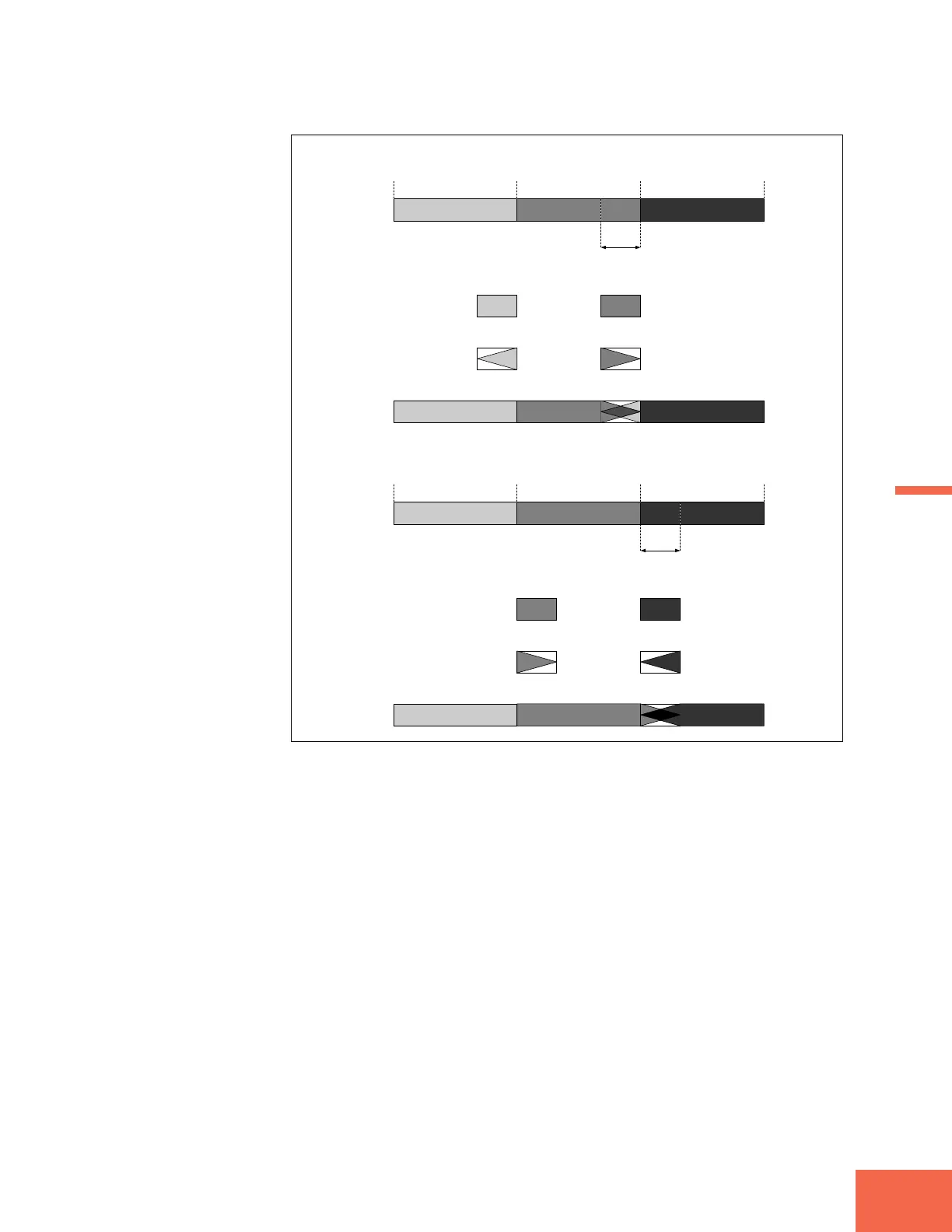
Processing if Area = sustain:
Width (where C - D = 100%)
Start Address
Step 1: Copy waveform piece from end of segment A-B into a buffer. Extract piece of equal length from the end of
C-D, and copy into another buffer. The length of these pieces is determined by the Width setting.
ABCDEF
Loop Start Address Loop End Address
Step 2: Apply fade-in processing to the A-B piece, and fade-out processing to the C-D piece.
Step 3: Combine the two resulting waveforms, and write the result into the extraction area at the end of C-D.
End Address
Processing if Area = release:
Width (where C - D = 100%)
Start Address
Step 1: Copy waveform piece from start of segment C-D into a buffer. Extract equal piece from the start of E-F,
and copy into another buffer. The lengths of these pieces is determined by the Width setting.
ABCDEF
Loop Start Address Loop End Address
Step 2: Apply fade-in processing to the C-D piece, and fade-out processing to the E-F piece.
Step 3: Combine the two resulting waveforms, and write the result into the extraction area at the start of E-F.
End Address



 To Next Page