185
Chapter 5 EDIT Mode
Chapter 5
FILTER Function
FILTER - FltScale (Filter Scaling)
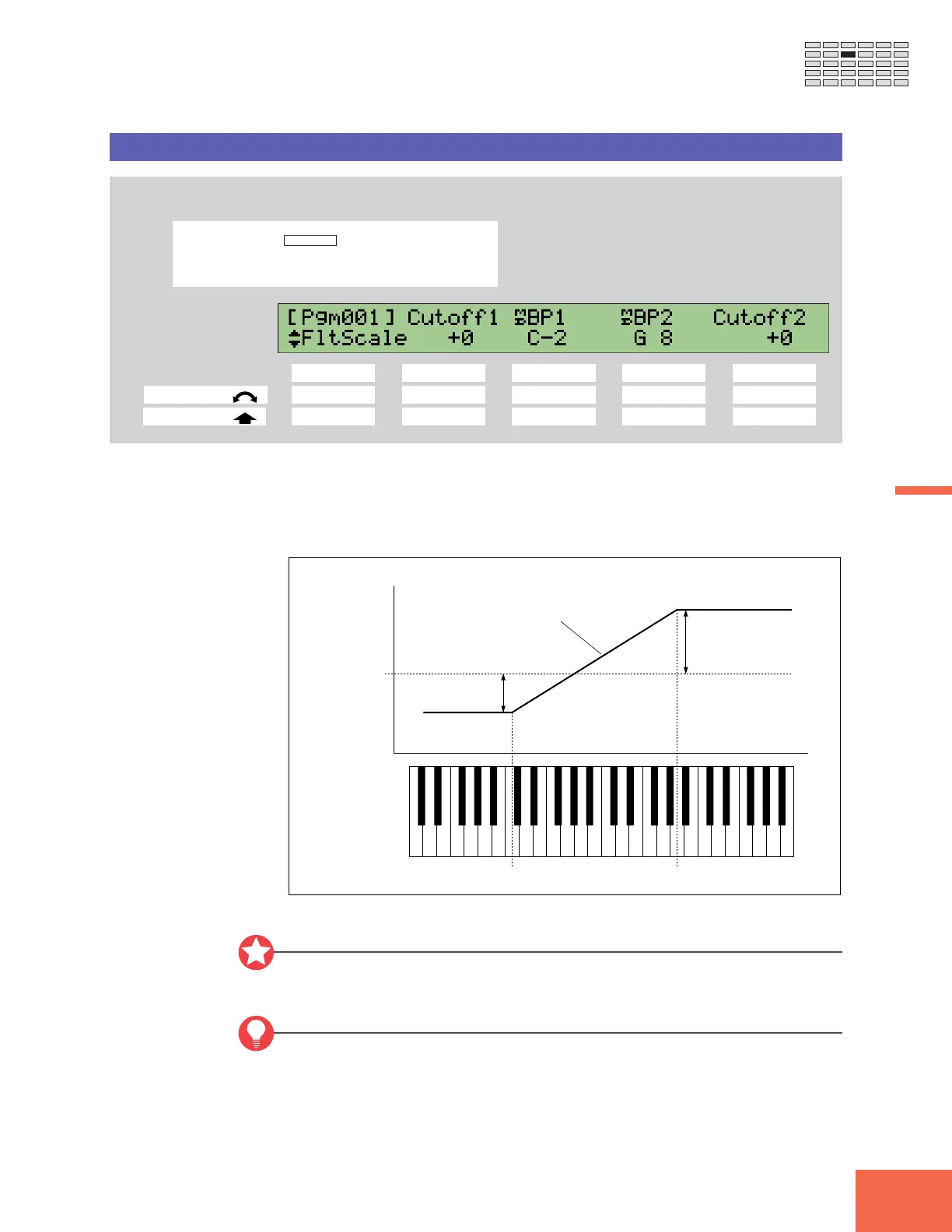
Sets the relation between cutoff frequency and keyboard location.
PROGRAM
TRIM / LOOP
RECORD
PROGRAM
TOTAL EQ
PLAY
EDIT
REC
DISK
UTILITY
SAMPLE
MAP / OUT
SETUP
SAMPLE
PANEL PLAY
EASY EDIT
FILTER
METER
SEQUENCE
SEQUENCE
EFFECT
EG
EFFECT
VOLUME
MASTER
SETUP
LFO
EXT CTRL
DISK
SYSTEM
CONTROL
MIDI / CTRL
MONITOR
IMPORT
MIDI
Turn Knob 1 to select FltScale.
Knob 1 Knob 2 Knob 3 Knob 4 Knob 5
Turn action ✔✔✔✔ -
Push action ✔ - ✔✔ -
This page determines how the cutoff frequency varies across the keyboard.
The following illustration shows the relationship. All notes from BP1 down are filtered
using cutoff frequency “Cutoff1,” while all notes from BP2 up are filtered by “Cutoff2.”
The applied cutoff frequency changes at a constant rate over the keyboard range BP1 to
BP2.
BP1
BP2
Frequency
+
—
Cutoff2
Cutoff1
Pitch (Note)
Cutoff frequency
set by Cutoff
parameter on
Filter page.
Applied cutoff frequency.
Important
It is not possible to set the actual cutoff frequency beyond a certain range. Regardless of
settings you make at this page, the cutoff frequency will not shift beyond these limits.
FYI
You can use the Note setting on the UTILITY | SYSTEM Display page (☞302) to select
whether key values for the BP1 and BP2 settings are shown by name (“C-2” to “G8”) or
by the corresponding MIDI note number (0 to 127). Descriptions below assume that you
are using name display.


 To Next Page