188
Chapter 5 EDIT Mode
EG Function
EG Function
The EG function sets up the sample’s envelope generators (EGs). The envelope genera-
tors determine how sound develops over time, both while the note is held and after it is
released. The A3000 offers three different EGs: an amplitude EG, a filter EG, and a pitch
EG.
FYI
The COMMAND key gives you rapid access to a number of helpful commands while you
are working with this function. For example, you can use the COMMAND key when you
want to save your edit results to disk, or when you want to cancel your new changes and
restore the previously saved data. (☞147)
EG - AEG (Amplitude Envelope Generator)
Sets up the amplitude envelope generator.
PROGRAM
TRIM / LOOP
RECORD
PROGRAM
TOTAL EQ
PLAY
EDIT
REC
DISK
UTILITY
SAMPLE
MAP / OUT
SETUP
SAMPLE
PANEL PLAY
EASY EDIT
FILTER
METER
SEQUENCE
SEQUENCE
EFFECT
EG
EFFECT
VOLUME
MASTER
SETUP
LFO
EXT CTRL
DISK
SYSTEM
CONTROL
MIDI / CTRL
MONITOR
IMPORT
MIDI
Turn Knob 1 to select AEG.
Knob 1 Knob 2 Knob 3 Knob 4 Knob 5
Turn action ✔✔✔✔✔
Push action ✔ ----
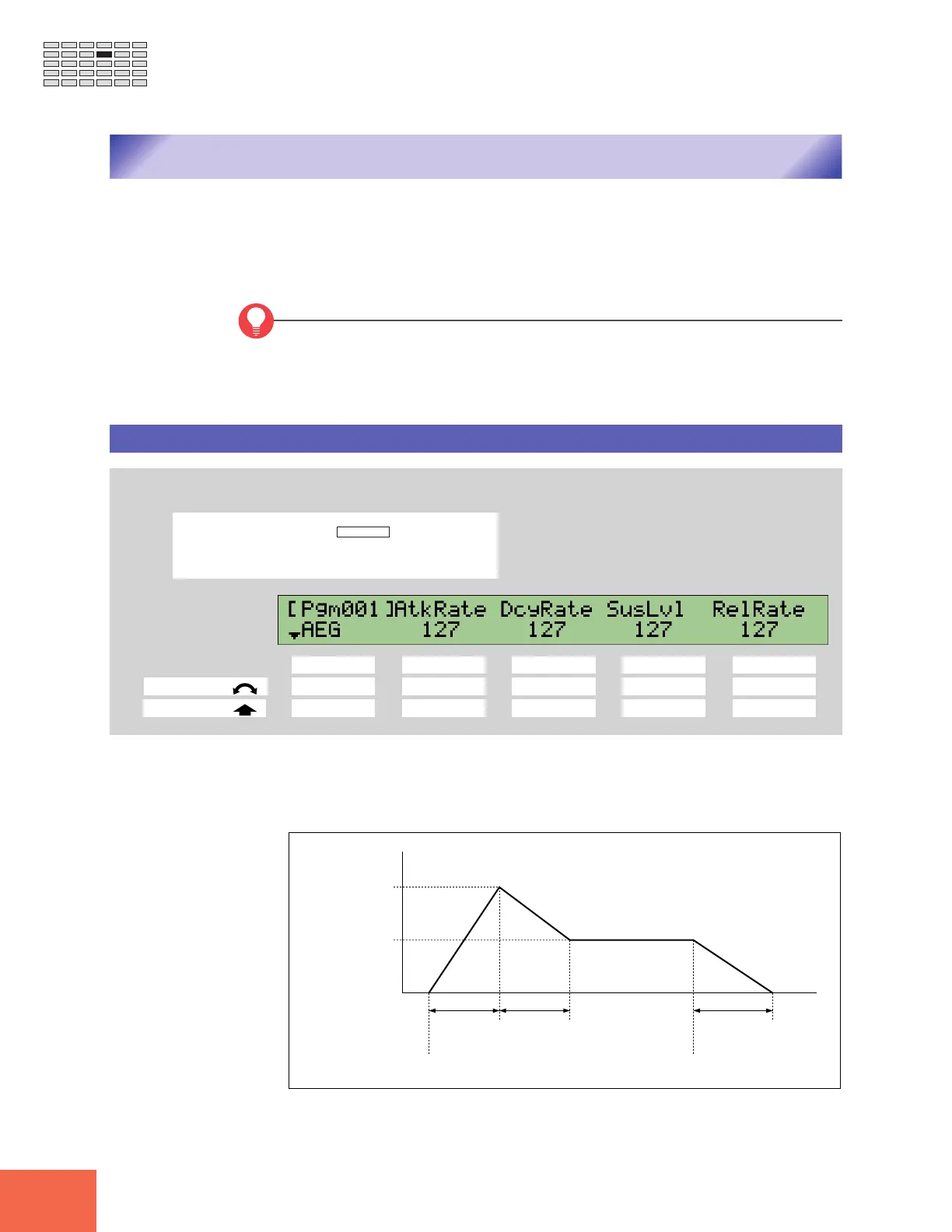
This page sets up the AEG (amplitude envelope generator). The AEG determines how
the sound level (amplitude) develops over time. Development begins at Note On, and
terminates when the sound dies out. The envelope is defined by four settings, as illus-
trated below.
Note On
Level
Maximum Level
Attack Rate Decay Rate Release Rate
Time
Sustain Level
Note Off



 To Next Page