ACU-RITE MILLPWR
G2
139
7.1 Demonstration Program
Programming an arc
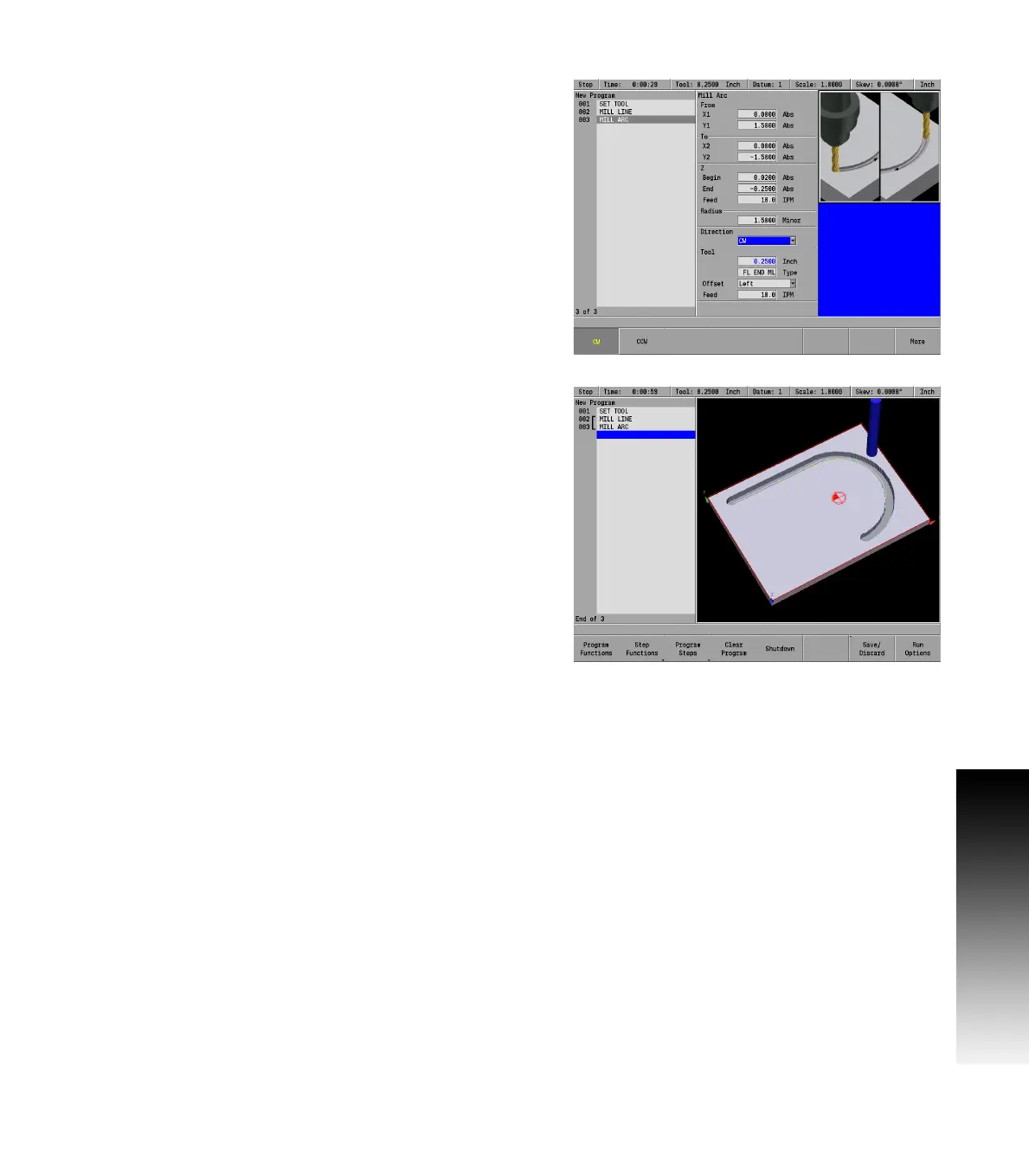
Press the ARC key. The cursor defaults to the To: X1 field in the Mill
Arc dialogue.
MILLPWR
G2
assumes that the program is continuing from the last
step, so it automatically fills in the From: X1, and Y1 fields, the
Z: fields, Tool fields, Feed: fields, and the Offset field.
Using the numerical keypad, enter the following information:
In the To: X2 field enter 0, and ARROW DOWN.
In the To: Y2 field enter -1.5, and ARROW DOWN.
In the Radius: MINOR field enter 1.5 and ARROW DOWN.
In the Direction: field, press the CW soft key.
Since this arc will be starting at the top and moving out, and around to
the bottom, the arc will be machined in a clockwise direction.
Press the USE key.
Saving the program:
At this point, enough information has been entered that the program
can be saved and given a name.
Press the Save / Discard soft key.
Select Save from the popup menu.
Enter the program name in the popup keyboard using the ARROW
keys. Name the program DemonstrationProgram.MPT. See
"Saving a program" on page 118 in the previous chapter for more
information.
Press the Save / Create soft key.
Next, the lower horizontal line will be programmed.


 To Next Page