190 8 Milling and Drilling
8.2 Additional Milling Functions
8.2 Additional Milling Functions
Step functions soft key
Additional functions are available from the PGM screen by pressing the
Step Functions soft key.
Explode
When in PGM mode there are certain functions that can
be exploded. Pressing the Explode soft key will
explode a program step into several, more detailed
steps. You can explode the following functions:
All HOLES functions, Row, Frame, Array and Bolt Circle
Repeat, Mirror and Rotate
Engrave Line and Engrave Arc
During the explode operation, the program list populates as it is being
exploded. A message will be displayed “Exploding the selected step”.
A Cancel soft key becomes available during the explode operation.
When this key is pressed, the explode operation stops, and the
program returns to it original state. No other options are available
during the explode operation.
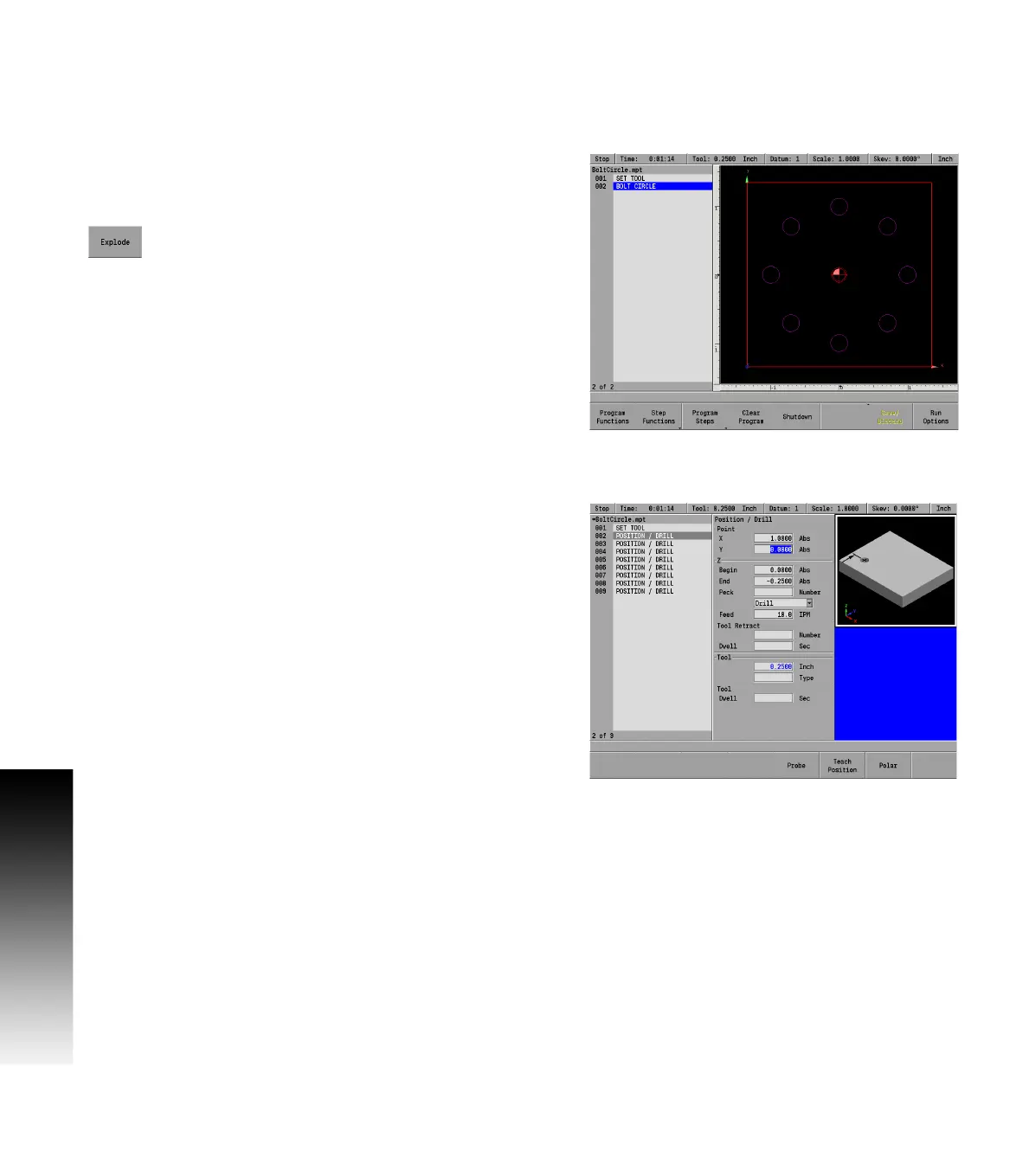
Example:
A Bolt Circle with eight holes has been programmed.
Edit the program by first highlighting the Bolt Circle step.
Press the Step Functions soft key
Press the Explode soft key.
MILLPWR
G2
will explode the “Bolt Circle” step into eight steps (002
thru 009).
The step that was exploded is now replaced with the individual lines,
arcs or positions that made up the step.
Highlight the step that represents the hole that will be edited and
press the ENTER key, or press the CLEAR key to delete it.



 To Next Page