Version 16.10 AF-6600 AF-5000 Series Install Manual 203
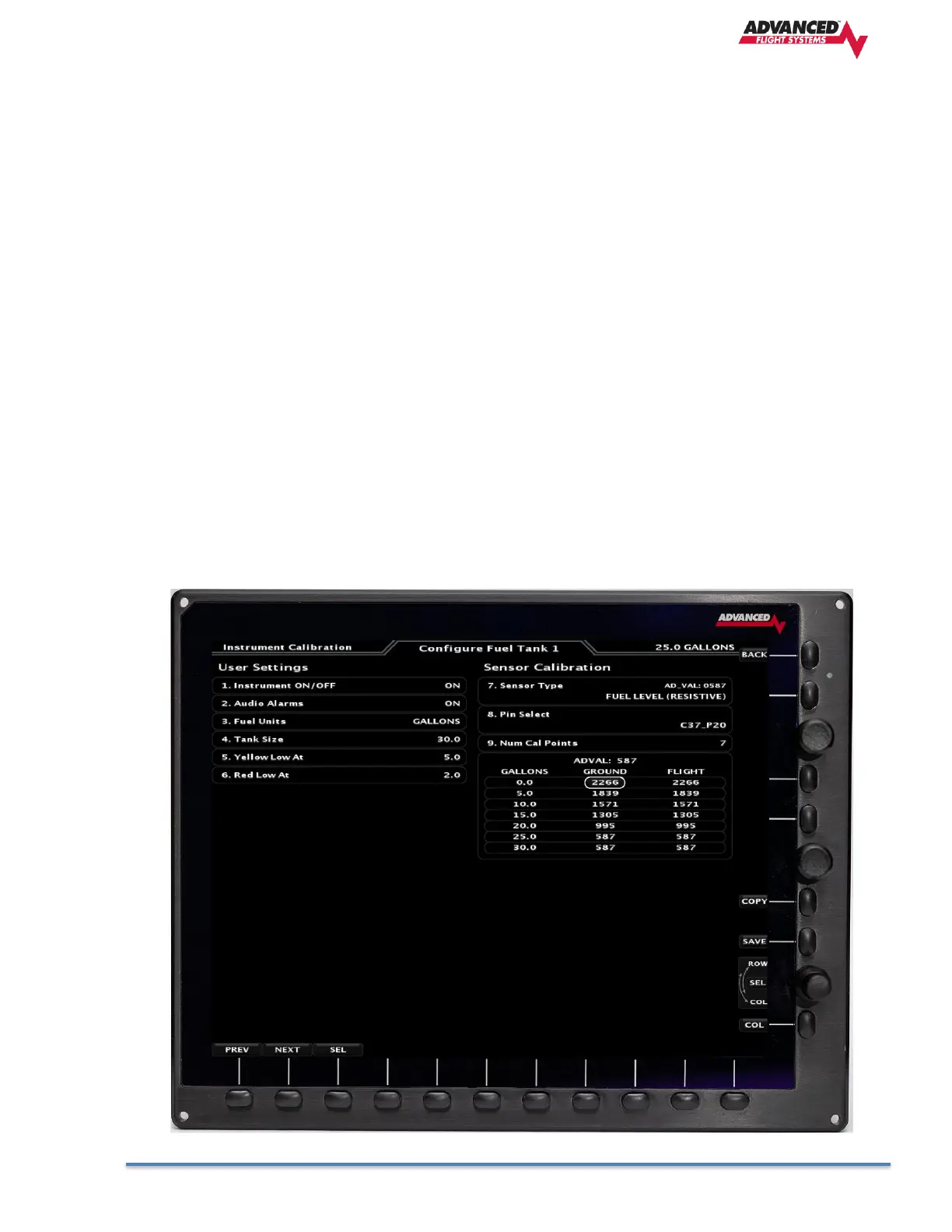
Steps To Calibrate a Fuel Tank:
1. Select Instrument Calibration mode on the Pilot PFD EFIS, verify that all EFIS
screens are powered on in the aircraft. Use the lower knob to scroll to Tank 1 (Left
Main), Tank 2 (Right Main), Tank 3 Left Aux, or Tank 4 Right Aux.
2. Verify the Tank is Empty.
3. Enter the max size of the Tank in the Tank Size field.
4. Set the Audio On/Off Setting. If this is set to ON, an Audio warning will sound if the
fuel level is below the Red Low At setting.
5. Set the Instrument On/Off Setting. If this is set to ON the tank will be displayed.
6. Enter the number of calibration points; it must have at least two points. Four points
could be used (zero, ¼, ½, ¾, Full) or one point for every 2 gallons. Every
calibration point must be different from the previous value until the tank
sensor cannot detect a change in the fuel level. Tank sensor values must
never reverse direction.
7. Use the lower knob to scroll down to the tank calibration data. The calibration data
is displayed in columns, one for ground and one for flight. Use the lower knob to
switch between ground and flight data columns. The current ADVAL (digital value of
the transducer) reading for the tank is displayed at the top of the table.



 To Next Page