Version 16.10 AF-6600 AF-5000 Series Install Manual 204
8. Starting at 0 Gallons press the [COPY] button or use the knob to record the current
ADVAL to the correct fuel amount and attitude (ground or flight).
9. Add fuel (at increments decided on) and then record the new ADVAL by pressing
[COPY]
10. Fill and record a reading for each attitude (ground and flight). If it is a tail wheel
aircraft, the best way to do this is to record the ground data then lift the tail and
record the flight data after the fuel reading has settled. Repeat this for each
increment until the tank is full.
11. Press the [SAVE] button to save the data to permanent memory and [BACK] to exit
Tank Calibration.
12. After completing Tank 1, move on to Tank 2 and follow the same procedure. If Aux
Tanks are present, follow this procedure for Tank 3 & 4.
13. IF THE AIRCRAFT DOES NOT HAVE AUX TANKS, TURN TANKS 3 & 4 OFF!
CAUTION: Do not turn off power before pressing the save button and exiting the
calibration menu.
Calibration Tips:
When lifting the tail you should set it on something, so the level you lift it to will be
consistent. You should also wait until the reading stops changing before setting it.
Fuel tank sensors are not accurate when the tank is near full. Once you notice the reading
not changing much or not corresponding with the rest of the readings during calibration the
last few entries in the fuel calibration data should be set to the same value.
If the tanks do not consistently show full, lower the digital value for the tank full data.
The fuel gauge will only show the digital fuel amount for the highest reading that the float
changed with a plus sign indicating that the correct fuel amount is not known but is over
the last reading. The analog gauge will show full for the last changing reading. It is normal
for an 18-gallon tank to show 16+ when it is full. This indicates that the float stopped
changing at 16 gallons and this is the highest fuel reading that can be detected by the float
in the tank.
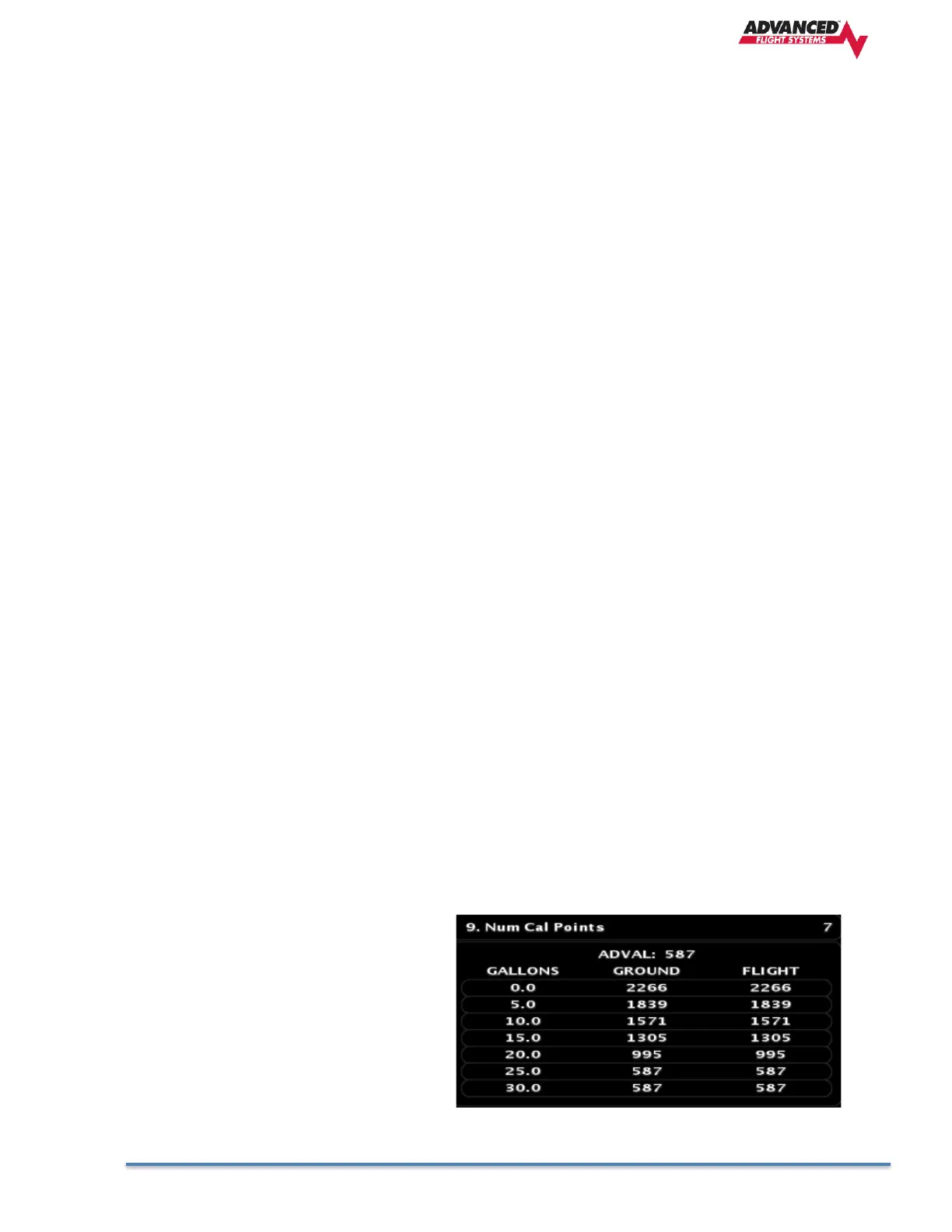
Valid Tank calibration values.
Values do not reverse direction and the
sensor stopped detecting fuel changes at
25 gallons.



 To Next Page